
bartc24285031
Participant
August 29, 2024
Question

Automatically Save "Folder Name" to photo metadata/tags in that folder?

  • August 29, 2024
  • 3 replies
  • 769 views

QUESTION: I'd like to have the "folder name" where an image is saved in LRC included as a tag/metadata in each image automatically or thru some bulk action.

BACKGROUND: I have all of my images stored on a hard drive in folders that are named with Date and event.  Hundreds of folders within folders and over 100,000 images.  These folders and the images inside them are then sync'd with LRC.  Using LRC face recongnition, I tag each image with the names of the people in the image. I then write that metadata back to the file to make sure that it always stays with it.  I would love to also save the information contained in host folder name to each image because it relates to the overall event.  With hundreds of folders within folders, i'd love to do this automatically or using some type of bulk action rather than folder by folder or image by image.

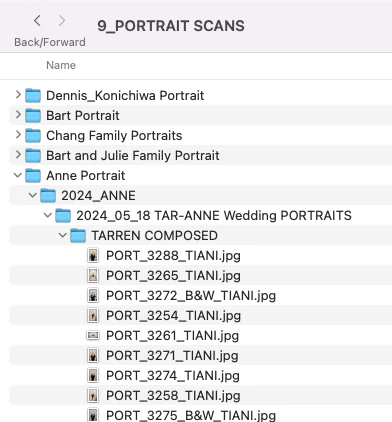
Screen Capture Below?
This topic has been closed for replies.

3 replies

bartc24285031
Participant
August 29, 2024

Thank you very much!  This is more information about my question than i've been able to find in a year or two.  I will check out both options and see what works best..  I'm very encouraged.  Thank you again!

john beardsworth
Community Expert
Community Expert
August 29, 2024

This dialog appears when you copy from the Path to Keywords - the magenta text showing a preview of the keywords that will be created.


john beardsworth
Community Expert
Community Expert
August 29, 2024

>> QUESTION: I'd like to have the "folder name" where an image is saved in LRC included as a tag/metadata in each image automatically or thru some bulk action.


You'll need a plugin for that kind of bulk action. Look up my Search and Replace, and use its Transfer function to copy from Path to Keywords. It then creates keywords to match each level of your folders. You can test this without buying.


bartc24285031
Participant
August 29, 2024

John, I just purchased your plug-in.  My quick testing showed me how powerful a tool it is.  Thank you.

john beardsworth
Community Expert
Community Expert
August 29, 2024

Great, it's a Swiss army knife of a plugin. While it should fix this specific problem, I hope you'll find plenty of other jobs for it.

Per Berntsen
Community Expert
Community Expert
August 29, 2024

Click the Customize button at the bottom of the Metada panel, and add Folder under Basic info.

You can also choose to have the file path displayed.