
Participant
September 28, 2024
Answered

Backup Wiederherstellung fehlgeschlagen

  • September 28, 2024
  • 4 replies
  • 826 views

Hallo zusammen

Habe vor ein paar Tagen meinen PC gewechselt. Den Ordner mit dem Lightroombackup habe ich  auf eine externe Festplannte kopiert. Nun kann ich den Backupkatalog auf dem neuen PC nicht öffnen da eine Fehlermeldung  wegen Schreibgestützt kommt. Den gesamten Backupordner kann ich zwar kopieren, den darin enthaltenen Katalog einzeln aber nicht. Öffnen geht schon gar nicht. Rechtsklick und Schreibschutz entfernen klappt leider nicht.

Falls hilfreich hier mein System:
Win 11 Pro, Intel i9  14900k, RTX 4080S, 32GB Ram


Kennt jemand das Problem und hat eine Lösung dazu? Die Bearbeitungen der letzten 5 Jahre wären einfach dahin  sonst.
This topic has been closed for replies.
Correct answer GoldingD

Mit dem Backup meinte ich die Katalogsicherung. Wenn ich diese auf dem neuen PC ins Lightroom Backupverzeichnis kopiere und starte kommt als erstes die Meldung Lightroom Catalog-3-v13.lrcat-data konnte nicht gefunden werden. Danach der Fehler  mit dem Schreibschutz wie in den angehàngten Bildern zu sehen.


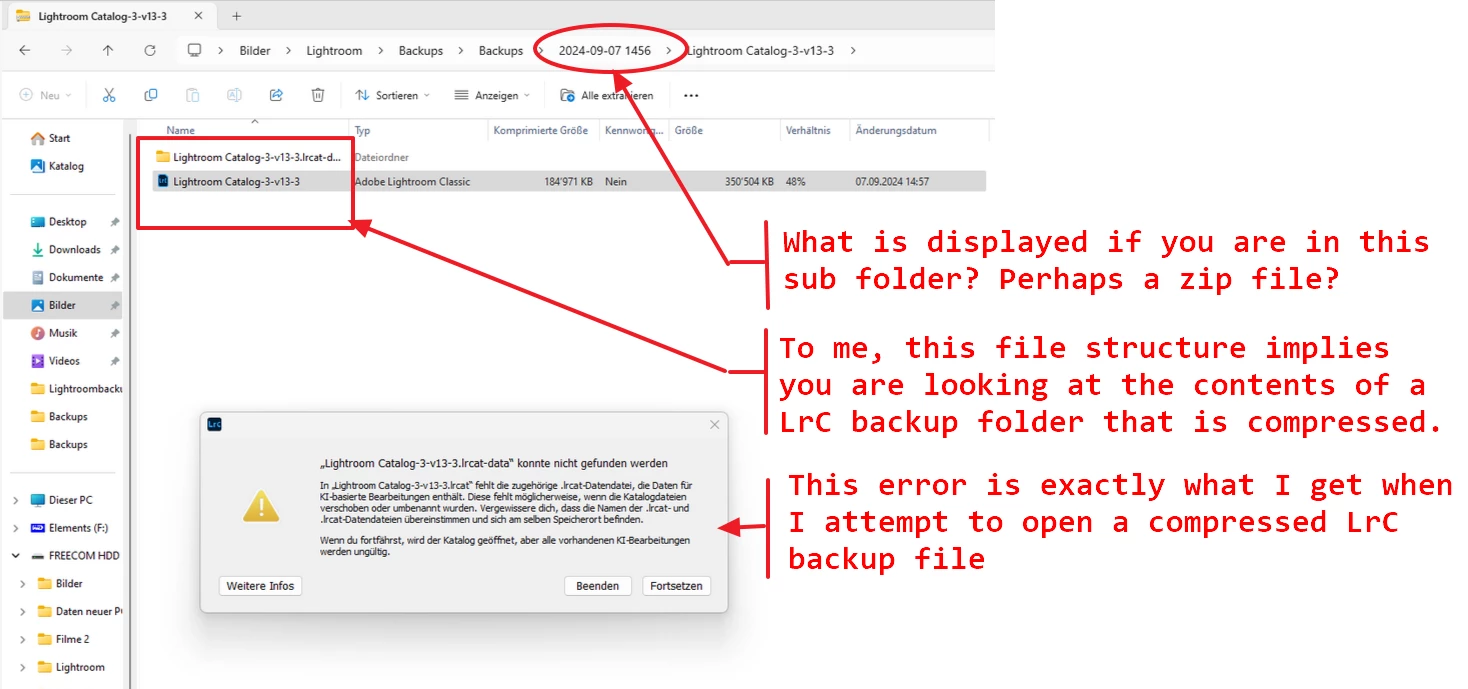
Actually, I think you are trying to open a compressed file:


For easy translation purposes, my statements in the annotated screenshot are:


  • What is displayed if you are in this sub folder? Perhaps a zip file?
  • To me, this file structure implies you are looking at the contents of a LrC backup folder that is compressed
  • This error is exactly what I get when I attempt to open a compressed LrC backup file

4 replies

GoldingD
Legend
September 28, 2024

And I will repeat a question asked. Why did you copy a LrC backup. It may been better to copy the actual working LrC catalog.


And did you copy the folder with the photos in it?


dj_paige
Legend
September 28, 2024

From the translation to English


Now I can't open the backup catalog on the new PC because an error message about write support comes up.


It is always helpful if you provide the EXACT word-for-word error message. This error message might be because you have not unzipped the backup catalog file first before using it. If that does not fix the problem, then we need to know the EXACT error message.

JohanElzenga
Community Expert
Community Expert
September 28, 2024

I wondered about that 'backup' too. If you change to a new computer, then there is no reason to use a catalog backup at all. Just copy the catalog folder to the new computer, as described in the link, and keep using the catalog in that folder. But if you do try to use a catalog backup for some reason, then unzip it first. You would not be the first one making that mistake.


-- Johan W. Elzenga
Participant
September 28, 2024

Mit dem Backup meinte ich die Katalogsicherung. Wenn ich diese auf dem neuen PC ins Lightroom Backupverzeichnis kopiere und starte kommt als erstes die Meldung Lightroom Catalog-3-v13.lrcat-data konnte nicht gefunden werden. Danach der Fehler  mit dem Schreibschutz wie in den angehàngten Bildern zu sehen.

Participant
September 28, 2024

Vollzugriff habe ich bereits eingestellt, hat nichts geändert.  Den zweiten Link habe ich soweit auch befolgt. Die Ordnerstruktur ist nun im Lightroom, komischerweise jedoch nur bis 2020, obwohl das Backup in 2024 gemacht wurde. Der Relink zum Dateipfad über Lightroom funktioniert aber nicht.

AxelMatt
Community Expert
Community Expert
September 28, 2024

Prüfe bitte über den Windows Explorer ob du die entsprechenden Zugriffsrechte (Vollzugriff) hast.

Windows 10: Ordner und Dateien besser absichern | NETZWELT


Hier findest du nützliche Tipps wie man Lightroom auf einen neuen Rechner umzieht.

How do I move Lightroom to a new computer? | The Lightroom Queen (Englisch)


My System: Intel i7-8700K - 64GB RAM - NVidia Geforce RTX 3060 - Windows 11 Pro 25H2 -- LR-Classic 15 - Photoshop 27 - Nik Collection 8 - PureRAW 6 - Topaz Photo AI