
Participant
October 31, 2023
Question

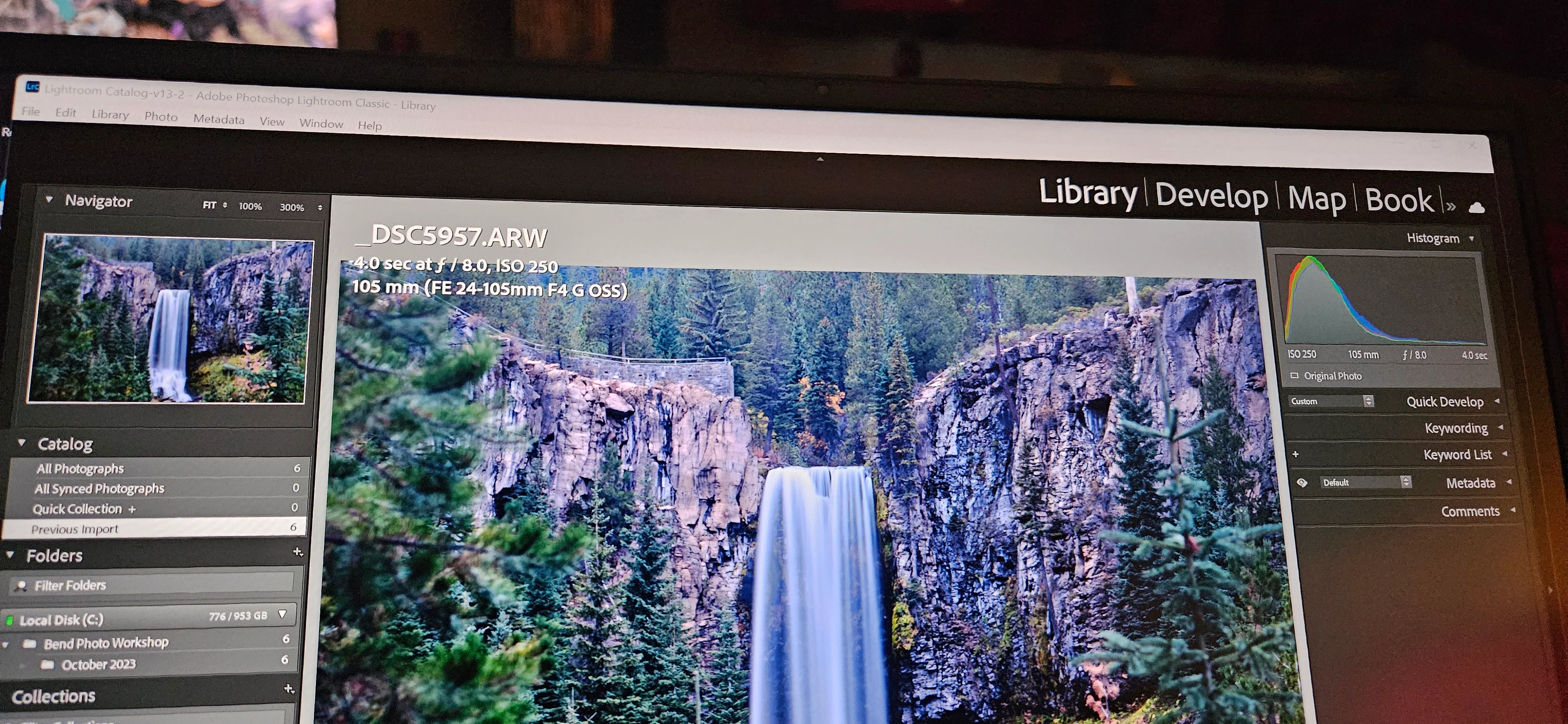
Bar above navigator (name on left side, library, develop, etc.) has distorted scale

  • October 31, 2023
  • 2 replies
  • 146 views

I am seeing a strange, isolated scaling issue for LR Classic on my LG Gram 16" laptop. Everything is in scale with the exception of the bar above navigator section (name on left side, library/develop/etc. on the right side). The library/develop section is enlarged font which causes the left side (name) to disappear. All other sections are in scale. Changes in font size or screen resolution ha ve no effect. I have attached an image. Anyone who has seen this and has a suggested solution I would appreciate it. 
This topic has been closed for replies.

2 replies

Rob_Cullen
Community Expert
Community Expert
October 31, 2023

Try editing your Identity Plate  [Edit > Identity Plate Setup...] and change the font sizes-


Regards. My System: Windows-11, Lightroom-Classic 15.4.1, Photoshop 27.8, ACR 18.4, Lightroom 9.4, Lr-iOS 10.4.0, Bridge 16.0.3 .
KC ORAuthor
Participant
October 31, 2023

Thanks for the tip. It cleaned up the right side menu.  Other side still not recovered. Would not have guessed to adjust identity plan font size. Appreciate it.

KC ORAuthor
Participant
October 31, 2023

Saw another post that pointed out that you can input your own identity plate on the left side and I was able to do this. Again, thanks for the identity plate direction for solution.

GoldingD
Legend
October 31, 2023

Not sure if some of the distortion I see in that photo is via ahandeld camera taing a photograph at some odd angle and some odd tilt. Can you crete a in computer screen capture instead of using a camera, a smartphone?


For Windows OS:


https://www.cnet.com/tech/services-and-software/8-easy-ways-to-take-screenshots-in-windows-10-and-11/


KC ORAuthor
Participant
October 31, 2023
Screenshot from PC. Same issue.


[image: image.png]