
ppaulo
Participant
October 29, 2019
Answered

Batch editing in Lightroom Classic

  • October 29, 2019
  • 2 replies
  • 1572 views

Hallo User,

I'm editing my great amount of holiday photos with LR CC. My problem is that there are allways the same run I want to shorten. The photos with the same exposure I can mark and work with batch editing, but then I have to open each photo to go to 'Photo/ Work in/Sharpener Pro 3:Output Sharpener'. And then save this photo after a short time. I would like to carry out this process with one button. Is there a possibility to do so in LR? If yes, does it work? Thanks a lot Paul


{Thread title edited by moderator}
    This topic has been closed for replies.
    Correct answer john beardsworth

    With Lightroom Classic batch editing is very simple - partly because the program is built around it.

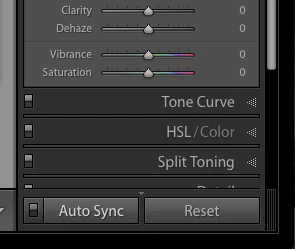
    You select the photos, ensure AutoSync is enabled, and drag the sliders. Give it a try.


    2 replies

    john beardsworth
    Community Expert
    john beardsworthCommunity ExpertCorrect answer
    Community Expert
    October 29, 2019

    With Lightroom Classic batch editing is very simple - partly because the program is built around it.

    You select the photos, ensure AutoSync is enabled, and drag the sliders. Give it a try.


    ppaulo
    ppauloAuthor
    Participant
    November 6, 2019

    Thanks a lot, it works

    99jon
    Legend
    November 6, 2019

    Don’t forget to disable auto-sync when you have finished to avoid future accidents.

    nikunj.m
    Community Manager
    Community Manager
    October 29, 2019

    Hi Paul,


    Batch processing images through a plugin like the Sharpener Pro 3:Output Sharpener would not be possible in Lightroom Classic. You can however create an action in Photoshop and then use that to batch process the images through there.

    You can check out the steps mentioned on page 14 of the PDF in the link below on how to create the action to include the Sharpener Pro 3:Output Sharpener.

    http://www.doncastercameraclub.co.uk/resources/Sharpener-Pro-3-User-Guide.pdf


    Let us know is that helps.


    Regards,

    Nikunj