
Participant
June 6, 2023
Answered

Beschädigte Dateien im Lightroom Katalog finden

  • June 6, 2023
  • 1 reply
  • 5486 views

Liebe Community, ich habe einen umfangreichen Lightroom-Katalog. Mit Bildern, die ich auf z. T. externen Festplatten gesichert habe. Nun ist es so, dass mir Ligtr. beim Durchscrollen der Bibliothek (wenn ich die Festplatten angeschlossen habe) das eine oder andere Bild als beschädigt anzeigt, nicht viele, aber doch einzelne. Wenn ich diese öffnen will mit Ph. oder einem Win-Dienstprogramm zeigt es sich, dass diese tatsächlich kaputt sind (ausgegraute Flächen etc). Diese Dateien finde ich immer nur zufällig, da beim Durchscrollen in der Bibliothekansicht ein fettes Rufezeichen am Icon auffällt. Nun meine Frage: Kann man irgendeine Funktion in L. verwenden, um beschädigte Fotos zu finden, aufgelistet? Ich würde gerne wissen, wie viele Bilder tatsächlich kaputt sind.
This topic has been closed for replies.
Correct answer johnrellis

Google translation: "Find corrupted files in the Lightroom catalog. Dear community, I have an extensive Lightroom catalogue. With pictures that I have on e.g. T. external hard drives have secured. Now it is the case that Ligtr. when scrolling through the library (when I have the hard drives connected) shows one or the other picture as damaged, not many, but a few. If I want to open them with Ph. or a Win utility, it shows that they are actually broken (grayed out areas, etc.). I always find these files by accident, because when scrolling through the library view, a bold exclamation mark on the icon catches my eye. Now my question: is it possible to use any function in L. to find corrupt photos listed? I would like to know how many pictures are actually broken."


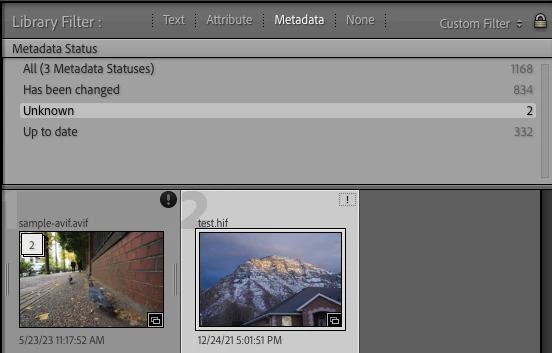
In the Library Filter bar, configure the Metadata browser to show the Metadata Status column. Files with Unknown status will include those showing the bold exclamation mark, as well as missing files and videos:


1 reply

johnrellis
johnrellisCorrect answer
Legend
June 6, 2023

Google translation: "Find corrupted files in the Lightroom catalog. Dear community, I have an extensive Lightroom catalogue. With pictures that I have on e.g. T. external hard drives have secured. Now it is the case that Ligtr. when scrolling through the library (when I have the hard drives connected) shows one or the other picture as damaged, not many, but a few. If I want to open them with Ph. or a Win utility, it shows that they are actually broken (grayed out areas, etc.). I always find these files by accident, because when scrolling through the library view, a bold exclamation mark on the icon catches my eye. Now my question: is it possible to use any function in L. to find corrupt photos listed? I would like to know how many pictures are actually broken."


In the Library Filter bar, configure the Metadata browser to show the Metadata Status column. Files with Unknown status will include those showing the bold exclamation mark, as well as missing files and videos:


Participant
June 13, 2023

Vielen Dank für die Antwort, ich konnte damit die Suche einschränken!