My current 2TB Samsung SSD drive which has approximately 1.5 TB of Lightroom files and catalogue etc (in other words everything) is currently formatted EXFAT. I want to move all of my LR onto another external drive - then reformat my current SSD drive and then bring all of the Lightroom files back onto the original (now reformatted) SSD drive.
Two questions:
What are the safest process steps for copying 1.5TB of LR files from the original SSD over to another external hard drive (whilst the original SSD drive is reformatted) and then back onto the original (now reformatted) SSD without risking any data corruption or problems?
Is APFS or macOS Extended (Journaled) the best format for stable, long-term data storage for regular LR usage on an SSD?
I not planning on using/sharing the drive with a PC in the future.
I have 2 backups of my LR - one on a second SSD and one on an HDD. I am planning on also reformatting my backup SSD once I have worked out the above steps.
Or is it easiest and safest to just keep using LR on an EXFAT formatted SSD?
Many thanks in advance for any guidance and suggestions.
I not planning on using/sharing the drive with a PC in the future.
Then format it as APFS, the recommended format for SSDs used only with current Macs. It will provide the fastest performance, and the best support for the latest macOS volume management features (FileVault encryption, APFS containers, snapshots, cloning…). For more information, read: Why Use APFS?
What are the safest process steps for copying 1.5TB of LR files from the original SSD over to another external hard drive (whilst the original SSD drive is reformatted) and then back onto the original (now reformatted) SSD without risking any data corruption or problems?
The literally safest way is to use any trusted backup/mirroring/cloning software that can verify the copy after it’s made. If there is any difference between source and destination, it’s listed as an error so you can have it re-copy any corrupted files to ensure the integrity of the copy. There are many applications that can do this on macOS. Two popular choices are ChronoSync and Carbon Copy Cloner. Regardless of which app you choose, generally it works like this:
Set one of your volumes as the source and the other as the destination.
Set the application to make an exact copy of the source to the destination. The software might call it a clone or mirror.
Set the application to verify the copy. It will re-read what it copied and compare it to the original. Be aware that verification makes the backup longer because it has to make that second pass to read and verify every file it copied during the first pass.
Another benefit of using a backup utility is that most of them keep a log, so if something goes wrong like your 1.5TB copy is interrupted, the log might be able to tell you where it stopped and maybe what went wrong. If you simply do a drag-copy in the macOS Finder, if that’s interrupted you might not know how far it got and which folders are incomplete. With a backup utility, you can have it re-scan the source and destination and list any folders or files that are not exactly the same on both volumes. Again, those would show up as errors to be corrected by another backup pass.
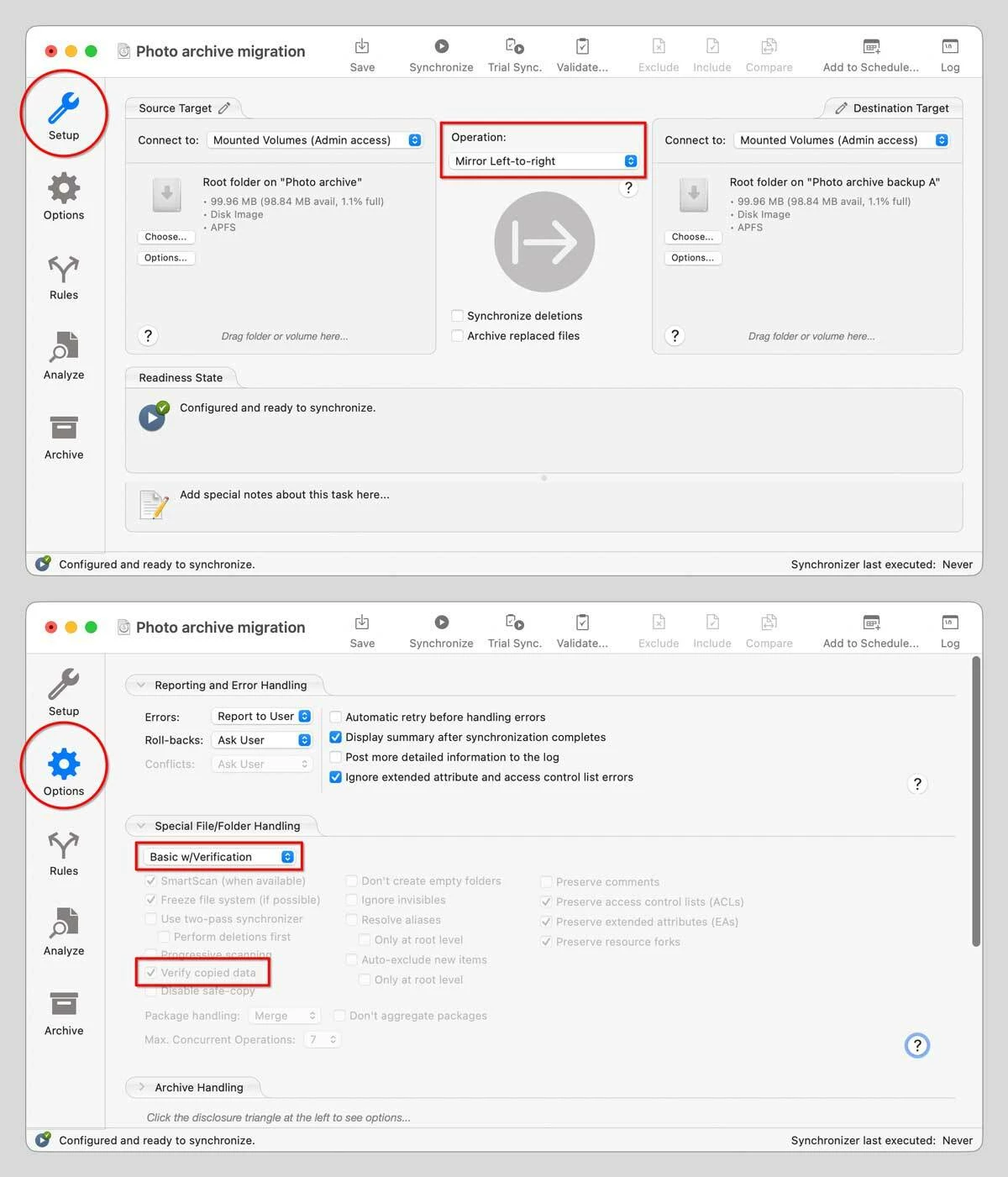
The picture below is an example of how the initial mirror copy might be set up in ChronoSync. The Verify Copied Data option is in the Options panel, and it’s dimmed because it’s automatically selected as part of the Basic w/Verification preset.
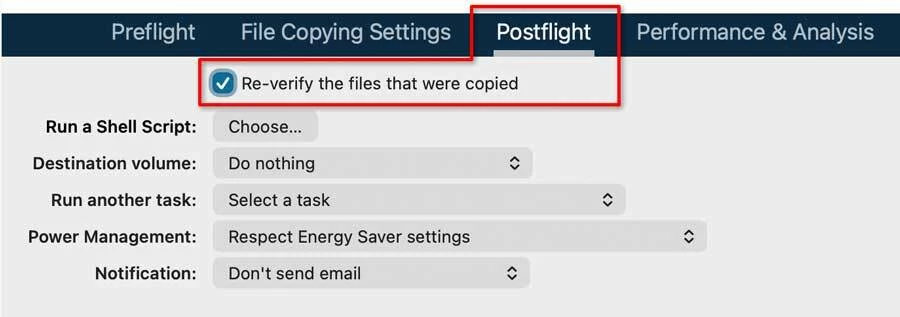
This picture is where you would find the verification option when setting up a mirror copy in Carbon Copy Cloner.
Thank-you @Conrad_C for taking the time to explain that and the steps involved. I am in the middle of doing as you suggested using goodsync to create a cloned copy rather than just copying and pasting.
I not planning on using/sharing the drive with a PC in the future.
Then format it as APFS, the recommended format for SSDs used only with current Macs. It will provide the fastest performance, and the best support for the latest macOS volume management features (FileVault encryption, APFS containers, snapshots, cloning…). For more information, read: Why Use APFS?
What are the safest process steps for copying 1.5TB of LR files from the original SSD over to another external hard drive (whilst the original SSD drive is reformatted) and then back onto the original (now reformatted) SSD without risking any data corruption or problems?
The literally safest way is to use any trusted backup/mirroring/cloning software that can verify the copy after it’s made. If there is any difference between source and destination, it’s listed as an error so you can have it re-copy any corrupted files to ensure the integrity of the copy. There are many applications that can do this on macOS. Two popular choices are ChronoSync and Carbon Copy Cloner. Regardless of which app you choose, generally it works like this:
Set one of your volumes as the source and the other as the destination.
Set the application to make an exact copy of the source to the destination. The software might call it a clone or mirror.
Set the application to verify the copy. It will re-read what it copied and compare it to the original. Be aware that verification makes the backup longer because it has to make that second pass to read and verify every file it copied during the first pass.
Another benefit of using a backup utility is that most of them keep a log, so if something goes wrong like your 1.5TB copy is interrupted, the log might be able to tell you where it stopped and maybe what went wrong. If you simply do a drag-copy in the macOS Finder, if that’s interrupted you might not know how far it got and which folders are incomplete. With a backup utility, you can have it re-scan the source and destination and list any folders or files that are not exactly the same on both volumes. Again, those would show up as errors to be corrected by another backup pass.
The picture below is an example of how the initial mirror copy might be set up in ChronoSync. The Verify Copied Data option is in the Options panel, and it’s dimmed because it’s automatically selected as part of the Basic w/Verification preset.
This picture is where you would find the verification option when setting up a mirror copy in Carbon Copy Cloner.
Make backups of your catalog file and all photos before you do the move (which you should be doing regularly anyway).
Use your OS to move the files onto a different external drive. Keep the folder hierarchy the same, do not move things around inside the folder hierarchy. Do not rename anything. Then format the disk. Then using your OS, move everything back to the exact same location as before, keeping the folder hierarchy the same, do not move things around inside the folder hierarchy. Do not rename anything.
Regarding question 2, I don’t know as I am not a Mac user.
PS: I assume your are using Lightroom Classic (LrC) and not Lightroom (Lr) as you said. Please refer to your software as Lightroom Classic or LrC, and not Lightroom or Lr from now on. Clarity is beneficial to everyone.
Clarification: when I say “move the files...” that means the catalog file plus the associated LRCAT-DATA file, and all photos. The LRCAT-DATA file also should be in the backup that you make before you start this process.





 AdChoices