Participant
December 2, 2022
Answered

Better separation of dynamic collection idea

  • December 2, 2022
  • 2 replies
  • 1230 views

Hi,

I create my collections by years.

so for example collection 2022

I create a set of collecion called Canada with it's own

Dynamic or normal  sub collection.

I create a set of collection called italy with it's own

Dynamic or normal collection.

In Dynamic collection instead to use only one whatever, all, no one in my opinion is better to also use logic statememt like (and, or, ect) between each value so in my example I want put some canadian photos I evaluate in green and red  I can do Valution color: Green OR valuation color: red AND File name contain: Canada.

In this way I can separete from photos took in Italy I evaluate in green and/or red

Regards

Ugo Merlini


This topic has been closed for replies.
Correct answer JohanElzenga
quote

the # method doesn't work I need a true boolean logic or in the latest version there is a bug

By @Ugo73


"Doesn't work" is a useless statement. Tell us what does not work. Does Lightroom not find some images that it should find? Does Lightroom find some images that it should not find? Give examples of those images. The # method has been around for many years and does not have known bugs. You can make very sophisticated searches with it, because you can use # multiple times in one smart collection.


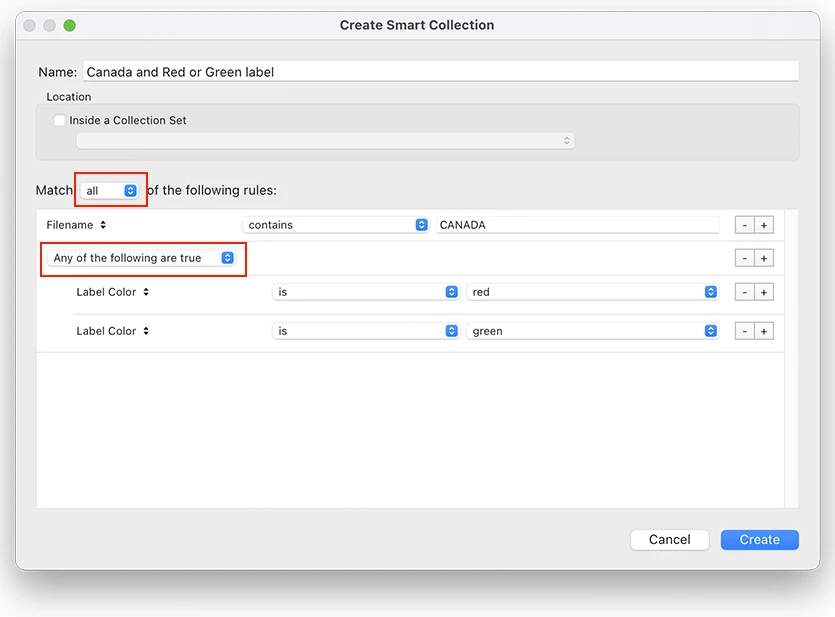
If I understood your original message correctly, then you want to find all images that have 'CANADA' in their file name and have a red label or a green label. This smart collection will do that:


If this is not doing what you want, then tell us what is still missing.


2 replies

JohanElzenga
Community Expert
Community Expert
December 2, 2022

It's difficult to fully understand what you are saying because of the language barrier, but I think I understand and I am pretty sure that what you want to do is actually already possible. If you set up a smart collection, then you will see a plus/minus icon on the right of each criterion, so you can delete it or add another criterion. Hold down the Alt/Option key and look what happens with the plus icon. It changes to an #. Click on it and you will see that you can now add an OR statement. This way you can setup a smart collection that searches for A and B or C. Is that indeed what you want?


-- Johan W. Elzenga
Ugo73Author
Participant
December 3, 2022

Hi,

the # method doesn't work I need a true boolean logic or in the latest version there is a bug

Ugo


dj_paige
Legend
December 3, 2022

Just so I can understand, please tell us what doesn't work when you try it. Be specific. Give details. What "true boolean logic" isn't possible? The # works for me.

dj_paige
Legend
December 2, 2022

Are you asking a question, or just presenting the method you use?

Ian Lyons
Community Expert
Community Expert
December 2, 2022

I believe it's a suggestion (Idea) whereby Smart Collections would use boolean logic. 

Ugo73Author
Participant
December 2, 2022

Hi,

yes it's a suggestion to use boolean logic. For as now is quite incomplete for a fully funcional filter method just look at Mozilla Thunderbird message filter methotod.

Regards

Ugo