Participant
March 29, 2023
Answered

Bilder werden grünlich

  • March 29, 2023
  • 2 replies
  • 186 views

Hallo zusammen,

ich hoffe jemand kann mir weiterhelfen, denn ich bin mit meinem Latein am Ende und ziemlich verzweifelt.


Ich bearbeite meine Bilder mit Lightroom Classic am Laptop und exportiere sie dann mit einem FTP in eine Online Galerie. Meine Kundem können sie dann über einen Link von dort herunterladen. Ich selbst lade sie am Handy von dort auch herunter, um sie auf Instagram zu posten. Ich selbst habe auch keinerlei Probleme. Bei meinen Kunden sind die Bilder auf Instagram aber dann plötzlich grünlich, wenn sie diese posten wollen! Woran kann das liegen? Was kann ich tun? An der Online-Galerie liegt es nicht, denn es passiert auch bei einer anderen Galerie oder per Mail. Deshalb liegt die Vermutung nahe, dass das Problem bei Lightroom liegt. 

Liebe Grüße 

This topic has been closed for replies.
Correct answer Per Berntsen
quote

I edit my images with Lightroom Classic on my laptop and then export them to an online gallery using an FTP. My customers can then download them via a link from there. I myself download them on my mobile phone from there to post them on Instagram. I myself have no problems either. For my customers, however, the pictures on Instagram are suddenly greenish when they want to post them! What could be the reason for this? What can I do? It's not because of the online gallery, because it also happens with another gallery or by mail. Therefore, it is reasonable to assume that the problem lies with Lightroom. 


By @Miriam29134112kdtv


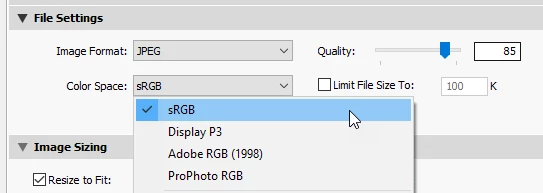
My guess is that you're exporting using the ProPhoto color space.

Then, at some point (Instagram?), the profile is stripped out, and the image becomes untagged.

Web browsers will assign sRGB to untagged material, and since the image was created in ProPhoto, the colors will be wrong, desaturated with a greenish cast.


When exporting images for screen viewing, always use sRGB.

ProPhoto should never be used for images leaving your computer, unless somebody specifically asks for it.


2 replies

Participant
March 29, 2023

Vielen Dank, das hat mir wirklich geholfen! Daran hatte ich gar nicht gedacht, weil ich dieses Problem noch nie in der Vergangenheit hatte und die Einstellungen auch nicht bewusst verändert habe. Danke! 

Per Berntsen
Community Expert
Per BerntsenCommunity ExpertCorrect answer
Community Expert
March 29, 2023
quote

I edit my images with Lightroom Classic on my laptop and then export them to an online gallery using an FTP. My customers can then download them via a link from there. I myself download them on my mobile phone from there to post them on Instagram. I myself have no problems either. For my customers, however, the pictures on Instagram are suddenly greenish when they want to post them! What could be the reason for this? What can I do? It's not because of the online gallery, because it also happens with another gallery or by mail. Therefore, it is reasonable to assume that the problem lies with Lightroom. 


By @Miriam29134112kdtv


My guess is that you're exporting using the ProPhoto color space.

Then, at some point (Instagram?), the profile is stripped out, and the image becomes untagged.

Web browsers will assign sRGB to untagged material, and since the image was created in ProPhoto, the colors will be wrong, desaturated with a greenish cast.


When exporting images for screen viewing, always use sRGB.

ProPhoto should never be used for images leaving your computer, unless somebody specifically asks for it.