
Known Participant
June 5, 2025
Answered

Bit depth of lossy DNGs?

  • June 5, 2025
  • 1 reply
  • 179 views

How can I determine the bit depth of a lossy compressed DNG made with the JPEG XL engine? I convert an adjusted RAW to a lossless DNG, then use Lightroom Classic or DNG Converter to generate from that a lossy compressed DNG. That lossy compressed DNG seems to have the same dynamic range and tonal malleability (5 stops!) as the original RAW file, so I have to assume it's more than 8 bits, as I'd expect a similarly abused JPEG to fall apart.
Correct answer johnrellis

[This post contains formatting and embedded images that don't appear in email. View the post in your Web browser.]


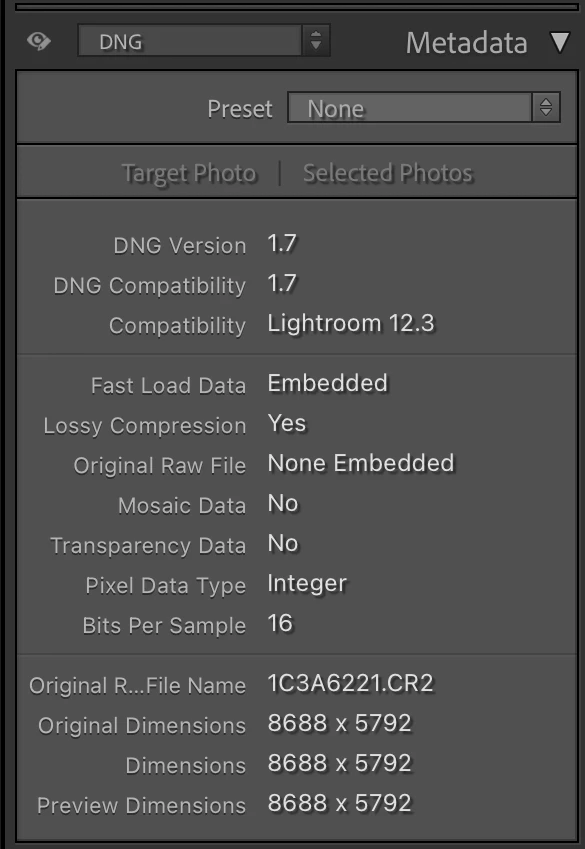
Raws converted to lossy DNGs by Library > Convert Photo To DNG have a nominal bit depth of 16 bits per channel (nominal, because the actual depth depends on the camera sensor which is typically less). You can see particulars about a DNG using the Metadata panel's DNG tagset:


1 reply

johnrellis
johnrellisCorrect answer
Legend
June 5, 2025

[This post contains formatting and embedded images that don't appear in email. View the post in your Web browser.]


Raws converted to lossy DNGs by Library > Convert Photo To DNG have a nominal bit depth of 16 bits per channel (nominal, because the actual depth depends on the camera sensor which is typically less). You can see particulars about a DNG using the Metadata panel's DNG tagset: