Resuelto
Black and White mix missing for me in 7.3.1
If I click on black & white in the basic panel, B & W where HSL/Color/B & W used to be is greyed out and it says, "Monochrome profile applied." I included a screenshot. Help please.
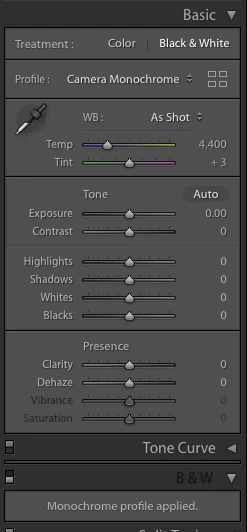

If I click on black & white in the basic panel, B & W where HSL/Color/B & W used to be is greyed out and it says, "Monochrome profile applied." I included a screenshot. Help please.
You need to select another black and white profile than camera monochrome. Camera monochrome is a profile that mimics the in-camera jpeg rendering when you set the camera to do a black and white and cannot be tweaked. All the other black and white profiles such as Adobe monochrome can be tweaked.
Enter your E-mail address. We'll send you an e-mail with instructions to reset your password.
 AdChoices