

Participating Frequently
April 17, 2026

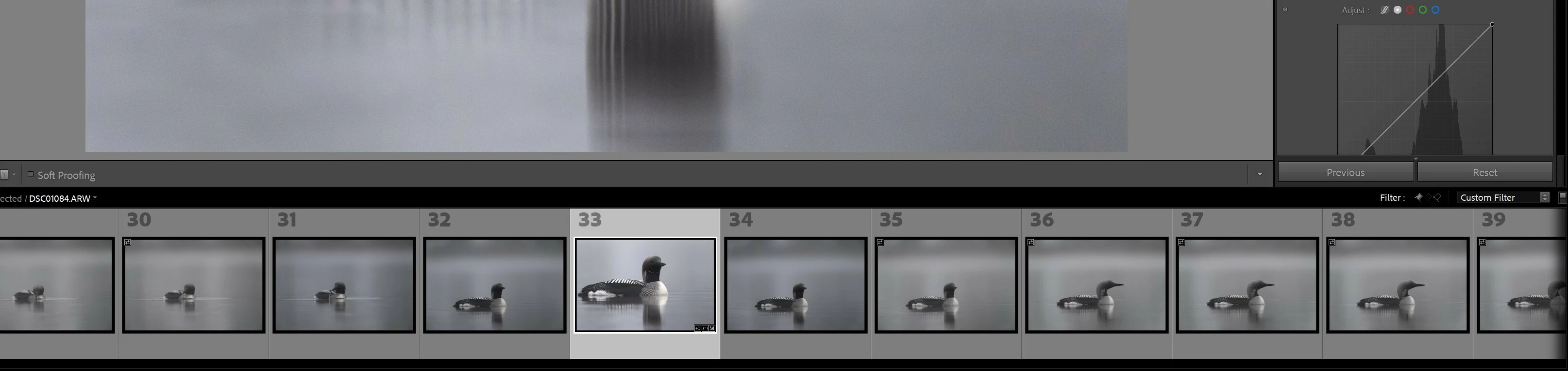
P: Black border in Filmstrip after installing 15.3

  • April 17, 2026
  • 20 replies
  • 991 views

black and white outline on my pictures in lightroom classic after update  v15.3 ->  Filmstrip
 

    20 replies

    Rikk Flohr_Photography
    Community Manager
    June 18, 2026

    Greetings all,  


    A new update for the Adobe Photography products has been released.  The June release contains an update regarding this issue. 

    If you do not see the update in your Creative Cloud Application, you can refresh it by pressing  [Ctrl/Cmd]+[Alt/Opt]+[ R ].

    Note: It may take up to 24 hours for your update to be available in your Creative Cloud app.


    Thank you for being so patient.  

    Note: It may take up to 24 hours for your update to be available in your Creative Cloud app.


    Thank you for being so patient.

    Rikk Flohr: Adobe Photography Org
    Participating Frequently
    June 3, 2026

    It always seems to be triggered by using Denoise!

    Participating Frequently
    May 23, 2026

    In my Windows 11 system, the white border is present if the image has a pick flag. If I remove the pick flag it has a black border. If I restart the application the black border is gone but it returns after editing a few images. The black border is then on all the filmstrip images (except those with a pick flag), not just the ones I have edited. I don’t see a black border in the main window thumbnails, only in the filmstrip.

    ChrisFourie-Lipman
    Participating Frequently
    May 4, 2026

    Same here, I have upvoted your post,
    Mine only appears when using AI tools like Denoise and Super Resolution

    Claire H.
    Community Manager
    Community Manager
    May 12, 2026

    Hi ​@ChrisFourie-Lipman, thank you for adding more context to this issue. Can you send your system info, a screen recording of the issue, and a numbered list of the exact steps needed to replicate it? You can find your system info by going to Help > System Info, copying and pasting it into a text file, and attaching it here. Thanks! ^CH

    Participant
    May 1, 2026

    Have upvoted; same for me on Windows 10 running Lightroom Classix 15.3.

    John Dukes
    Participant
    April 27, 2026

    I am on a MS Windows machine too.  And I am also experiencing the same issue with the black box. It goes away if I exit out of Lightroom Classic and enter back in.  But one thing I noticed it is also doing is once a photo has a black outline over it, it also removes the white “Pick” flag that I previously entered when I chose the photo as a picked selection.  

    Interestingly, I reverted back to the previous version of 15.2.1, the black box no longer seems to appear but I noticed that the pick flag is still gone if had the black box around the image in the 15.3 version. I was easily able to add them pick flag back in, but I am not sure if it removed other pick flags I have on other photos in my LR catalog.

    Hope that this is fixed soon. In the meantime, I decided to stay in version 15.2.1 until it is fixed. 

    Participating Frequently
    April 27, 2026

    Remember to vote for the bug 🤞

    Participating Frequently
    April 24, 2026

    I have the same problem. :(

    omognard
    Participant
    April 24, 2026

    It's a bug. It was definitely not like this before.

    I'm losing valuable real estate in my filmstrip because of that.

    Another bug introduced in 15.3: the point where you zoom in when switching between photos now resets from photo to photo, but not always (kind of random behavior)

    Adobe, please fix.

    Using Win 11 Pro + LrC 15.3

    darrylb37499677
    Participant
    April 23, 2026

    same for me in  15.3, updated yesterday.  I don’t use the AI Denoise (only the manual NR) and it happens to me.  Restarting clears it but then appears after a few minutes.  Can’t determine what triggers it.

    Participating Frequently
    April 21, 2026

    If you close LrC and re-open it, the black border has gone. It happened when I updated AI tools after some new edits.

    Participating Frequently
    April 21, 2026

    The problem shows up again right after running denoise. It still happens even if you shut down LrC and reopen it.!

    Participating Frequently
    June 3, 2026

    Yep! Always.
