Participating Frequently
June 2, 2025
Answered

Black outline to subjects when applying lens blur

  • June 2, 2025
  • 1 reply
  • 445 views

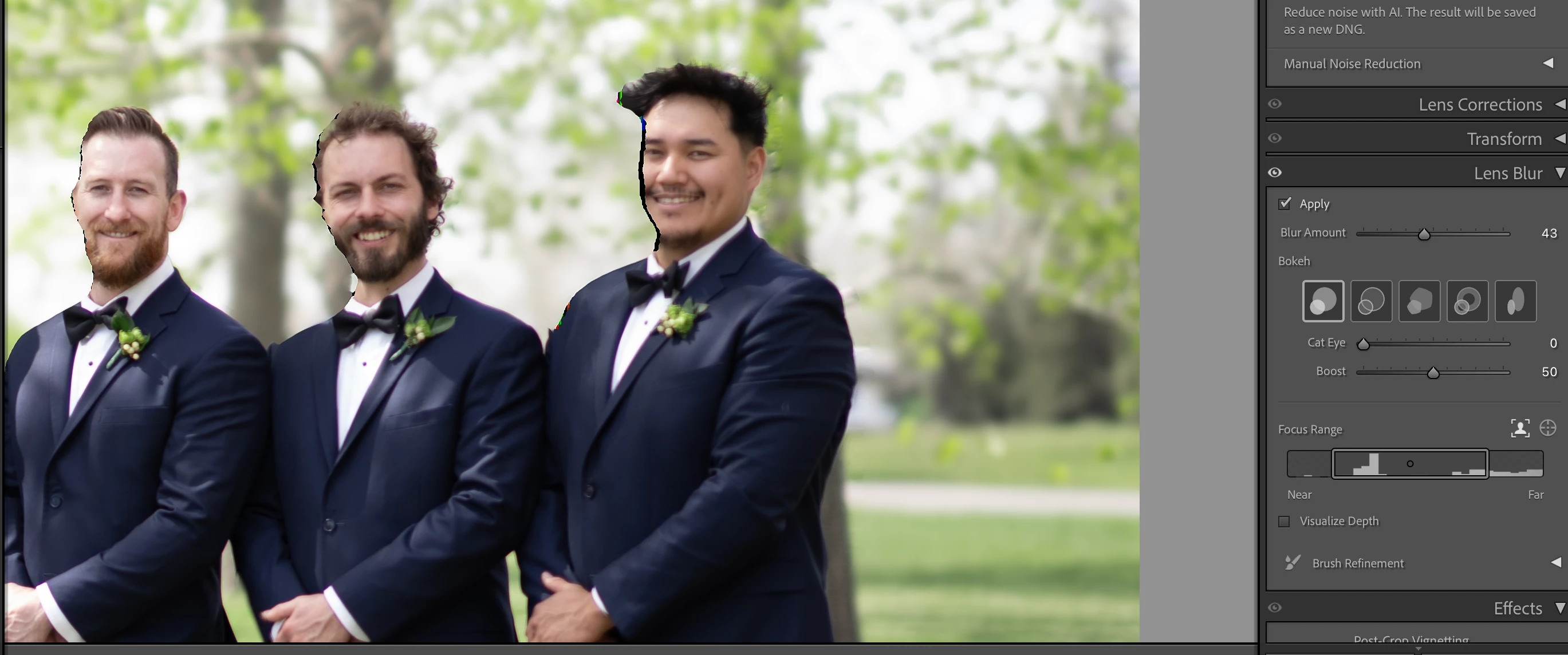
I've applied an adaptive background lens blur. When I exported the photo, I noticed a black outline around some of the faces. I went back into Adobe Lightroom Classic and removed the lens blur. The outline went away. When I used the slider to put it back, the black outline appeared again.


Is there a fix for this?


[Moved from ‘Bugs’ to ‘Discussions’ by moderator, according to forum rules.]

Correct answer johnrellis

[This post contains formatting and embedded images that don't appear in email. View the post in your Web browser.]


1. Try setting Preferences > Performance > Use Graphics Processor to Custom and unchecking Use GPU For Export. Does the problem still occur?


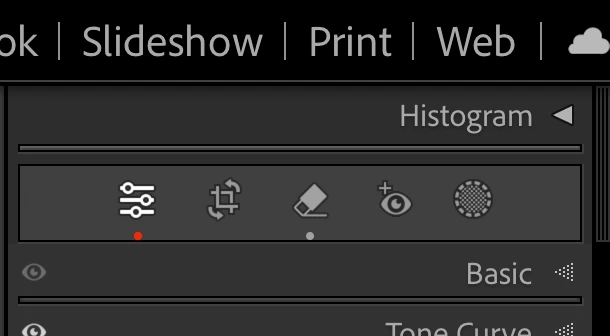
2. Do you see any red dots under the icons in the Develop tool panel at the top?


If so, that means you've applied Remove on top of the lens blur, and LR needs to recompute the Lens Blur mask. Do the Develop menu command Settings > Update AI Settings.


3. If neither of those help, upload a problem original photo to Wetransfer, Dropbox, Google Drive or similar free service and post the sharing link here. We can see if the problem occurs on other LR installations, and if so, file a bug report.


1 reply

JohanElzenga
Community Expert
Community Expert
June 2, 2025

This looks like a GPU issue. Please state your hardware specs and MacOS version.


I also noticed that it looks like you did not make any brush refinements (the option is collapsed). Did you try to improve the mask at all? The person on the left does not have that black line, but the mask edge around his face is pretty bad (his right ear is cut off) and needs refinement. Same for the person in the middle. He also lost his ear. Perhaps the same refinement removes the black line at the face of the person on the right?


-- Johan W. Elzenga
Participating Frequently
June 2, 2025

Here are my MacOS specs. I didn't try to refine the lens blur at all yet.

The black line is there when I export the photo. Does the graphics processor also effect the export of photos?

I'll try to refine the lens blur, but am still concerned about the black lines.


[PII image removed by moderator]

johnrellis
johnrellisCorrect answer
Legend
June 2, 2025

[This post contains formatting and embedded images that don't appear in email. View the post in your Web browser.]


1. Try setting Preferences > Performance > Use Graphics Processor to Custom and unchecking Use GPU For Export. Does the problem still occur?


2. Do you see any red dots under the icons in the Develop tool panel at the top?


If so, that means you've applied Remove on top of the lens blur, and LR needs to recompute the Lens Blur mask. Do the Develop menu command Settings > Update AI Settings.


3. If neither of those help, upload a problem original photo to Wetransfer, Dropbox, Google Drive or similar free service and post the sharing link here. We can see if the problem occurs on other LR installations, and if so, file a bug report.