Known Participant
December 12, 2023
Question

Black screen in Crop mode

  • December 12, 2023
  • 2 replies
  • 686 views

I open a picture in Develop module, click Crop tool and I get a completely black screen. See attached screen shot. MacBook Pro M1 Ventira 13.6.2, Lightroom Classic 13.0.1.
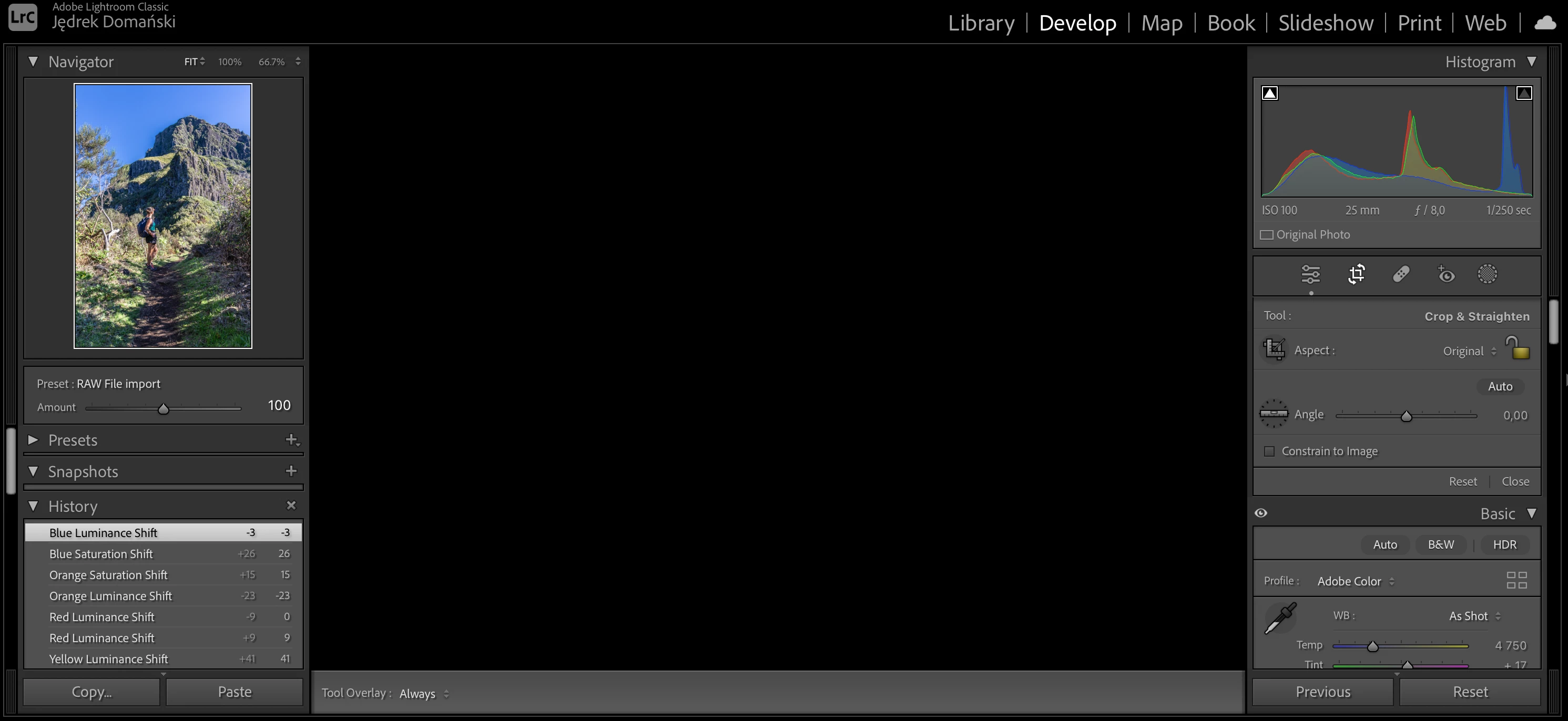
 

[moved from bugs to discussions according to the community rules - Mod.]

This topic has been closed for replies.

2 replies

GoldingD
Legend
December 12, 2023
Known Participant
December 12, 2023

What does this reset do exactly? I have import presets and develop presets which are applied to every imported file into Lightroom. Will this destroy my presets?

GoldingD
Legend
December 12, 2023

Read the links I provided, they explain it. Resetting the preferences file is a very common LrC fix. It does not always work, it is not the absolute fix. Their is no guarantee that if you reset the preference file things will get fixed, you could be wasting time and effort. Or you could try, and see if that fixes your problem, cross fingers.


When the preferences file gets corrupted, it causes all sorts of odd behavior. That empty Develop Loupe view just screams preference file, had the Navigator windows and the History panel also have been gray, then it would probably be 100% preference file. The preference file contains all sorts of settings, not just the settings in the preference panel. The preference file will not be recreated or overwritten due to updates, upgrades, or even partial (not complete) uninstalls (the normal uninstall via the Adobe Creative Cloud Desktop App, will not remove it by default)


In the links, the how to backup your various preferences is stated. Resetting the preference file will change those to defaults.


P.S. please remember that I like 99.9% of the members in this community are not Adobe employees, nor programmers, nor Service Help Techs, just fellow users.


Known Participant
December 12, 2023

I encountered a bug when I added a linear gradient mask and tried applying exposure settings such as Exposure, Highlights, Shadows, etc. See attached screen shot. MacBook Pro M1 Ventira 13.6.2, Lightroom Classic 13.0.1


[moved from bugs to discussions according to the community rules - Mod.]

GoldingD
Legend
December 12, 2023

As I remarked in your other post:

https://community.adobe.com/t5/lightroom-classic-bugs/crop-bug-whole-black-screen/idc-p/14292816#M50201

This might be a corrupt preference file.

Some would look at that odd image and think corrupt image, but would that not first show up immediately after import, after LrC creates the preview from the RAW?

Second thought would be a GPU issue, but that would involve a AI mask like Sky, not a simple Gradient.

So, perhaps visit the preference file issue first, see if that helps.


Known Participant
December 12, 2023

Actualy no mask works for me, no Sky mask, no Subject, People, Background, literarily no mask works. What might be wrong?