
Participant
October 30, 2017
Question

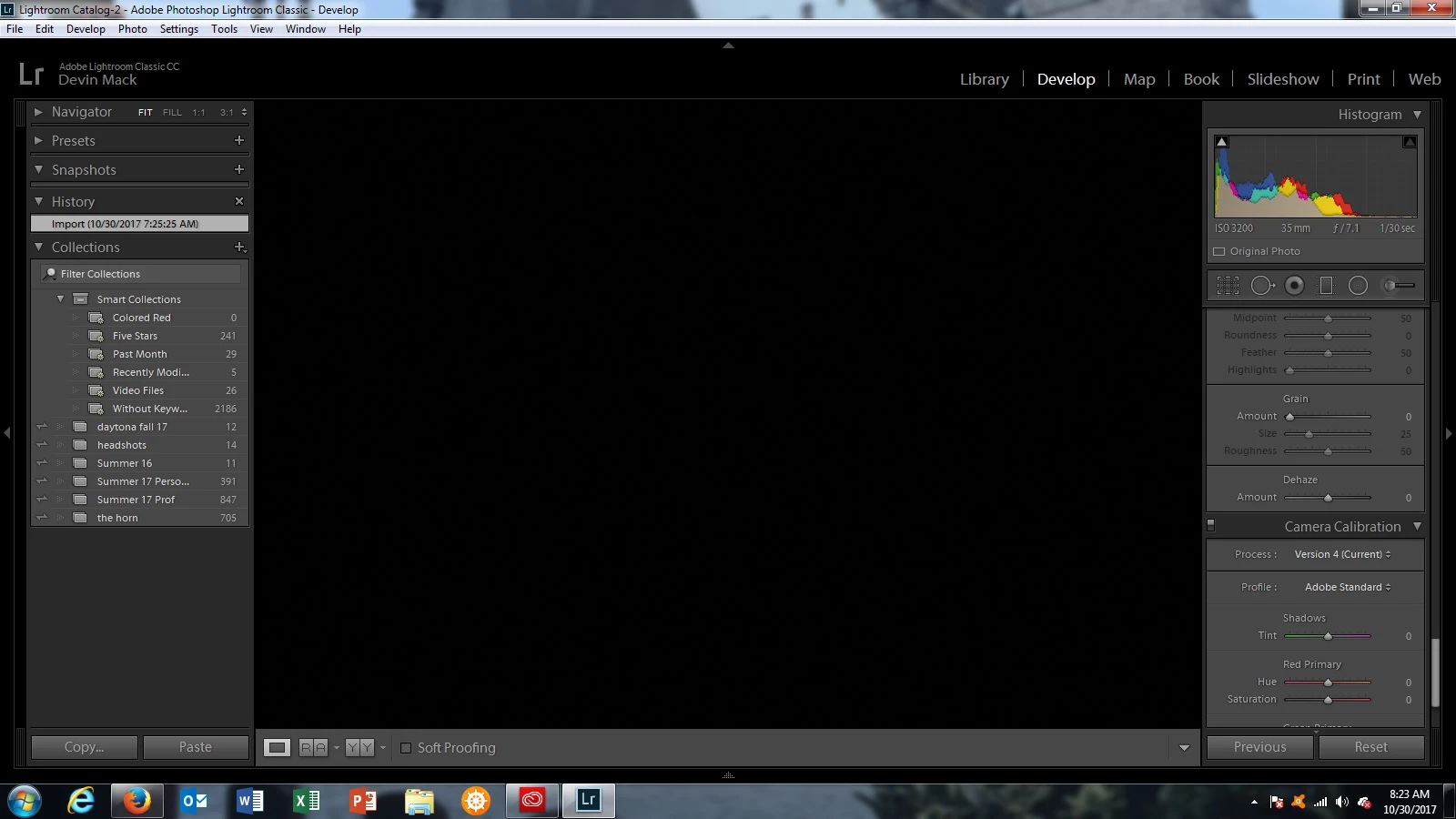
Blacked Out Loupe View in Develop Module

  • October 30, 2017
  • 7 replies
  • 5692 views

It seems that since the update to "Classic" that at every start up of the program I can develop one photo and upon moving to the next loupe view is blacked out. In other words in the main view for developing the photo it is not visible. In reference and before/after views the photo is visible. Loupe view is however visible from my second screen. This makes it quite awkward to edit. See the screenshot below
My OS is Windows 7x64 and my Lightroom is version 7.0.1

    This topic has been closed for replies.

    7 replies

    Participant
    January 24, 2019

    I started having this problem, and I hope i've found an answer.  Go to Preferences - Performance tab, and uncheck "Use Graphics Processor"

    Participant
    March 15, 2019

    Cheers TJ - had exactly the same problem using Win10 and Lightroom Classic CC 8.1, and your uncheck the 'Use Graphics Processor' method worked straight away! Cheers! :-)

    Participant
    August 1, 2018

    Clearly this is a bug they're yet to fix. I was facing the same issue, but I tried this and it has worked so far. My system is W 8 , 64bit, with Radeon R5 graphics. Lightroom CC version 7.1.

    Open the folder in Library view. Then make some minor change in the Quick develop section. Then click on the Develop tab. This should show the file in loupe view and work for all other files in the folder.

    Participant
    October 16, 2018

    Thanks, this has been bugging me as well, and despite the fixes above, it came back. This workaround seems to be permanent for the folder. It is definitely a bug and needs a proper fix. Thought the latest update might have it sorted, but 8.0 doesn't solve it.

    peterk18538216
    Known Participant
    December 13, 2017

    I've got the same problem.  This appears to be a known problem (somewhat).  I've got a Radeon RX 470.  The "blackout" showed up initially when Radeon updated to the 17.4.4 driver (4/23/2017).  Reference the following link: Crash Camera Raw or Lightroom 

    The 17.2.1 driver used to work for me but now it no longer works.  The only answer I've found that works is to disable the graphics cpu, but then I loose significant performance.    This is getting very frustrating.  I'm not sure at this point whether to blame (and get rid of) Lightroom or my AMD card.

    Any help!   I've tried the above suggestions and they don't work.

    Participant
    November 1, 2017

    I have the same problem on a computer running a current version of Windows 10. In my case the Develop module works fine until I swap to another module. It has happened after swapping to the Print module, and even after swapping back to the Library. In effect you have to stay in Develop, or be prepared to relaunch Lightroom Classic if I want to use another module in the meantime. Never saw this problem until I upgraded to Classic.

    Participating Frequently
    October 31, 2017

    Devinm, try SeanMcCormacks work around but, also thin out your presets in the Dev mod. I've ditched about 50 or so presets and the performabce has improved and I seem to have the Loupe view back... so far.

    And, this work around has just failed. Black loupe view again

    Participant
    October 31, 2017

    Yeah I tried doing that exactly. It seems to be spotty. Last night I went through about 10 pictures before it happened again, and most times I get through 1.

    Luckily I have a second monitor that I can work from, its just super awkward to edit with and is a bit slower in reflecting edits.

    Hopefully this will be fixed... soon :/

    Sean McCormack
    Community Expert
    Community Expert
    October 31, 2017

    How many graphics cards do you have?

    Sean McCormack. Author of 'Essential Development 3'. Magazine Writer. Former Official Fuji X-Photographer.
    Participating Frequently
    October 31, 2017

    I've the same problem. I'm running Windows 10 and my hardware configuration matches the requirements for LR Classic CC. I've only ever experienced this issue since the upgrade to LR Classic.

    Sean McCormack
    Community Expert
    Community Expert
    October 30, 2017

    Update your video drivers..

    also try this:

    1. Choose Edit > Preferences.
    2. In the Preferences dialog, go the Presets tab.
    3. In the Presets tab, click the Show Lightroom Presets Folder button. The root preset folder opens in the File Explorer.
    4. In the File Explorer, navigate into the Lightroom folder.
    5. Go to the link https://adobe.ly/2hUHGYa and download the config.lua file. Copy the downloaded config.lua file into the Lightroom folder mentioned in the previous step.
    6. Relaunch Lightroom Classic CC.

    The System Info dialog (Help > System Info) should display the config.lua flags entry as shown below:

    Config.lua-Flags:

    AgView.disableDirect2D = true

    Sean McCormack. Author of 'Essential Development 3'. Magazine Writer. Former Official Fuji X-Photographer.
    Participant
    October 30, 2017

    Okay so I thought it was fixed but alas after editing about 5 photos the problem returned. Exactly the same no change. The main panel is black in Loupe View but in compare, and before/after I can view the photo.

    I have updated my video driver to the latest version, and tried the second fix you mentioned. Neither have solved the problem.