What border do you want bigger? Do you mean the Photo Cell size, or a fancy border that you might add to the photo in another app?
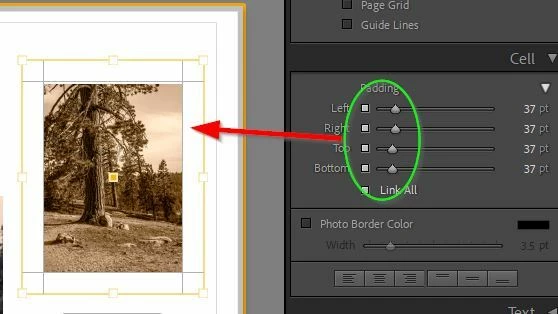
If a photo cell fills the page entirely you can only move the image within the cell by dragging on the centre ‘handle’. If you change the cell padding margins then you can reposition the photo in the cell, but you cannot move the entire cell (it still fills the page).
If the photo cell is smaller than the page then, with the cell selected, dragging the centre ‘handle’ should move the entire cell on the page- always if [Zoom to Fill] has been set. I found in some circumstances , When Zoom to Fill is not set, I had to first try moving the cell by holding down the [Shift] key and dragging the centre ‘handle’.
In case you need to export photos with borders or frames, Borders plugin from LightroomToolbox is a much powerful tool and much easier than dealing with the print module. It is currently only for win, but will be available for mac
Predefined borders (created by Photoshop or other apps eg. Nik Silver Efex) are easily possible but you have to Zoom out on the photo to the minimum and it will fit the borders entirely within the Photo cell.
When you have a photo cell selected- the cell (with photo) can be moved on the page by dragging the ’handle’ in the centre of the photo.
The cell can be resized or reshaped by dragging the corner or edge ‘handles’.
If you apply a colored background on the page then bordered photos will have a small surrounding area of white unless you edit the border in the other app to not have a white edge.
What border do you want bigger? Do you mean the Photo Cell size, or a fancy border that you might add to the photo in another app?
If a photo cell fills the page entirely you can only move the image within the cell by dragging on the centre ‘handle’. If you change the cell padding margins then you can reposition the photo in the cell, but you cannot move the entire cell (it still fills the page).
If the photo cell is smaller than the page then, with the cell selected, dragging the centre ‘handle’ should move the entire cell on the page- always if [Zoom to Fill] has been set. I found in some circumstances , When Zoom to Fill is not set, I had to first try moving the cell by holding down the [Shift] key and dragging the centre ‘handle’.
I only know of simple Stroke borders in the Book. Can you show an example of a “predesigned border”?
For Stroke Borders the ‘stroke’ follows the photo cell dimensions. If you increase a photo’s ‘Padding’ you only reduce the size of the photo within the cell, and the stroke remains unchanged.
Hi Rob, This is what I mean with the predefined borders. For the stroke border you are talking about, it would be helpful it always takes on the last desired width. Because now I have to change it every single time… And as you can see in this screenshot, the problem with the texts popping up is here as well.




 AdChoices