Known Participant
April 2, 2026
Answered

Book module: getting rid of 'photo text' popping up when you click on the frame

  • April 2, 2026
  • 3 replies
  • 63 views

I constantly have to tick 'photo comment ' away, it pops up at random or whenever you click on the photo frame. Does anyone else has this? 

    Correct answer Rob_Cullen

    While in the Book Module-

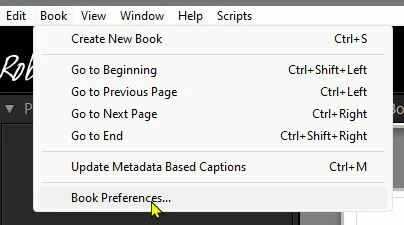
    Go to main menu > Book >Book Preferences...

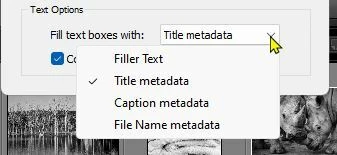
    Change the Text Option for “Fill text….” to something other than ‘Filler Text’. 


    3 replies

    Known Participant
    May 31, 2026

    Much much better! Thank you very much! But I still find that the smaller ‘textnotes’ pop up too easily. Just clicking on the photo to adjust the size, triggers them already, and then they have to be deleted again. Makes the workflow slower (for me). But this already helps a lot, thanks again! 

    Rob_Cullen
    Community Expert
    Community Expert
    May 31, 2026

    In the text panel you can toggle on/off both Page Text and Photo Text.

    You can drag a text panel on the page by holding the cursor on the square dot.


    Regards. My System: Windows-11, Lightroom-Classic 15.4.1, Photoshop 27.8, ACR 18.4, Lightroom 9.4, Lr-iOS 10.4.0, Bridge 16.0.3 .
    Rob_Cullen
    Community Expert
    Rob_CullenCommunity ExpertCorrect answer
    Community Expert
    May 31, 2026

    While in the Book Module-

    Go to main menu > Book >Book Preferences...

    Change the Text Option for “Fill text….” to something other than ‘Filler Text’. 


    Regards. My System: Windows-11, Lightroom-Classic 15.4.1, Photoshop 27.8, ACR 18.4, Lightroom 9.4, Lr-iOS 10.4.0, Bridge 16.0.3 .
    Rob_Cullen
    Community Expert
    Community Expert
    April 2, 2026

    Can you post a screen-clip of what you see?

    Do you mean the Photo cell?

    And which “comment”?  Photo Text, Page Text, or Photo Description?


    Regards. My System: Windows-11, Lightroom-Classic 15.4.1, Photoshop 27.8, ACR 18.4, Lightroom 9.4, Lr-iOS 10.4.0, Bridge 16.0.3 .
    Known Participant
    May 30, 2026

    Sorry for the late reply, it has been busy… Here you can see a screenshot of what I mean, several text layers pop up without I asked too, and they make it more difficult to see the pictures and make an appropriate layout.