



Todd Shaner
Legend
January 31, 2018
Answered

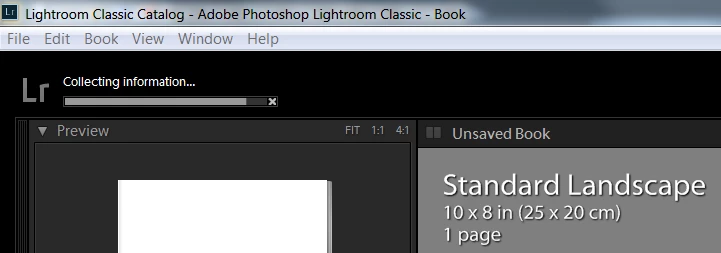
Book Module Showing 'Collecting Information'

I'm using LR Classic 7.1 on my Windows 7 system and when switching to the Book module a task 'Collecting Information' starts in the upper left corner. If I switch to any other module the task completes in a few seconds, but switching back to the Book module causes it to reappear and start the task again. I've tried numerous settings changes, complete system restart, etc., but this task pops up and hangs near completion every time I switch to the Book module. I did a search and found a few old posts with no solution found so it's not a common issue. I've never used the Book module to create an actual book other than for "test" purposes so it's not a big issue. I just don't like unexplained things that may later cause other issues.
    This topic is closed to new replies. Start a new post to keep the conversation going.
    Rob_Cullen
    Rob_CullenCorrect answer
    Community Expert
    February 1, 2018

    I have see the same 'Progress Bar" in the past but cannot remember why!

    Most likely answer is that Lightroom is searching through the full database  (catalog) of photos before it builds the book.

    I am without an answer, just Questions-

    Do you have "All Photographs" selected in the Catalog panel under the Navigator?

    Have you created a standard Collection of images to use in the book?

    How many photos do you see on the Filmstrip at the base of the Book screen?

    I note that the book is still in an "Unsaved" state, have you tried to [Create a Saved Book] and then always work from the "Book" Collection? (not the "Standard" collection)

    Regards. My System: Windows-11, Lightroom-Classic 15.6, Photoshop 27.8, ACR 18.7, Lightroom 9.4, Lr-iOS 10.4.0, Bridge 16.0.3 .

    2 replies

    Rob_Cullen
    Community Expert
    Rob_CullenCommunity ExpertCorrect answer
    Community Expert
    February 1, 2018

    I have see the same 'Progress Bar" in the past but cannot remember why!

    Most likely answer is that Lightroom is searching through the full database  (catalog) of photos before it builds the book.

    I am without an answer, just Questions-

    Do you have "All Photographs" selected in the Catalog panel under the Navigator?

    Have you created a standard Collection of images to use in the book?

    How many photos do you see on the Filmstrip at the base of the Book screen?

    I note that the book is still in an "Unsaved" state, have you tried to [Create a Saved Book] and then always work from the "Book" Collection? (not the "Standard" collection)

    Translate
    Regards. My System: Windows-11, Lightroom-Classic 15.6, Photoshop 27.8, ACR 18.7, Lightroom 9.4, Lr-iOS 10.4.0, Bridge 16.0.3 .
    Todd Shaner
    Legend
    February 1, 2018

    thank you for the suggestions.Last night I was able to stop the 'Collecting Information' task from launching by saving the currently open test book using 'Create Saved Book.' I restarted LR and all was back to normal until I deleted the book from the Collections panel. This morning I created another small test book with 3 pages, used 'Create Saved Book,' switched to the Library module, and then deleted the book in the Collections panel. This allowed me to remove the test book without causing the 'Collecting Information' task to launch again. Thanks for your help!

    If interested this is the issue I was working on when this problem started. It may or may not be related:

    How to "Export Book to PDF" with "bleed"

    Translate