Known Participant
April 2, 2026
Answered

Book module: when you save a custom layout, text layout or borders are not saved

  • April 2, 2026
  • 2 replies
  • 60 views

It is fantastic there is an option to create your own templates, but not everything is saved unfortunately.

 

    Correct answer Rob_Cullen

    Using the provided Page Templates for an image with borders is problematic.

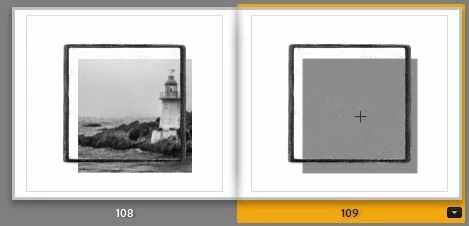
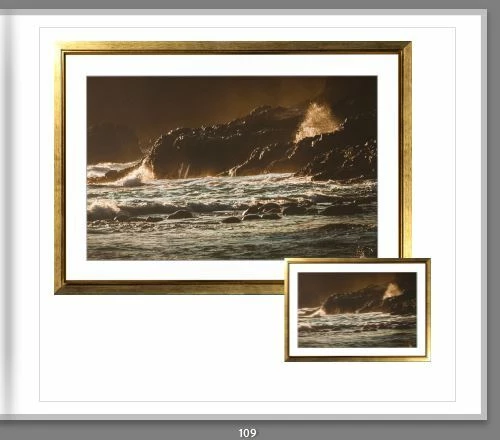
    The templates are fixed and only the photo cell can be moved leaving the border in place. And if you make your own Custom template then the saved custom template will reproduce the page as you saved it. eg-

    For Borders around your images you are always better to edit a photo in another app applying any border style you want, save the new image to the catalog and use the new image in the book- complete with its new border (in a normal page template layout).


    2 replies

    Rob_Cullen
    Community Expert
    Rob_CullenCommunity ExpertCorrect answer
    Community Expert
    May 31, 2026

    Using the provided Page Templates for an image with borders is problematic.

    The templates are fixed and only the photo cell can be moved leaving the border in place. And if you make your own Custom template then the saved custom template will reproduce the page as you saved it. eg-

    For Borders around your images you are always better to edit a photo in another app applying any border style you want, save the new image to the catalog and use the new image in the book- complete with its new border (in a normal page template layout).


    Regards. My System: Windows-11, Lightroom-Classic 15.4.1, Photoshop 27.8, ACR 18.4, Lightroom 9.4, Lr-iOS 10.4.0, Bridge 16.0.3 .
    Known Participant
    June 1, 2026

    Thank you Rob. Any advise on which app to use? So far, I couldn’t find the nice B&W borders Lightroom uses anywhere. It is a pity it cannot be adjusted in Lightroom itself. 

    Rob_Cullen
    Community Expert
    Community Expert
    June 2, 2026

    Which App?  An obvious answer would be Photoshop if you have it.

    Lightroom-Classic, because it is a parametric editor it does not alter pixels, so drawing borders and frames is not relatively simple- there are a couple of ways in Lr-Classic, but a pixel based editor allows more creativity:

    In Lightroom-Classic:

    Use a simple stroke border in the Book module

    Also use a simple stroke border in the Print module and save the print as a JPG for import and use in the book.

    Use an extreme (dark?) brush or linear gradient in the Develop module to draw borders. eg. Adobe Exchange has Lightroom presets from ‘Precision Presets’ that create borders with this method- https://tinyurl.com/3sdsxwu4

    Use freeware apps:.

    A good example (for Windows users) would be Photoscape-X available in the Microsoft store https://tinyurl.com/3yvaz2cv  It has both Borders and Frames-

    You would need to [Save] your image from the external app and import it to LrC-  Or even better if it were possible-    I tried to add Photoscape to LrC External Editors in LrC Preferences- But it is installed in a protected WindowsApps system folder that LrC cannot access.


    Regards. My System: Windows-11, Lightroom-Classic 15.4.1, Photoshop 27.8, ACR 18.4, Lightroom 9.4, Lr-iOS 10.4.0, Bridge 16.0.3 .
    Rob_Cullen
    Community Expert
    Community Expert
    April 2, 2026

    Can you explain your reference to “borders”.

    When I save a Custom Pager Layout, the page is easily re-produced ) blank to add photos and text).

    Designed one Custom Page and Custom page reproduced multiple times.


    Regards. My System: Windows-11, Lightroom-Classic 15.4.1, Photoshop 27.8, ACR 18.4, Lightroom 9.4, Lr-iOS 10.4.0, Bridge 16.0.3 .
    Known Participant
    May 30, 2026

    Hi Rob,


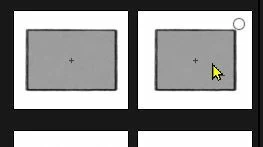
    Screenshot is a custom layout I made with a border. 

    Screenshot 2 is the custom layout selected, but the border is gone. 


    Rob_Cullen
    Community Expert
    Community Expert
    May 31, 2026

    No screenshot to view!

    Regards. My System: Windows-11, Lightroom-Classic 15.4.1, Photoshop 27.8, ACR 18.4, Lightroom 9.4, Lr-iOS 10.4.0, Bridge 16.0.3 .