


Participant
March 31, 2026
Question

Book Photo Text not populating with metadata

  • March 31, 2026
  • 1 reply
  • 14 views

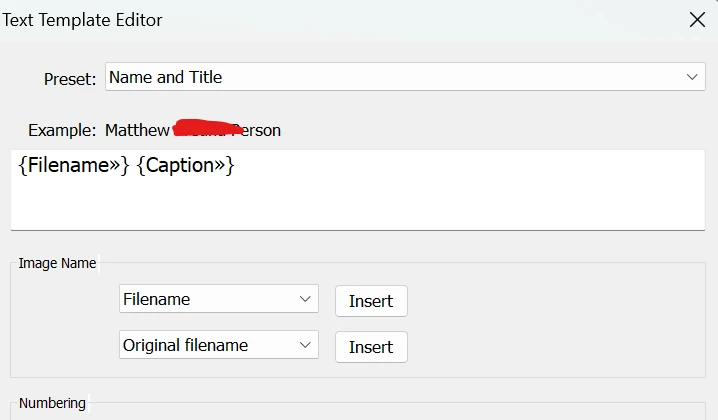
Cannot figure out why the photo text will not populate with the metadata. I feel like I have googled and tried everything. Photos have custom metadata (even default items like exposure, file name, capture time, are not populating). I have checked the settings under Book Preferences and have tried the 'update Metadata based captions". I have closed and updated and re-opened. Please help!
 

    1 reply

    CMass
    Community Manager
    Community Manager
    March 31, 2026

    Hey! Just a couple quick things that will really help narrow this down:

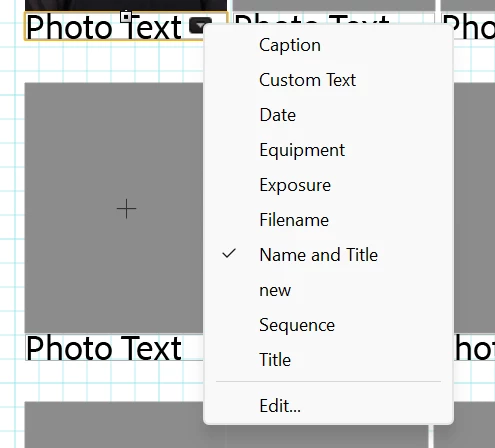
    > When you click on the text box in the Book module, is it set to “Photo Text” or “Custom Text” in the Text panel?

    > If you switch it to something simple like Filename, does anything show up at all?


    ^CM

    Participant
    March 31, 2026

    Thank you!!

    I am clicked into a text box with a photo and this is what I see in the Text Panel-

    Name And Title is a custom Text Template that I saved, that brings in the file Title and Caption from the metadata in the library screen. I have toggled through all of the options for that text and nothing else appears on the page other than “Photo Text”.