Participant
June 18, 2021
Answered

Book: Scalable, moveable, size-adjustable boxes

  • June 18, 2021
  • 3 replies
  • 543 views

What are these boxes for? I can't insert text in them. I can't insert images in them. I can't delete them. I can make them smaller, larger, square or rectangle ... but other that, I haven't a clue as to what their function is nor can I find info in the "detailed overview of LR Classic features" on the Adobe site.


??????????
This topic has been closed for replies.
Correct answer @MNiessenPhoto

It looks like the photo there is set as background.

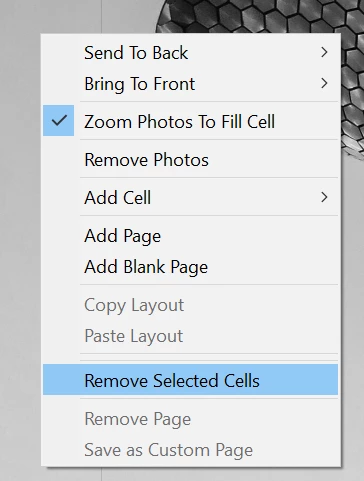
The boxes are called cells and can contain different pictures (drag them from the filmstrip into the cells). If you don't want them, just right-click and select "Remove selected cells" (it seems both are selected in the screenshot so both will be deleted, but you could of course remove only one).

Hope that helps,

Michael

_____________

Michael Niessen - Photographer, photo-editor, educator

3 replies

@MNiessenPhoto
Legend
June 19, 2021

?????????? right back at you...

What boxes?

Michael

_____________

Michael Niessen - Photographer, photo-editor, educator

Photo-editing (Ps/Lr/LrC) and photography workshops & one-on-one training (off- and online)
F. McLion
Community Expert
Community Expert
June 18, 2021

"Latest", means you are on 10.3, right, just want to make sure as this is not always clear

Please also post your OS and version, as well as the exact process to get these "boxes" in question.

--- Got your issue resolved? Please label the response as 'Correct Answer' to help your fellow community members find a solution to similar problems. ---
Community Expert
June 18, 2021

What boxes do you mean? Please post a screenshot to make it clearer.


My System: Intel i7-8700K - 64GB RAM - NVidia Geforce RTX 3060 - Windows 11 Pro 25H2 -- LR-Classic 15 - Photoshop 27 - Nik Collection 9 - PureRAW 6 - Topaz Photo AI
sgarey1Author
Participant
June 19, 2021

Here's a screen shot.  The "white boxes" cannot be deleted. They can only be size-adjusted. I can make them fill the entire spread or reduce them to a tiny box. There's nothing in the View or Window pull-downs that give me any indication of what to do with them.  Thanks for your help.


@MNiessenPhoto
@MNiessenPhotoCorrect answer
Legend
June 19, 2021

It looks like the photo there is set as background.

The boxes are called cells and can contain different pictures (drag them from the filmstrip into the cells). If you don't want them, just right-click and select "Remove selected cells" (it seems both are selected in the screenshot so both will be deleted, but you could of course remove only one).

Hope that helps,

Michael

_____________

Michael Niessen - Photographer, photo-editor, educator

Photo-editing (Ps/Lr/LrC) and photography workshops & one-on-one training (off- and online)