
Participant
September 4, 2018
Answered

Box Lightroom

  • September 4, 2018
  • 2 replies
  • 614 views

Hi, I just bought box lightroom and I have no idea how to start it!

I downloaded Ligtroom Classic CC from Adobe Creative Cloud my trial has ended and I have no idea how to change it to my box lightroom?

I tried this:

"Help" -> "sign out"

"Help" -> "sign in Now" and then there is information that my trial expired so i choose "Linces this software" and I have this information (on printscreen below), no place to put my licence number.

Also I manage to add my box lightroom licence number in the online system Cont Adobe in "Plans&Products" but it didn't work out.


What should I do?
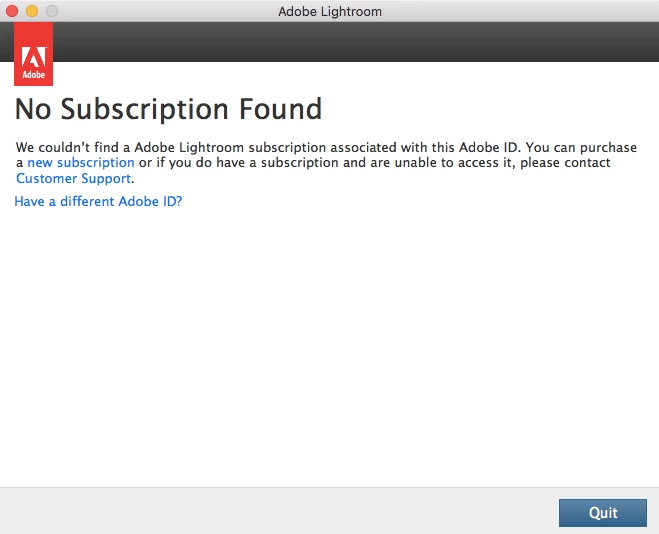
This topic has been closed for replies.
Correct answer Abambo

Do you have a disk coming with your box or only a serial number?

If you have a disk, you can install from that disk. You can follow these instructions: Download and install Lightroom 6 (Single App license) . You do not need however to buy the software and to download.

If you have only a serial number you should use this link (Download Photoshop Lightroom ) to download Lightroom. Download Lr6 and upgrade to 6.14, the latest and last version of Lr 6. You can upgrade immediately to 6.14.

2 replies

Abambo
Community Expert
Community Expert
September 4, 2018

What is „BOX LIGHTROOM“. There is and was no such product at Adobe.

If, however, you bought a boxxed version of Lightroom, you acquired an old one and your catalog will not work with that version.

Please state the version number of your acquisition. You should also install the version you have bought. If it is Lr 6, you have acquired the latest perpetual version and that one is still a little bit current.

You may have trouble to get it recognized as Lr 6 as the same version was also available with a subscription. Look here for a solution: How to convert a Lightroom CC trial version to licensed Lightroom 6 copy

Discussion successfully moved from Adobe Creative Cloud to Lightroom Classic CC — The desktop-focused app

ABAMBO | Hard- and Software Engineer | Photographer
Participant
September 4, 2018

The full name of my product is Adobe Lightroom 6 ESD EN (65237401)

Abambo
Community Expert
AbamboCommunity ExpertCorrect answer
Community Expert
September 4, 2018

Do you have a disk coming with your box or only a serial number?

If you have a disk, you can install from that disk. You can follow these instructions: Download and install Lightroom 6 (Single App license) . You do not need however to buy the software and to download.

If you have only a serial number you should use this link (Download Photoshop Lightroom ) to download Lightroom. Download Lr6 and upgrade to 6.14, the latest and last version of Lr 6. You can upgrade immediately to 6.14.

ABAMBO | Hard- and Software Engineer | Photographer
Akash Sharma
Legend
September 4, 2018