Participant
May 23, 2023
Answered

Brush adjustments

  • May 23, 2023
  • 2 replies
  • 284 views

My brushes are not working. I have restarted my computer, lightroom. I've unistalled lightroom and reinstalled. I have no idea what is going on. All my settings are the same. I have tried some tricks to just be able to edit properly. 


When i click the brush option, it covers the whole page automatically. When i try to 'subtract' it, it does not work at all. It's been 15 hours of this. I'm going nuts. 
This topic has been closed for replies.
Correct answer Rob_Cullen

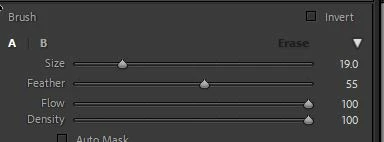
Check that you have Brush Flow and Density set high (eg. 100)

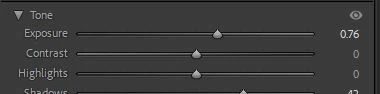
Check that you have some adjustments made to the Brush sliders

"it covers the whole page"

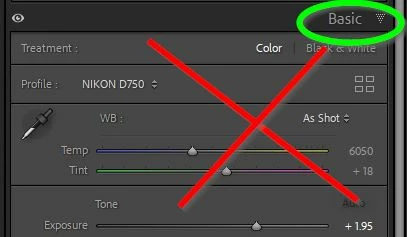
Check to be sure you are NOT is the Basic panel of adjustments

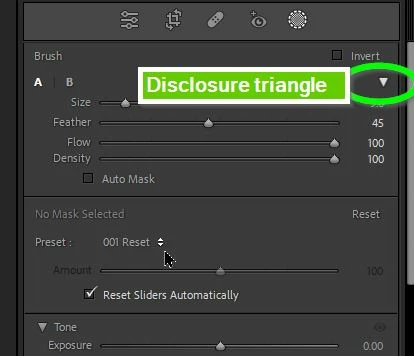
Check that you are seeing the full Brush Adjustments panel by toggling the Disclosure triangles


2 replies

Rob_Cullen
Community Expert
Rob_CullenCommunity ExpertCorrect answer
Community Expert
May 23, 2023

Check that you have Brush Flow and Density set high (eg. 100)

Check that you have some adjustments made to the Brush sliders

"it covers the whole page"

Check to be sure you are NOT is the Basic panel of adjustments

Check that you are seeing the full Brush Adjustments panel by toggling the Disclosure triangles


Regards. My System: Windows-11, Lightroom-Classic 15.1.1, Photoshop 27.3.1, ACR 18.1.1, Lightroom 9.0, Lr-iOS 10.4.0, Bridge 16.0.2 .
Participant
May 23, 2023

OMG IT WAS THE FLOW.


I can not believe i overlooked such a small detail. UGH! Thank you so much 


AxelMatt
Community Expert
Community Expert
May 23, 2023

In a first step you should reset the LR preferences to the defualt settings.

Reset Procedure:

  • Close Lightroom.
  • Windows: Hold down [Alt]+[Shift] while restarting Lightroom.
    Mac: Hold down [Opt]+[Shift] while restarting Lightroom.
  • Overwrite the Preferences when prompted by the dialog.
  • Close Lightroom.
  • Restart Lightroom.


It's recommended to backup your preferences before you reset the preferences to the default settings: 

https://helpx.adobe.com/lightroom-classic/kb/preference-file-and-other-file-locations.html


If this doesn't help try is to switch off the GPU support from the Lightroom preferences and check if that helps to fix the issue.

Go to Lightroom > Preferences > Performance tab > Uncheck "Use Graphics Processor" > Restart Lightroom.

https://helpx.adobe.com/lightroom-classic/kb/troubleshoot-gpu.html


If this also doesn't help we need more informations about your environment.

Please provide also a copy of your 'System Info'. This can be get from the LrC Help > System Info menu item.

There's a copy button in the System Info dialog. Press this button and paste the info into your next forum post.


My System: Intel i7-8700K - 64GB RAM - NVidia Geforce RTX 3060 - Windows 11 Pro 25H2 -- LR-Classic 15 - Photoshop 27 - Nik Collection 8 - PureRAW 6 - Topaz Photo AI