yvondaigle
Inspiring
April 4, 2017
Answered

Brush toll is very slow in Lightroom CC2015

  • April 4, 2017
  • 3 replies
  • 677 views

Hello,

I installed Photoshop CC2017 and Lightroom CC2015 about a week ago.

The touch-up brush tool in Lightroom is very slow and long to react when I make a stroke which makes my work long and difficult. Whether I use my mouse or my Wacom tablet, it's the same. In Photoshop, it does not seem to be a problem.

I have Windows 10, with 12G of memory.

Thank you for helping me.
    This topic has been closed for replies.
    Correct answer JoeKostoss

    Are you using the latest version of Lightroom, LRCC2015.9?  If not, update to this version.

    There are 3 things you can try to increase brush response:

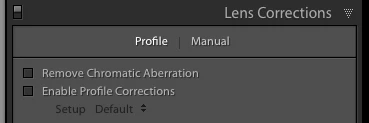
    1. If you are using Lens Correction, turn it off until all other processing is complete.

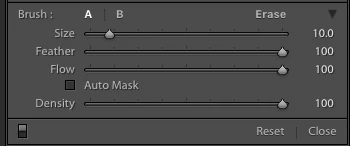
    2. Unselect Auto Mask unless you absolutely need it for a specific area.

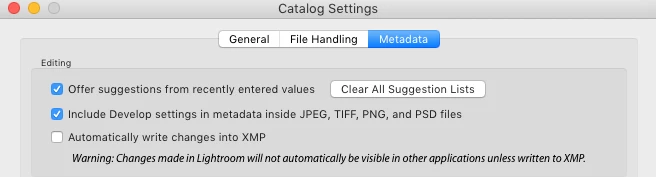
    3. In Catalog Settings, turn off the option to automatically write changes into XMP.  This was more of a problem in earlier versions of Lightroom and appears to have been corrected in later versions.

    3 replies

    yvondaigle
    Inspiring
    April 5, 2017

    Hi,

    Would dividing my catalog into multiple catalogs will solve my problem?

    Thank you

    dj_paige
    Legend
    April 5, 2017

    yvondaigle  wrote

    Hi,

    Would dividing my catalog into multiple catalogs will solve my problem?

    Thank you

    No. Not only would it not help, it has significant other disadvantages. It is a terrible idea, that helps nothing.

    If you're doing brushing, you should turn off the GPU acceleration (Preferences/Performance tab/uncheck "Use Graphics Processor")

    yvondaigle
    Inspiring
    April 5, 2017

    Hi dj,

    Thanks for your advice about the multiple catalogs. I will try your suggestion when I doing brushing.

    Thank you

    JoeKostoss
    Community Expert
    JoeKostossCommunity ExpertCorrect answer
    Community Expert
    April 4, 2017

    Are you using the latest version of Lightroom, LRCC2015.9?  If not, update to this version.

    There are 3 things you can try to increase brush response:

    1. If you are using Lens Correction, turn it off until all other processing is complete.

    2. Unselect Auto Mask unless you absolutely need it for a specific area.

    3. In Catalog Settings, turn off the option to automatically write changes into XMP.  This was more of a problem in earlier versions of Lightroom and appears to have been corrected in later versions.

    yvondaigle
    Inspiring
    April 4, 2017

    Thank you Joe,

    I have the latest version and I try all your 3 things and it is the same.

    It is to slow to work like that and I start to dont like my Lightroom CC2015

    Thank you

    dj_paige
    Legend
    April 4, 2017
    yvondaigle
    Inspiring
    April 4, 2017

    Thanks for the informations, but is there a solution?

    Yes I often make corrections with the brush on my photos and I do not have a 4K monitor.

    I subscribed to Photoshop / Lightroom CC to do some work on photos. But is there something to do with Lightroom or nothing to do?

    Thank you again