
Participant
December 28, 2018
Question

Built in lens profile corrections not working

  • December 28, 2018
  • 3 replies
  • 514 views

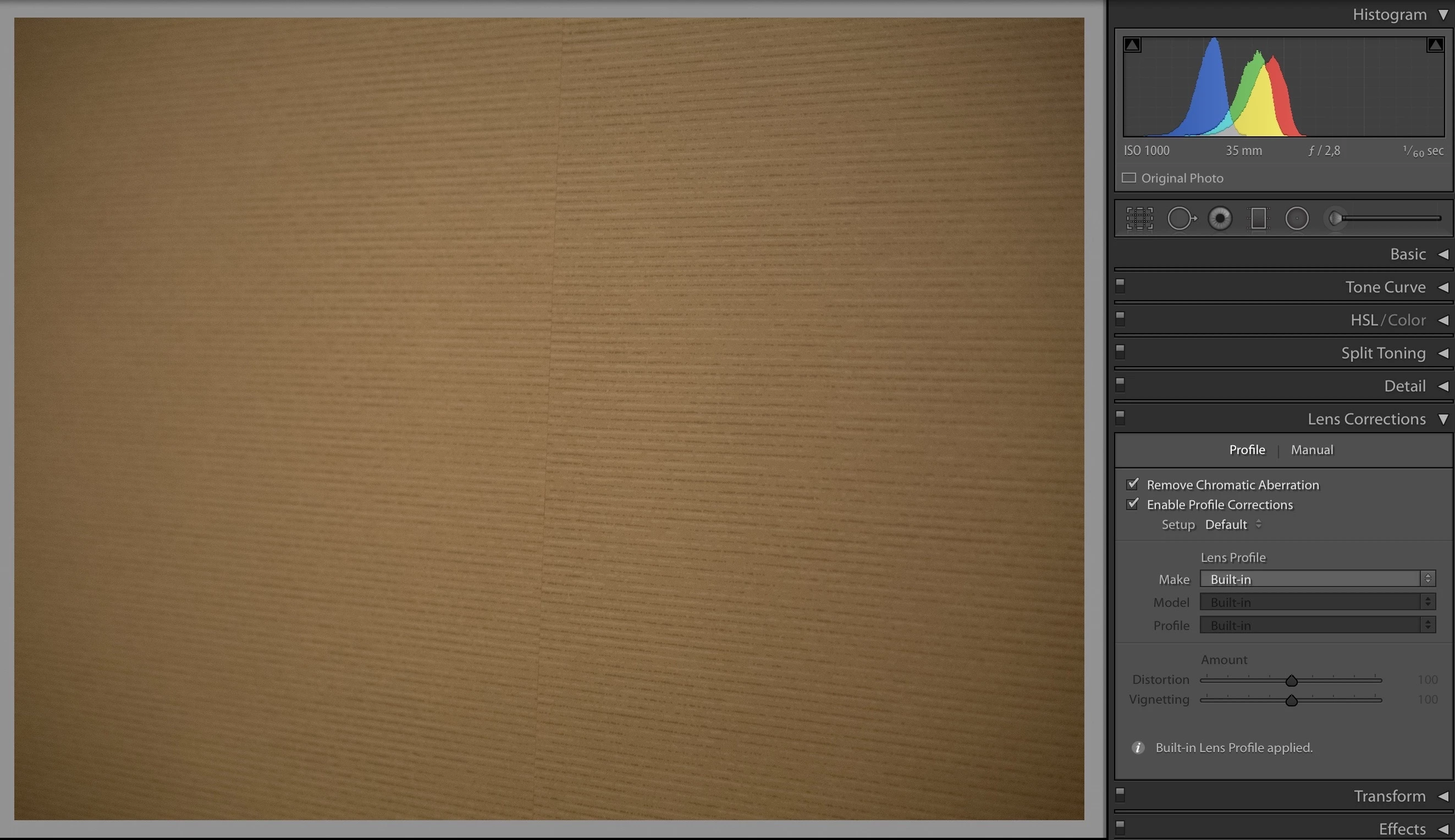
So I import RAW files from my Panasonic GX9 (tried converting to DNG, same result), and want to get rid of vignetting and distortion. Now this magic "enable profile corrections" box should remove all my problems right? Well it doesn't do anything. It says in the bottom of the lens corrections box that "built in lens profile applied", so lightroom definitely knows what lens and camera I'm using. How do I fix this? Please help me! This is bugging the heck out of me
This topic has been closed for replies.

3 replies

Just Shoot Me
Legend
December 29, 2018

Look at the bottom of that section. It state Built in profile Applied. Checking the Enable Profile Correction box does nothing as the Built In Profile is already being applied.

If you want more then you will need to do it manually.

GoldingD
Legend
December 28, 2018

You see the letter i in that note from lightroom? Click on it for more info.

Basically for many cameras, especially in the mirror-less variety the camera manufacturer is applying in camera corrections. And that is passed on to lightroom (either lightroom simply knows this for a particular camera, or some metadata is written in the RAW to tell Lightroom to nether mind about allowing auto corrections past Chromatic, probably the former)

For additional corrections, you will need to do them manually.

I do not know if for your particular camera, if this feature will behave differently if you set in camera auto corrections off (but I suspect not)

I also do not know, that if you had legacy glass attached, if this will not be the case.

Ian Lyons
Community Expert
Community Expert
December 28, 2018

The correct profile is automatically applied via an opcode. This is mandated by the camera vendor and can't be overridden.

Participant
December 28, 2018

Yes this is what the info text implies, but as you can see in the image, the vignetting is still there. I see people get rid of all distortion and vignetting by ticking that box but it doesn’t fix anything for me. At least not for my mft lenses

Legend
December 28, 2018

If you click on 'i' in the bottom left corner of the Lens collection panel you may see that it says that only "Distortion and Chromatic Aberration" are corrected with the built-in profile.

Click on the manual tab then add vignette corrections as needed.

You need to check for each camera/lens what this built-in correction provides for you. On other cameras/lenses I see the built-in corrections are for 'Distortion and Vignetting' but not Chromatic aberrations.