
daWalrus
Inspiring
December 20, 2017
Answered

Camera Information not Showing in Lens Correction

  • December 20, 2017
  • 5 replies
  • 3956 views

I am trying to figure out why the Camera and lens information has stopped showing for my most recent pictures in the "Lens Correction" module? I can still see the information when I use the information function in the Library, metadata and Develop modules, just not in Lens Correction for my most recent photos.

Thanks,

Jim
This topic has been closed for replies.
Correct answer johnrellis

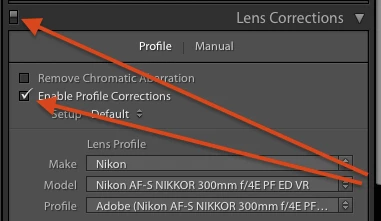
It wasn't clear from your last post -- make sure that the Lens Corrections panel is enabled and Enable Profile Corrections is checked:

If that doesn't help, upload a sample photo to Dropbox or similar and post the sharing link here.  That will let us quickly determine whether the issue is with the photo or your LR configuration.

5 replies

Participant
January 31, 2023

Good morning from New Mexico...


I am using LrC and have a Canon R5 using the EF 100/500


I also can not get the lens corrections to see my camera and lens.  I spent about two hours on the phone with Adobe LrC tech support and they could not figure out why  either...


Very frustrating, for I am a wildlife photographer...

I have tried so many things, Adobe, blogs like this one but just know luck..

Any ideas...


Thank you... OBG


Rikk Flohr_Photography
Community Manager
January 31, 2023

You’ve posted to a very old thread. It is highly unlikely that the issue described in this thread, though not impossible, is the same issue which you are currently experiencing. Rather than resurrect an old thread that is seemingly similar, you are better posting to a new thread with fresh, complete information including system information, a complete description of the problem and step-by-step instructions for reproduction. 


In the unlikely event the issue is the same, we will merge you back into the appropriate location. 


Thank you!


Rikk Flohr: Adobe Photography Org
Participant
December 21, 2017

If I try to auto enable the lens corrections for my Nikon D800 and Nikon 50mm 1.4 lens, it doesn't work. And when I try to set it manually, it gives me the wrong lens I think. It gives me 1.4 D instead of a 1.4 G. They are Tiff files. I just don't know what to do, because I need the correct lens profile for these images.


I no longer have the raw files either, because they are older files that I uploaded and converted to tiff since my then current lightroom/camera raw did not support the files.

Community Expert
December 22, 2017

"If I try to auto enable the lens corrections for my Nikon D800 and Nikon 50mm 1.4 lens, it doesn't work. And when I try to set it manually, it gives me the wrong lens I think. It gives me 1.4 D instead of a 1.4 G. They are Tiff files. I just don't know what to do, because I need the correct lens profile for these images."

Profiles are made for either correcting Raw or non-Raw. So you may not have any non-Raw profile present, for the 50mm / 1.4. In that case you won't be able to select that lens manually, nor set up any user lens profile default, when it's a TIFF image in question.

It is possible to "kludge" and re-save a copy of the Raw correcting profile that is present, suitably changed using a text editor. This needs to be saved into the user lens profiles folder. For proper results these will need to have been an un-cropped TIFFs that you have converted, since lens correction works on the basis of having the full original image area to work with.

Once the right profile is present, and manually selected, THEN this can be set as a default profile as has been explained by others. In order to get this new default recognised on other images of the same sort, it is sufficient to change their Profile option from "Auto", as shown in your screenshot, to "Default".

["Auto" simply means, use any built-in lens profile but if none is found, give up. "Default" means, use any default assignment the user may have set up, failing that use any built-in lens profile assignment, failing that give up.]

Hence "Default" is perfectly safe to apply to any / all images (replacing "Auto"). Those already getting the right results with Auto, won't see any change.

This is all much less laborious, and less error-prone, than applying the Manual selection of each specific lens profile, onto just the photos taken with that lens. You can make a Develop preset which simply activates profiled correction with the selection of "Default", and then this same preset can be applied to pictures of any sort (Raw or non-Raw) and taken with any lens. The right needful thing will then happen to each one. If you only subsequently set up a new user lens profile default, the affected images are already "primed" to respond to that immediately and automatically.


"I no longer have the raw files either, because they are older files that I uploaded and converted to tiff since my then current lightroom/camera raw did not support the files."

Keeping the Raws regardless, is always a good habit and instinct IMO.

daWalrus
daWalrusAuthor
Inspiring
December 20, 2017

It appears that for some reason, the "Remove Chromatic Aberration" and "Enable Profile Corrections" boxes are no longer checked for imported files. Checking them then provides the camera and lens details.

This poses another question, where can I select these boxes checked as the default for imported Raw files???

Thanks!!

Jim

johnrellis
Legend
December 20, 2017

The camera defaults for that camera may have gotten changed.  Select a photo, go to Develop, and do the menu command Develop > Set Default Settings > Restore Adobe Default Settings.

johnrellis
Legend
December 20, 2017

The camera defaults for that camera may have gotten changed.  Select a photo, go to Develop, and do the menu command Develop > Set Default Settings > Restore Adobe Default Settings.

Then try importing a fresh photo from the camera.

johnrellis
Legend
December 20, 2017

Are the problem photos raw, JPEG, or TIFF?  Lens Corrections are generally only available for raws, not JPEGs or TIFFs.

If you have a raw selected, do you have Lens Corrections > Enable Profile Corrections checked?

daWalrus
daWalrusAuthor
Inspiring
December 20, 2017

They are Raw photos. Lens Corrections are selected, the information for the camera/lens is blank. It appears for older photos taken with the same camera/lens.

Jim Durrant

Home (815) 776-9373

Mobile (847) 922-6253

jim.durrant@mchsi.com

johnrellis
johnrellisCorrect answer
Legend
December 20, 2017

It wasn't clear from your last post -- make sure that the Lens Corrections panel is enabled and Enable Profile Corrections is checked:

If that doesn't help, upload a sample photo to Dropbox or similar and post the sharing link here.  That will let us quickly determine whether the issue is with the photo or your LR configuration.

Sahil.Chawla
Adobe Employee
Adobe Employee
December 20, 2017

Hi Jim,

Could you please try resetting the preferences of Lightroom?

Also, please let us know what camera are you using & which operating system are you working on?

Regards,

Sahil

daWalrus
daWalrusAuthor
Inspiring
December 20, 2017

Where do I reset the preferences???

The camera is a Canon 80D and I am running on Mac OS 10.13.2. It used to work, I can see it for older pictures.

Jim Durrant

Home (815) 776-9373

Mobile (847) 922-6253

jim.durrant@mchsi.com