
Participant
February 12, 2023
Answered

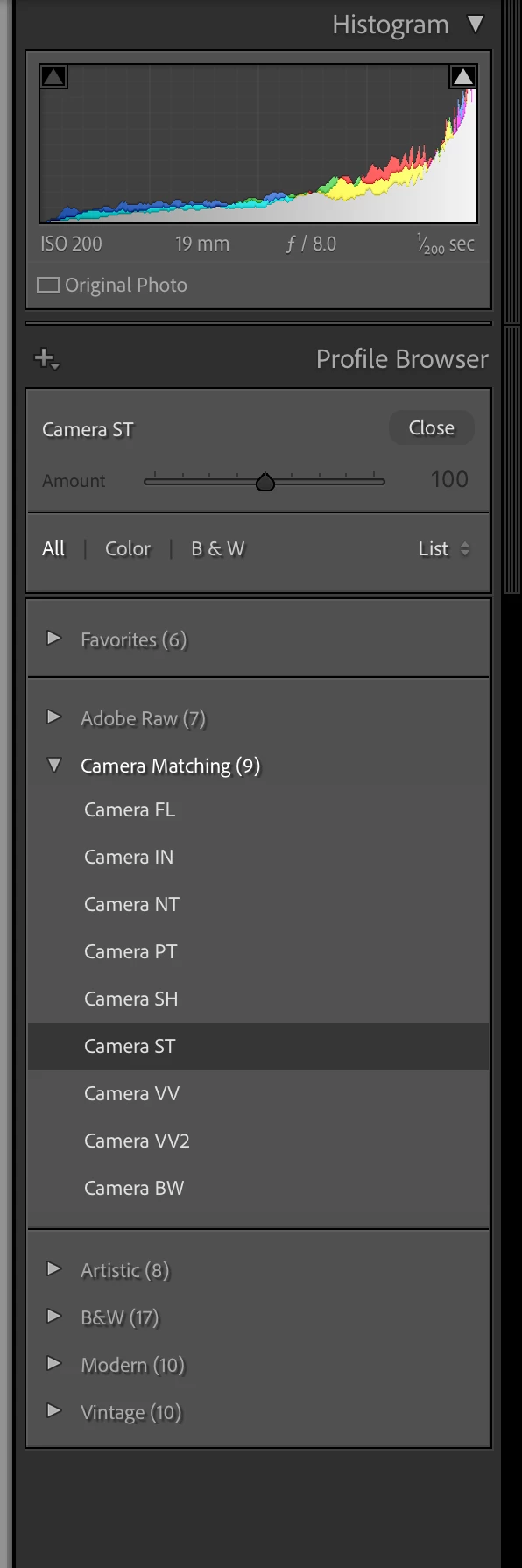
Camera Matching Abbreviations "Camera FL, Camera IN, Camera NT...etc"?

  • February 12, 2023
  • 3 replies
  • 9376 views

Hi all, 

Im using todays recent updated Lightroom Classic and noticed in the "Camera Matching" profiles of the profile browser have the profiles are named as "Camera FL, IN, NT, PT, SH, ST, VV, VV2 and BW". I could take a good guess at what a few these abbreviations stand such as BW for black and white. I was wishing they would not be abbreviated and if anyone could tell me what each stands for? It seems they didn't use to be abbreviated.


Thank you!
 

Correct answer Ian Lyons

If using a Sony, then below are what Sony list in the manual for A7 RIV or V. Therefore, in this case it was Sony who chose to abbreviate, not Adobe.


Menu item details


ST:
Standard finish for a wide range of subjects and scenes.


PT: (Portrait)
For capturing skin in a soft tone, ideally suited for shooting portraits.


NT:
The saturation and sharpness are lowered for shooting images in subdued tones. This is also suitable for capturing image material to be modified with a computer.


VV:
The saturation and contrast are heightened for shooting striking images of colorful scenes and subjects such as flowers, spring greenery, blue sky, or ocean views.


VV2:
Creates an image with bright and vivid colors with rich clarity.


FL:
Creates an image with moody finish by applying sharp contrast to the calm coloring as well as the impressive sky and colors of the greens.


IN:
Creates an image with matte textures by suppressing the contrast and saturation.


SH:
Creates an image with bright, transparent, soft, and vivid mood.


BW:
For shooting images in black and white monotone.


3 replies

Ian Lyons
Community Expert
Ian LyonsCommunity ExpertCorrect answer
Community Expert
February 12, 2023

If using a Sony, then below are what Sony list in the manual for A7 RIV or V. Therefore, in this case it was Sony who chose to abbreviate, not Adobe.


Menu item details


ST:
Standard finish for a wide range of subjects and scenes.


PT: (Portrait)
For capturing skin in a soft tone, ideally suited for shooting portraits.


NT:
The saturation and sharpness are lowered for shooting images in subdued tones. This is also suitable for capturing image material to be modified with a computer.


VV:
The saturation and contrast are heightened for shooting striking images of colorful scenes and subjects such as flowers, spring greenery, blue sky, or ocean views.


VV2:
Creates an image with bright and vivid colors with rich clarity.


FL:
Creates an image with moody finish by applying sharp contrast to the calm coloring as well as the impressive sky and colors of the greens.


IN:
Creates an image with matte textures by suppressing the contrast and saturation.


SH:
Creates an image with bright, transparent, soft, and vivid mood.


BW:
For shooting images in black and white monotone.


Dave91Author
Participant
February 12, 2023

Oh ok! That totally makes sense now. The Camera Matching profile is literally customized to my camera profiles. I was confused at first watching a recent Lightroom tutorial of someone's Camera Matching profiles looking different. Thanks for your help!

Ian Lyons
Community Expert
Community Expert
February 12, 2023

If you tell us which camera make/model you're using, then we might be able to help you with what the abbreviations mean.

Sean McCormack
Community Expert
Community Expert
February 12, 2023

As they're to match the modes on your camera, they should be listed on your camera. As to why they're abbreviated, the full sentence may be longer than the allowed text code. 

Sean McCormack. Author of 'Essential Development 3'. Magazine Writer. Former Official Fuji X-Photographer.