
Participant
October 12, 2023
Question

Can anyone help my solve why my Lightroom is taking up so much space?

  • October 12, 2023
  • 3 replies
  • 404 views

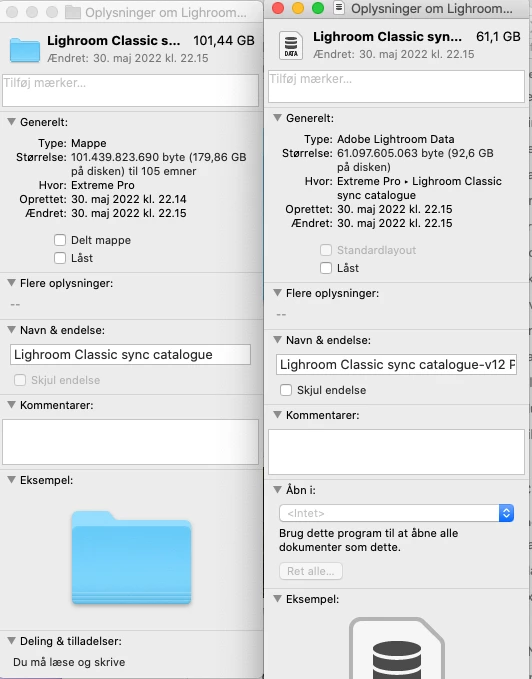
My lightroom is filling up my External harddisk, even though I never ask it to backup. I always say no, because I don't want it taking up all the space, but it is so large anyway. Does anyone have a suggestion for that? 
This topic has been closed for replies.

3 replies

dj_paige
Legend
October 12, 2023

Please tell us what is in the folder.

JohanElzenga
Community Expert
Community Expert
October 12, 2023

That is not the catalog that is shown in your screenshot, but the previews package. That package is always big, because it contains previews for all your photos. This has nothing to do with backups (which you should make!!!!!).


The first screenshot shows the entire catalog folder, which is not excessively large. The second screenshot does not show the entire file name plus extension, but if you look at the type, then you'll see it says 'Adobe Lightroom Data'. That suggests it's the Previews package. The catalog file would show as 'Adobe Lightroom Classic.app document'. A previews package of 96 GB is not excessive either (mine is 176 GB for 200,000 photos). Optimizing the catalog won't change anything to this pacakge.


-- Johan W. Elzenga
JohanElzenga
Community Expert
Community Expert
October 12, 2023

BTW, you can delete the 'Lightroom Catalogname Previews.lrdata'. Lightroom will rebuild it, but it will take a lot of time before it has grown so big again. Make sure you delete the correct one, not 'Lightroom Catalogname.lrcat'!


-- Johan W. Elzenga
C.Cella
Inspiring
October 12, 2023

I can't be sure but history is probably responsible for your .lrcat file being that big.


Optimize the catalog.

Then after the restart make a backup and then erase history for the files you have finished editing.