


Participant
January 18, 2021
Answered

Can i delete the Previews.lrdata if the hard drives is not big enough?

  • January 18, 2021
  • 4 replies
  • 2124 views

Hi, i am running the Lightroom Classic ver.9.2, my whole hard driver is 3TB, but the Catalog Previews.lrdata is about 2TB, it is too big!

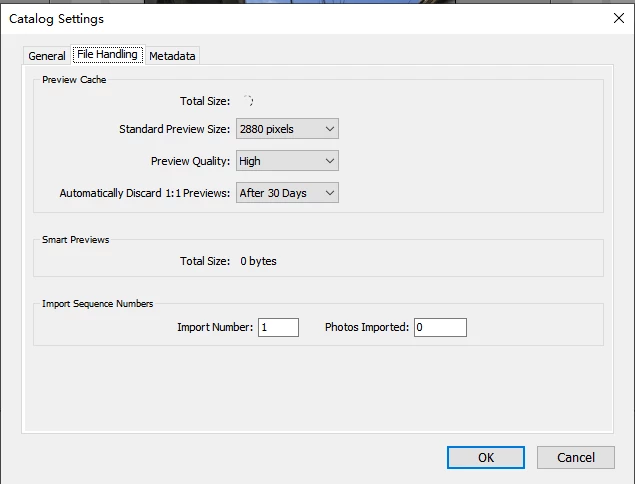
i am setting the "delete 1:1 Previews after 30 days", but the previews is not deleted automatically,why?

so can i delete the Catalog Previews.lrdata just in the windows File manager?

Thanks for any wisdom shared.

Correct answer F. McLion

In addition to Gary's detailled answer and proposal ...

Yes, you can delete the Previews folder. They will be recreated as needed. Of course, loading images then will be a bit slower since that is one of the main purpose of the previews.

4 replies

JohanElzenga
Community Expert
Community Expert
January 18, 2021

"i am setting the "delete 1:1 Previews after 30 days", but the previews is not deleted automatically,why?"


Just so you understand this part: Lightrom uses a pyramid of previews, so it can quickly show you the grid, or a full screen version of the image (standard-sized preview). A 1:1 preview is used for when you zoom in to 100%. Deleting the 1:1 previews will not delete the previews.lrdata folder, because the rest of the preview pyramid remains. In other words: your conclusion that Lightroom does not delete the 1:1 previews after 30 days is probably the wrong conclusion.


I would advice against Ian's suggestion to manually force Lightroom to build the standard-sized previews again. There is no need and it might be counter-productive. It does not only take a lot of time, but it will also create a large previews.lrdata folder again. Lightroom will create a preview if and when you need it, so let Lightroom decide. You'll notice that the previews.lrdata folder will remain much smaller for much longer time, because Lightroom will not create any previews for each old image that you don't look at.


-- Johan W. Elzenga
Participant
December 4, 2024

John. I want to have ready access to my catalog on my Laptop. I created smart previews for all my photos and I copy the catalog onto my laptop without the accompanying photo files, i.e. I view the previews.

If I want to reduce my overall catalog size but keep the smart previews is there an efficient way to do this?

JohanElzenga
Community Expert
Community Expert
December 4, 2024

Smart previews have nothing to do with ordinary previews, so anything you can do to reduce the size of the ordinary previews cache is still possible when you use smart previews. Please note this is a years old thread. Today Lightroom Classic has new options to reduce that size.


-- Johan W. Elzenga
Ian Lyons
Community Expert
Community Expert
January 18, 2021

Yes, you can delete the lrdata previews folder. However, I see that you've set the preview quality to High. This option takes up a lot of additional space (approximately double) compared to the Medium option, but provides only limited improvement. So, you would be best to set it back to the default Medium option, then close application before deleting the lrdata previews folder. When you relaunch the application after deleting lrdata previews you can easily rebuild the previews using the 'Library > Previews > Build Standard-sized Previews' menu option. 


BTW, is there a reason for you setting the Standard-sized preview to 2880 pixels instead of the default Auto option? Unless you're using a 4K or 5K monitor the Auto option tends to apply a resolution that matches the native resolution of your monitor.  With 4K and 5K monitors you should select an option from the list closest to half the resolution Auto indicates. For example, if Auto indicates 5120 pixeks, then manually select 2880 pixels

F. McLion
Community Expert
F. McLionCommunity ExpertCorrect answer
Community Expert
January 18, 2021

In addition to Gary's detailled answer and proposal ...

Yes, you can delete the Previews folder. They will be recreated as needed. Of course, loading images then will be a bit slower since that is one of the main purpose of the previews.

--- Got your issue resolved? Please label the response as 'Correct Answer' to help your fellow community members find a solution to similar problems. ---
gary_sc
Community Expert
Community Expert
January 18, 2021

I'm not a big fan of what you're proposing but there are alternatives.


In fact there are several things you can do which would be much more productive.


1) get all of your images on an external hard drive. Currently I have ALL of my images, the catalog, etc. etc. on a 4 TB external drive. (I also have a 2ndary 4 TB drive (with slower in/out, cheaper) that backs up the first drive.) This will not only remove unnecessary things from your comptuer's hardrive but will speed up LRC, PS, and any other applications that depend upon scratch space.


If you do this than you will not need #2, but here it is anyway


2) Delete this History from your alterations from the Develop module (select all, go to Develop (menu) and Delete History.)


F. McLion
Community Expert
Community Expert
January 18, 2021

Gary,

Deleting the History has impact on the catalog size and no impact on the previews.

--- Got your issue resolved? Please label the response as 'Correct Answer' to help your fellow community members find a solution to similar problems. ---
Inspiring
January 18, 2021

Deleting Develop History impact on the catalog size depends on the amounts of edits made. It may have HUGE impact (e.g. tenfold). But you need to optimize the catalog for this to happen (typically done during backup of the catalog).

I would recommend against storing the catalog on external drive: in case of unexpected disconnect, you may end up with corrupted catalog. Also, external drive are typically HDDs, internal (nowadays) - SSDs which are much faster for random read/write operations.