


windowlicker
Participant
May 3, 2026
Answered

can I option-click to do multiple object maskings?

  • May 3, 2026
  • 3 replies
  • 68 views

The ‘select objects’ is a great tool, but when I do multiple maskings, with every new object mask, I have to click the ‘+’ key and click ‘select object’ . Is there a way to option-click a certain button, so I don’t have to go to the toolbar and click those 2 keys for every new object mask?  It would save me a lot of time..
    Correct answer jrsforums

    Other shortcuts

    https://www.lightroomqueen.com/keyboard-shortcuts/

    3 replies

    jrsforumsCorrect answer
    Inspiring
    May 3, 2026
    Legend
    May 3, 2026

    @windowlicker 

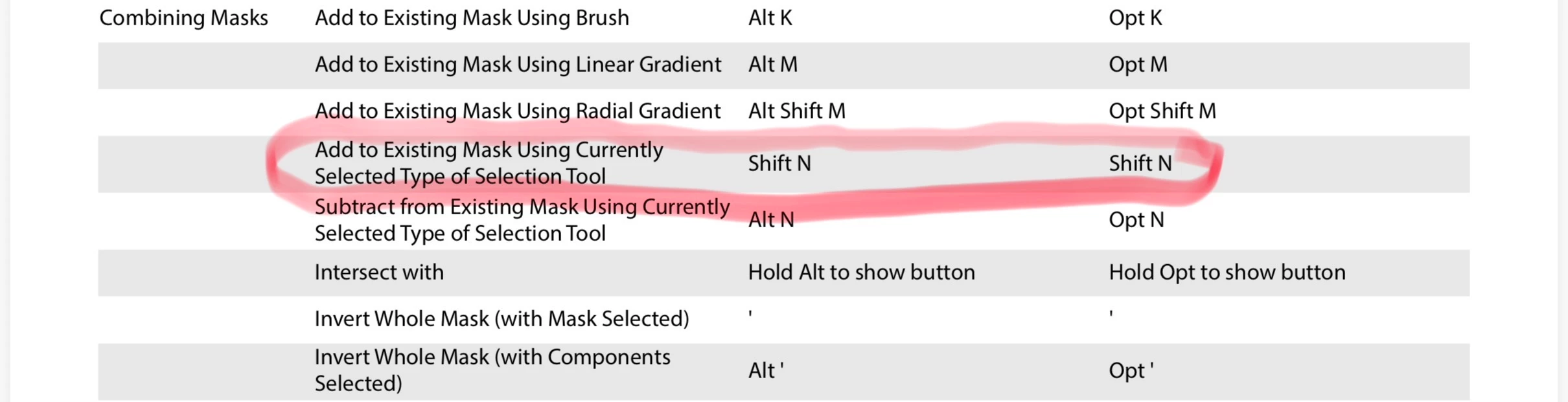
    Create your first Object in a Mask. While that Object mask is selected, press Shift+N to Add another mask of the same type currently selected. Press Alt+N to Subtract another mask of the same type currently selected.

    windowlicker
    Participant
    May 3, 2026

    This is exactly what I needed! Thank you so much for making my life a little bit easier 😀

    dj_paige
    Legend
    May 3, 2026

    Please clarify a few things

    • What software are you talking about? What version NUMBER? (We need version NUMBER and not words like “current” or “up-to-date”.
    • What do you mean by multiple maskings? Same mask on different photos? Multiple masks on one photos? Something else?
    windowlicker
    Participant
    May 3, 2026

    Thanks for answering. I should’ve mentioned the software. It’s Lightroom Classic 15.3.
    In Lightroom you can select a mask for an object you want to, let’s say, darken. You click the + key and click  ‘select objects’ and you draw a square over the object and AI does the exact outline. 
    But when I photoshop an interior ,I have multiple windows that need masking to darken the outside light.

    In this shot there are 5 masks , but in other shots I need 10 masks or more. 
    For object masking I have to click the ‘+’ key and the ‘select objects’ key and then draw a quare over the window, then the next window I have to click  ‘+’ key and the ‘select objects’ key and then draw a quare over the second window, then the next window again, etc..
    It would be much easier if I could just option-click and just draw the mask over the first window, then the second window etc, without having to go back to the toolbar every time.