If you mean iCloud Drive*, yes, it’s possible because iCloud Drive syncs to a local folder on the Mac, and Lightroom Classic can catalog local folders. Simply import the photos from the folders synced to iCloud Drive, the same way you would import them from anywhere else. However, you might have trouble finding iCloud Drive files in the Import dialog box because of the hidden location where Apple actually stores iCloud Drive files on a Mac (see below). It will probably be easier to use drag-and-drop import: Drag the folders or files you want to import from iCloud Drive on the desktop, and then drop them on the Lightroom Classic application icon so that the Import dialog box opens.
Below are more details, and more complications you should be aware of…
Although you see iCloud Drive in the macOS Finder or iOS Files app, that is not its true location, it’s only a shortcut. The cloud-synced files are really inside the (hidden by default) Library folder of your macOS user account, in the Mobile Documents subfolder (in the Finder it appears as “iCloud Drive” but in Terminal it’s “Mobile Documents”).
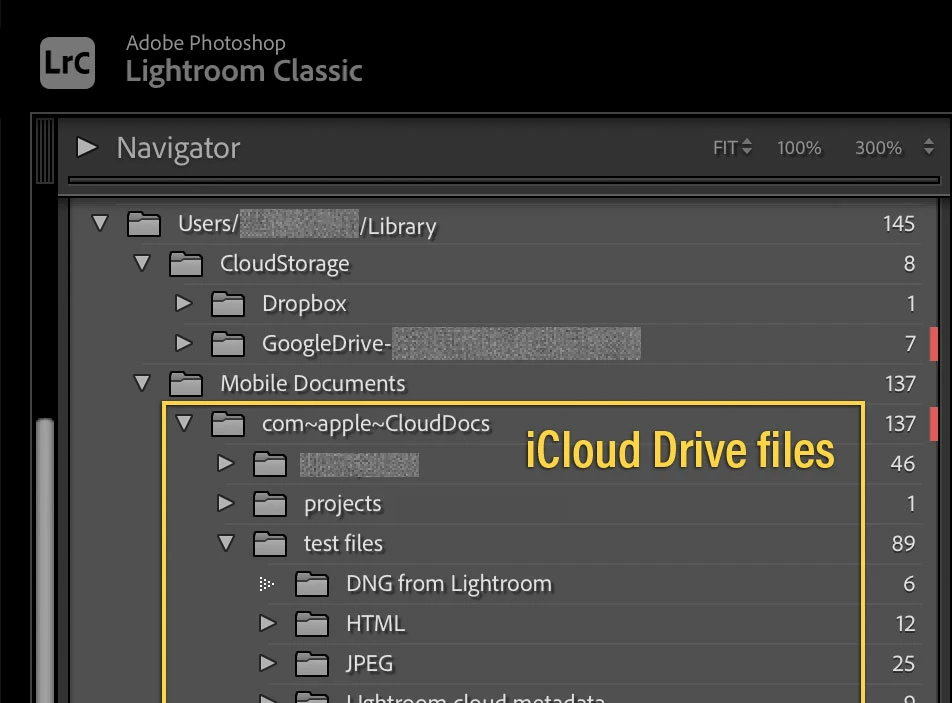
That sounds technical, but the reason to bring it up is that if you imported iCloud Drive files into a Lightroom Classic catalog, you might wonder where they are in the Folders panel. You’ll never find them in the Folders panel under iCloud Drive. The Folders panel lists the imported files at their actual, hidden location. So after import, you want to look for the imported files under the path shown in the picture below, which is the actual path to locally cached iCloud Drive documents:
/Users/[username]/Library/Mobile Documents/com~apple~CloudDocs
The second potential complication is that sometimes the catalog may have trouble loading some photos. This can happen if iCloud Drive is not finished syncing changes from the cloud when the catalog wants to display something. It can also happen if you used the option to keep the file only in iCloud Drive (instead of syncing to a local copy), because then the only local file Lightroom Classic can try to open is an “dataless” placeholder file for the cloud original. In that case you have to make sure the file is actually downloaded.
If you can deal with all of that, then it’s OK to link a catalog to files on iCloud Drive.
Those guidelines apply to other cloud sync services such as Google Drive, Dropbox, etc…, although macOS actually keeps those files under the hidden CloudStorage folder as shown in the picture.
(*You can link a catalog to photos in iCloud Drive, but not to photos in iCloud Photos.)





 AdChoices