Participant
September 28, 2023
Answered

Can't create Lightroom Preset or Manage Preset

  • September 28, 2023
  • 2 replies
  • 1484 views

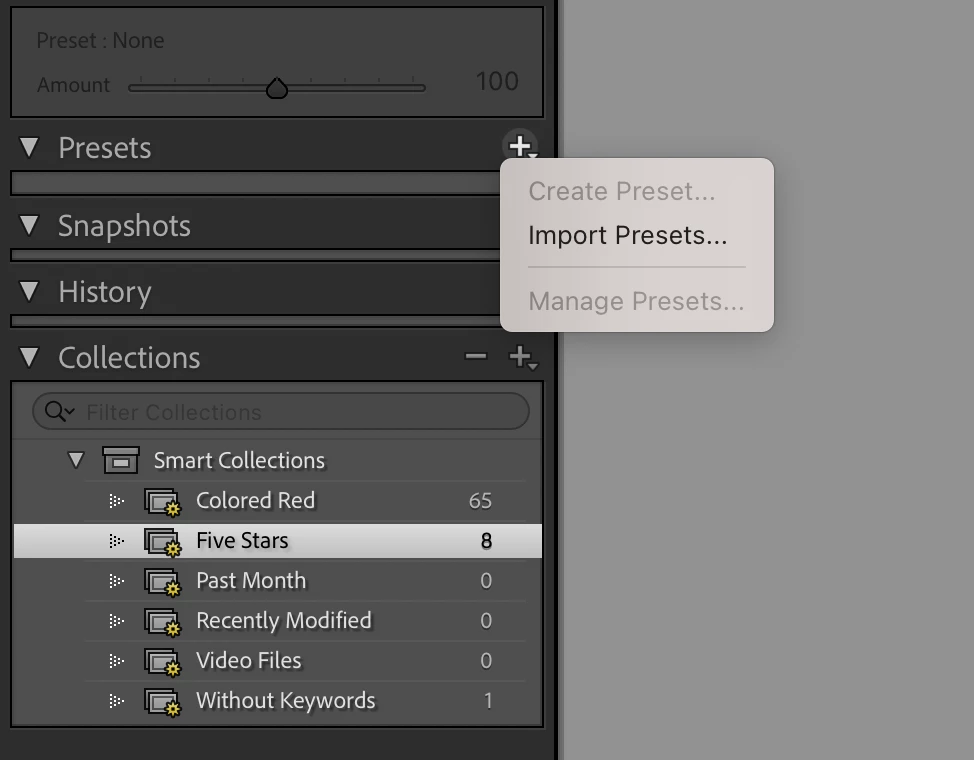
I'm trying to create a preset in lightroom classic however the option is greyed out. I'm also unable to see any of my imported presets under the 'preset' dropdown menu. 
This topic has been closed for replies.
Correct answer JohanElzenga

@Rob_Cullen I remember that there is a situation where no presets are displayed. I thought it was when no image is selected (maybe indeed only on the Mac), but perhaps it was a different situation after all, like a new catalog without any images. I can't check it because I'm on my iPad right now. Anyway, if this is with a new catalog, then it does not apply the the OP, because the collection panel shows images.


2 replies

AxelMatt
Community Expert
Community Expert
September 29, 2023

In a first step try is to reset the preferences to the default settings.

  • Reset Procedure:
  • Close Lightroom.
  • Windows: Hold down [Alt]+[Shift] while restarting Lightroom.
    Mac: Hold down [Opt]+[Shift] while restarting Lightroom.
  • Overwrite the Preferences when prompted by the dialog.
  • Close Lightroom.
  • Restart Lightroom.


It's recommended to backup your preferences before you reset the preferences to the default settings: 

https://helpx.adobe.com/lightroom-classic/kb/preference-file-and-other-file-locations.html


If this doesn't help, please provide also a copy of your 'System Info'. This can be get from the LrC Help > System Info menu item. There's a copy button in the System Info dialog. Press this button and paste the info into your next forum post.

What has been changed on your system before the error occur?


My System: Intel i7-8700K - 64GB RAM - NVidia Geforce RTX 3060 - Windows 11 Pro 25H2 -- LR-Classic 15 - Photoshop 27 - Nik Collection 8 - PureRAW 6 - Topaz Photo AI
JohanElzenga
Community Expert
Community Expert
September 28, 2023

Do you have an image selected? Without an image Lightroom wouldn't know what to save. It also won't display any presets (because you can't apply any preset without having an image to apply it to) and so 'Manage Presets' is also disabled.


-- Johan W. Elzenga
Rob_Cullen
Community Expert
Community Expert
September 29, 2023

@JohanElzenga  I am curious about your statement " It also won't display any presets". If I De-select all images and in the Develop module (no image selected to edit) I still see a greyed-out list of all my Presets. (Maybe a Mac/Windows difference).

The OP cannot see even greyed-out presets with the disclosure triangle 'open'.


Regards. My System: Windows-11, Lightroom-Classic 15.1.1, Photoshop 27.3.1, ACR 18.1.1, Lightroom 9.0, Lr-iOS 10.4.0, Bridge 16.0.2 .
JohanElzenga
Community Expert
JohanElzengaCommunity ExpertCorrect answer
Community Expert
September 29, 2023

@Rob_Cullen I remember that there is a situation where no presets are displayed. I thought it was when no image is selected (maybe indeed only on the Mac), but perhaps it was a different situation after all, like a new catalog without any images. I can't check it because I'm on my iPad right now. Anyway, if this is with a new catalog, then it does not apply the the OP, because the collection panel shows images.


-- Johan W. Elzenga