Participating Frequently
January 8, 2018
Answered

Can't delete blank photos showing in Smart Collection (Mac)

  • January 8, 2018
  • 1 reply
  • 3115 views

Hello, I'm flummoxed. I have a load of blank photos showing in a Smart Collection that don't exist in my catalogue (I've removed ALL my photos from my catalogue in trying to figure out a solution). I am thinking they must be previews of some sort but I've done Library/Previews/Discard 1:1 Previews without success, and Library/Previews/Discard Smart Previews just hangs. I could delete my catalogue and start again but I have a lot of Smart collections etc that I'd prefer not to lose.  Does anyone have any idea what I can do? Thanks.

    This topic has been closed for replies.
    Correct answer Just Shoot Me

    Pres Command + a to Selected all then right click and select Remove photos from the pop up menu, like you have in your screen shot.

    But that will just remove them from the collection.

    You need to find what folder those images are supposed to be in. So right click on one of them, NO Select All, and select "Show Folder in Library" from that pop up menu.

    They might be in many different folders, I don't know I am not at your computer.

    These are image files you have imported into LR then either you deleted them outside of LR or they were on an external drive that is not now connected to your Mac.

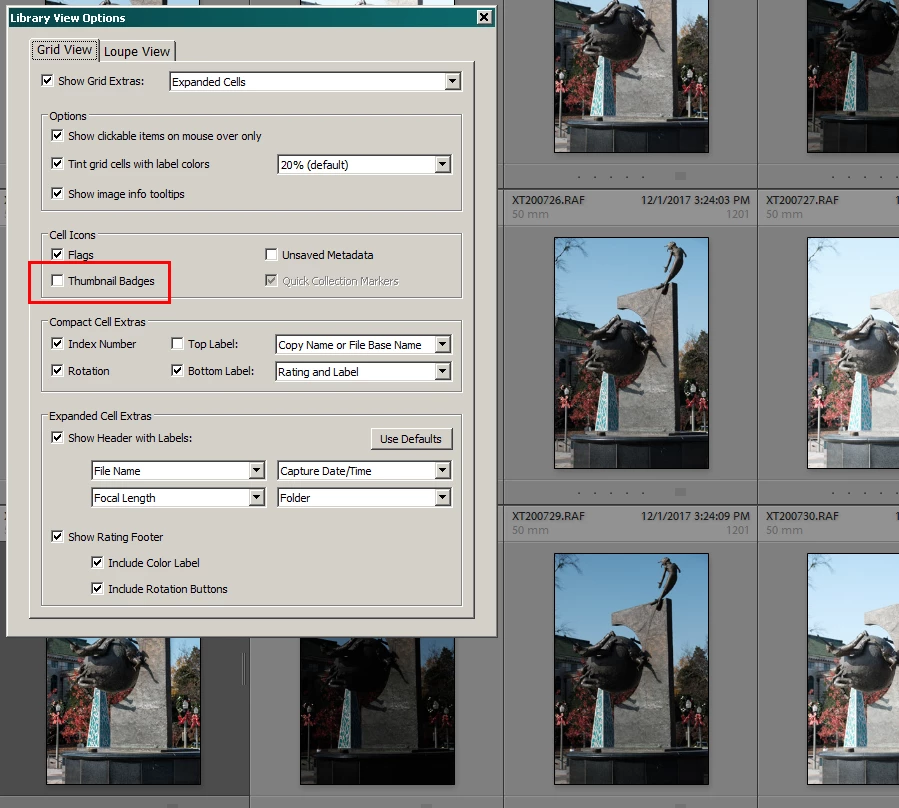
    It would also help to have the file names and the folder/s they are supposed to be stored in showing with in the thumbnail boxes. You can do that by going to the View Options entry in that same pop up menu and checking the boxes to show that.

    1 reply

    Just Shoot Me
    Legend
    January 8, 2018

    Please show us a screen shot.

    What you describe is not possible. No collection, smart or otherwise, can have images boxes in them without LR having a record of those images being imported into the catalog file.

    Blank image boxes means LR has a record of the file but LR can't find that file on your drive and has no preview for it.

    Participating Frequently
    January 8, 2018

    Thanks for the super fast reply - here's a screenshot:

    (btw when I right-click on one of the blanks, the 'Show in Finder' option is greyed out and the 'Go to Folder in Library' option does nothing, which I why the impossible seems to be possible in this case)

    Just Shoot Me
    Legend
    January 8, 2018

    you have to log in to the forum website to post a screen shot in a reply. you can't do it from an email reply.