
Participant
February 21, 2023
Answered

Can't edit or delete photos

  • February 21, 2023
  • 2 replies
  • 1191 views

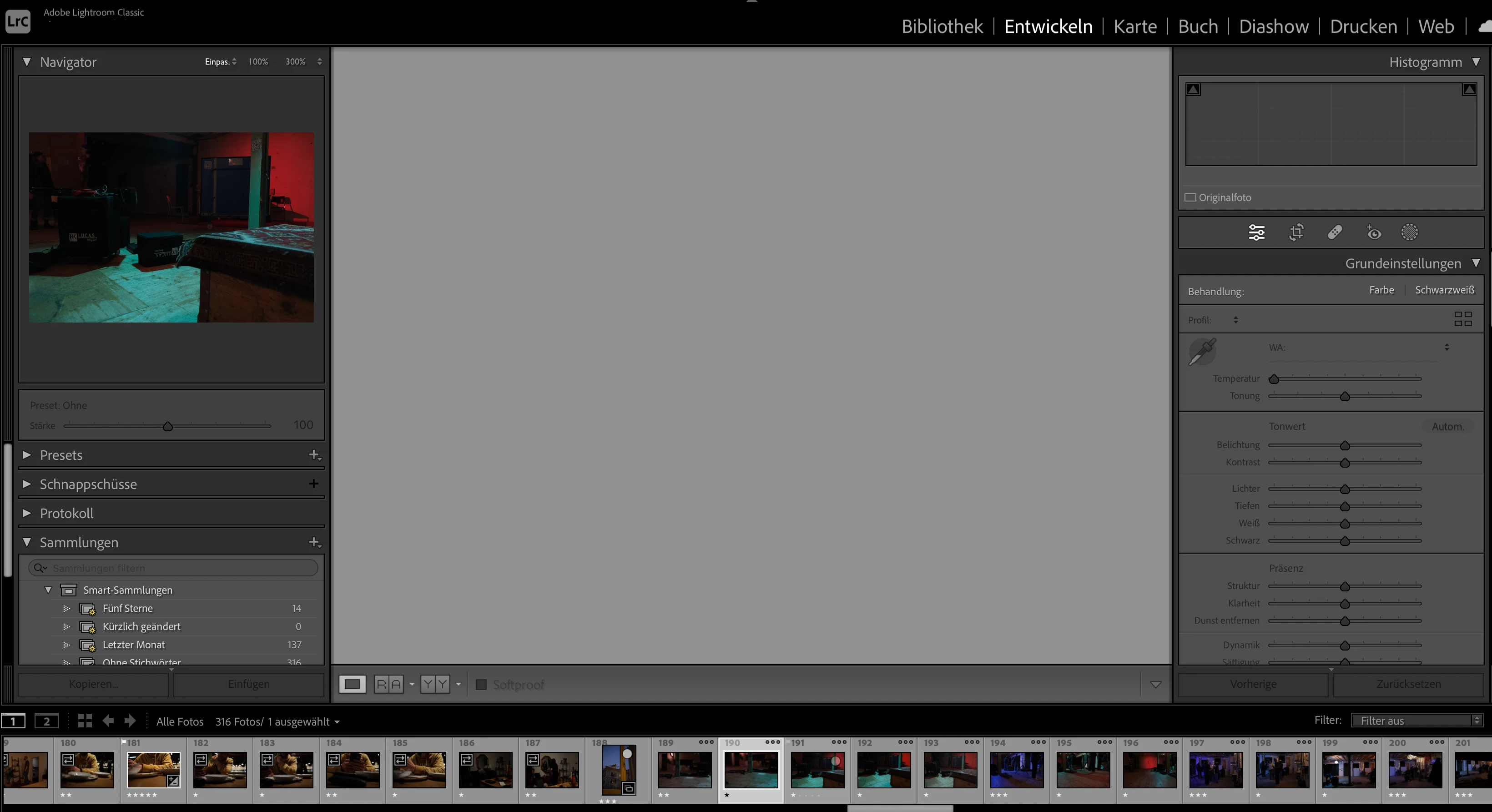
I have a problem with Lightroom Classic. I imported photos (RAW-Files) I took with my new camera. At first, I was able to rate them, but now I cannot edit them (see picture). Lightroom won’t let me delete the pictures either, so I can’t reload them into the program. I tried uninstalling Lightroom but it did not solve the problem.


In the preview all the pictures I can’t edit have three little dots in the upper right corner. It looks to me as if they would still be loading, but nothing is happening.

I have this problem only with the pictures I took with my new camera (Fuji X-S10). I’m still able to edit the pictures I took with my older camera.


The pictures are saved on an external hard drive, but this should not be the problem: I always work like that. I work with a MacBook Pro.
This topic has been closed for replies.
Correct answer DdeGannes

Please provide the version number of the Lightroom Classic app you are using, also the version number of your macOS. See the screen capture for info.

 Are you able to view the images properly in the Library module? If so in your Lightroom Classic preferences tab turn off GPU acceleration and restart LrC and see if it makes a difference.


2 replies

F. McLion
Community Expert
Community Expert
February 21, 2023

In addition, you can check if the monitor profile is corrupt:

https://www.lightroomqueen.com/how-do-i-change-my-monitor-profile-to-check-whether-its-corrupted/


--- Got your issue resolved? Please label the response as 'Correct Answer' to help your fellow community members find a solution to similar problems. ---
DdeGannes
Community Expert
DdeGannesCommunity ExpertCorrect answer
Community Expert
February 21, 2023

Please provide the version number of the Lightroom Classic app you are using, also the version number of your macOS. See the screen capture for info.

 Are you able to view the images properly in the Library module? If so in your Lightroom Classic preferences tab turn off GPU acceleration and restart LrC and see if it makes a difference.


Regards, Denis: iMac 27” mid-2015, macOS 11.7.10 Big Sur; 2TB SSD, 24 GB Ram, GPU 2 GB; LrC 12.5,; Lr 6.5, PS 24.7,; ACR 15.5,; (also Laptop Win 11, ver 24H2, LrC 15.3; PS 27.0; ) Camera Oly OM-D E-M1.
Participant
February 21, 2023

thank you, it worked! 🙂

DdeGannes
Community Expert
Community Expert
February 21, 2023

@Philippe25890902j72i , ok so if turning off the GPU worked for you please indicate what version of macOS you are using?

Regards, Denis: iMac 27” mid-2015, macOS 11.7.10 Big Sur; 2TB SSD, 24 GB Ram, GPU 2 GB; LrC 12.5,; Lr 6.5, PS 24.7,; ACR 15.5,; (also Laptop Win 11, ver 24H2, LrC 15.3; PS 27.0; ) Camera Oly OM-D E-M1.