Inspiring
Oct 5, 2022 1:39 AM UTC
Answered

Can't find brush tool in Lightroom Classic (Windows)

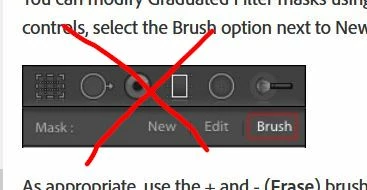
Hi. First post in this forum, and still fairly new to Lightroom (and Photoshop) itself. Here's my question. I'm aware that the Brush tool is a fairly important one in Lightroom -- one that can make a significant difference on an image. But I can't seem to find it! In images I've seen online, under the histogram is a bunch of little icons, including one at the end that is like a little circle with dots surrounding it and then a slider, but I don't see anything like that. The rightmost icon for me is for the masking tool, which I believe is different. Any clarification would be appreciated. Thank you!


{Title edited by Moderator}

This topic is closed to new replies. Start a new post to keep the conversation going.
Rob_Cullen
Rob_CullenCorrect answer
Community Expert
Oct 5, 2022 3:38 AM UTC

Now even the help file link given by @Ranjisha Sengupta  is OUT OF DATE! except for the one reference link to https://helpx.adobe.com/lightroom-classic/help/masking.html


These tool icons are not used in Lightroom-Classic v11.5.


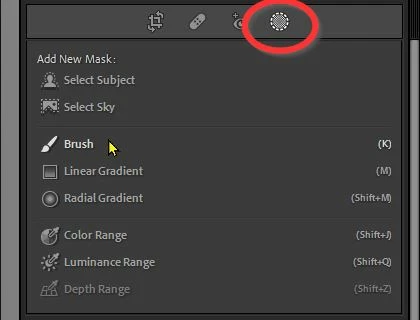
The 'New' version uses the Masking icon that contains the 'old' Tools and the new 'super' AI masking tools. (Select Subject, etc_)

Read about these new features here-

2021-10 MASKING TOOL Oct2021 (J Kost)

And FYI the Brush Tool is still activated by keyboard [K] (as the masking panel indicates!)


Regards. My System: Windows-11, Lightroom-Classic 15.6, Photoshop 27.8, ACR 18.7, Lightroom 9.4, Lr-iOS 10.4.0, Bridge 16.0.3 .

3 replies

Inspiring
Oct 7, 2022 1:10 AM UTC

Okay, sorry I got a bit sidetracked so couldn't respond sooner. I was just about to take a screenshot and then also paste a link from an online image displaing how I thougth it was supposed to look, but now it looks like it's a moot point. But just to answer your question anyway, Ranjisha, it's 11.5, which I guesss is consistent with Rob's answer (I just download for the first time about two months ago, so I assumed I had the newest version). Thanks to both of you. 

Translate
Rob_Cullen
Community Expert
Rob_CullenCommunity ExpertCorrect answer
Community Expert
Oct 5, 2022 3:38 AM UTC

Now even the help file link given by @Ranjisha Sengupta  is OUT OF DATE! except for the one reference link to https://helpx.adobe.com/lightroom-classic/help/masking.html


These tool icons are not used in Lightroom-Classic v11.5.


The 'New' version uses the Masking icon that contains the 'old' Tools and the new 'super' AI masking tools. (Select Subject, etc_)

Read about these new features here-

2021-10 MASKING TOOL Oct2021 (J Kost)

And FYI the Brush Tool is still activated by keyboard [K] (as the masking panel indicates!)


Translate
Regards. My System: Windows-11, Lightroom-Classic 15.6, Photoshop 27.8, ACR 18.7, Lightroom 9.4, Lr-iOS 10.4.0, Bridge 16.0.3 .
Ranjisha Sengupta
Legend
Oct 5, 2022 2:01 AM UTC

Hi there,


Welcome to the Community; thanks for reaching out.

Which version of Lightroom are you using? Can you share a screenshot of what you're seeing? 

We have a 'brush' preference under the masking tool section; are you referring to that or the Adjustment brush tool?

Check this article to know where and how you can get the brush tool and its functionalities: https://helpx.adobe.com/lightroom-classic/help/apply-local-adjustments.html.


Let us know if this works.


Thanks,

Ranjisha

Translate