
Participant
December 2, 2024
Answered

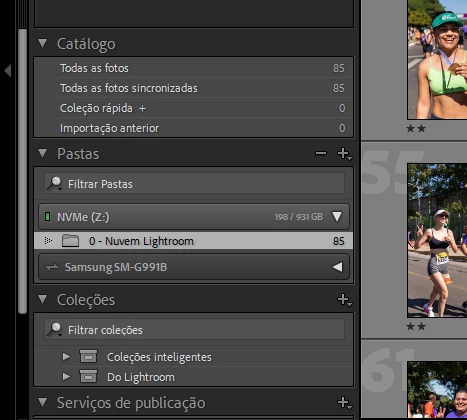
Can't find folders on folder panel in order to move backed up photos from Mobile

  • December 2, 2024
  • 1 reply
  • 176 views

I just don'tget the cloud.


I edited some photos from Lightroom Mobile and they all got backed up to the cloud. Currenly, they got downloaded into the "0" folder from the screenshot. But there are many other folders alongside that one, I want to move the RAW images from folder 0 to folder 1, for instance, and this one doesn't show up in the folders panel.


What the hell am I supposed to do? If I move them via Windows, everything gets wrong and I lose all my edits, right? I can click to show parent folder, which is "Images", but even then the subfolders don't show up.
 

This topic has been closed for replies.
Correct answer JohanElzenga

Then add a temporary image to that folder, so Lightroom can import that. You can delete it again after the folder has been added.


1 reply

JohanElzenga
Community Expert
Community Expert
December 2, 2024

Lightroom Classic is not a file browser but a database application. It will not show folders on your disk that do not contain any images that are in catalog. So if you want to move an image to such a folder, you will first have to add it to the catalog. You can do that by clicking on the plus icon at the top right of the panel, and choose 'Add Folder'.


-- Johan W. Elzenga
Participant
December 2, 2024

I'll try and do that as soon as I get back home, though I have the impression that I did try that, because I saw the icon. Just to make sure, but moving them via CTRL + X and CTRL + V onto the folder I want them in truly is a no-go? In a way that would preserve all my edits.

JohanElzenga
Community Expert
Community Expert
December 2, 2024
quote

moving them via CTRL + X and CTRL + V onto the folder I want them in truly is a no-go? In a way that would preserve all my edits.


By @Lucas28863555by05


You must drag and drop the images. Edits are in the catalog so they will be preserved.


-- Johan W. Elzenga