
Participant
April 24, 2023
Answered

Can't find the original Noise Reduction Slider

  • April 24, 2023
  • 4 replies
  • 4360 views

Lightroom Classic, latest update. MacBook Pro Monterey.


Problem: DeNoise creates duplicates copies of each photo it is used with. I DO NOT want duplicate copies of my photos.

 
DeNoise takes several minutes to complete, way too long. I looked at your blog sites. EVERYONE is having this problem.
 
Result: Please put back the original Noise Reduction Slider, as an option. This is valuable to me because I prefer to do my own editing, not have AI do my editing. I do a better job.
 
Thank you,
This topic has been closed for replies.
Correct answer Ian Lyons

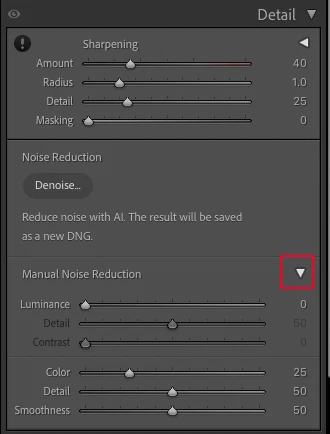
The original Noise adjustment sliders can be accessed by clicking on the little triangle to right of where you see 'Manual Noise Reduction' See attached screenshot.


4 replies

TheDigitalDog
Inspiring
April 24, 2023
quote
DeNoise takes several minutes to complete, way too long. I looked at your blog sites. EVERYONE is having this problem.

By @carlac43290497


Not me; it takes 12 seconds to process a 24.2MP raw and it does a fantastic job! The older sliders still remain if you want to go that route (as others have explained here). 

The reason Denoise produces a new document is that the NR is baked into a linear DNG from which you move forward in processing (if desired) while the original is kept untouched as it should be. Delete the old one if you really don't want a 2nd document which considering the cost of disk storage may be akin to throwing out the baby with the bath water. 

If you have problems with AI processing, don't use any AI processing, which is getting more and more updated in many raw pipelines. You can always "do your own editing". 

Author “Color Management for Photographers" & "Photoshop CC Color Management/pluralsight"
Participant
May 13, 2023

When the second image is created, it is stacked with the original RAW file.. The AI processing is amazing. Im processing 50MP RAW images on my laptop, although a bit of a beast, the AI process takes me less than 20 seconds. If your machine is a little slower, try cropping before noise reduction (if it's an option for you). Just wanted to add my 2 cents.

Jim Wilde
Community Expert
Community Expert
May 13, 2023
quote

If your machine is a little slower, try cropping before noise reduction (if it's an option for you). Just wanted to add my 2 cents.


By @EyeofNewton_Photography


That won't work. AI Denoise is applied to the original raw file (so takes the same amount of time), then any edits that had been made to the original (including the crop) are then copied to the enhanced DNG.

Ian Lyons
Community Expert
Ian LyonsCommunity ExpertCorrect answer
Community Expert
April 24, 2023

The original Noise adjustment sliders can be accessed by clicking on the little triangle to right of where you see 'Manual Noise Reduction' See attached screenshot.


Rikk Flohr_Photography
Community Manager
Community Manager
April 24, 2023

The original noise reduction sliders were not removed. They are still where they were previously though you have to expand the disclosure triangle to see them:


Rikk Flohr: Adobe Photography Org
kglad
Community Expert
Community Expert
April 24, 2023

<moved from cc desktop bugs>