Known Participant
August 31, 2017
Answered

Can't find the tool to quickly change number of images in Library grid

  • August 31, 2017
  • 1 reply
  • 507 views

Just upgraded to cc.  Before I upgraded, in LR Library mode there was a little horizontal scroll bar and I could quickly expand or decrease the number of images in the grid.  For example, I could quickly zoom so that the grid would have anything from a single image to 3 per row or 6 or 9 per row, etc.  Been through all settings and can't figure out how to get that tool back.  Anyone know?
    This topic has been closed for replies.
    Correct answer Rob_Cullen

    1. On the Main Menu:   View>Show Toolbar

    or

    2. Press T

    and

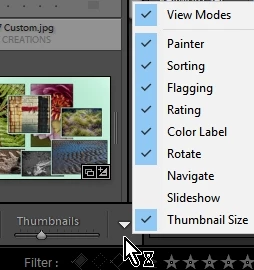
    3. Open the drop-down menu on the end of the Tool bar to select visible options.

    also

    4. Make the side panels narrower, and view Lightroom 'full screen' to give more room to see the tool bar items.

    and

    5. Press +/- on numeric keypad to enlarge/reduce thumbnails.  (Shift&+/- on the standard numeric keys)

    1 reply

    Rob_Cullen
    Community Expert
    Rob_CullenCommunity ExpertCorrect answer
    Community Expert
    August 31, 2017

    1. On the Main Menu:   View>Show Toolbar

    or

    2. Press T

    and

    3. Open the drop-down menu on the end of the Tool bar to select visible options.

    also

    4. Make the side panels narrower, and view Lightroom 'full screen' to give more room to see the tool bar items.

    and

    5. Press +/- on numeric keypad to enlarge/reduce thumbnails.  (Shift&+/- on the standard numeric keys)

    Regards. My System: Windows-11, Lightroom-Classic 15.3, Photoshop 27.5, ACR 18.3, Lightroom 9.3, Lr-iOS 10.4.0, Bridge 16.0.3 .
    Sassie8Author
    Known Participant
    August 31, 2017

    Thank you!  The +/- button worked well.  And then later on (without me being aware of having done anything) the thumbnail slider was suddenly there - that was what I was looking for but couldn't remember what it was called!