Participating Frequently
September 28, 2017
Answered

Can't Import Images Lightroom version: CC 2015.12 [ 1125239 ] License: Creative Cloud

  • September 28, 2017
  • 2 replies
  • 699 views

Lightroom version: CC 2015.12 [ 1125239 ]

License: Creative Cloud

Hi

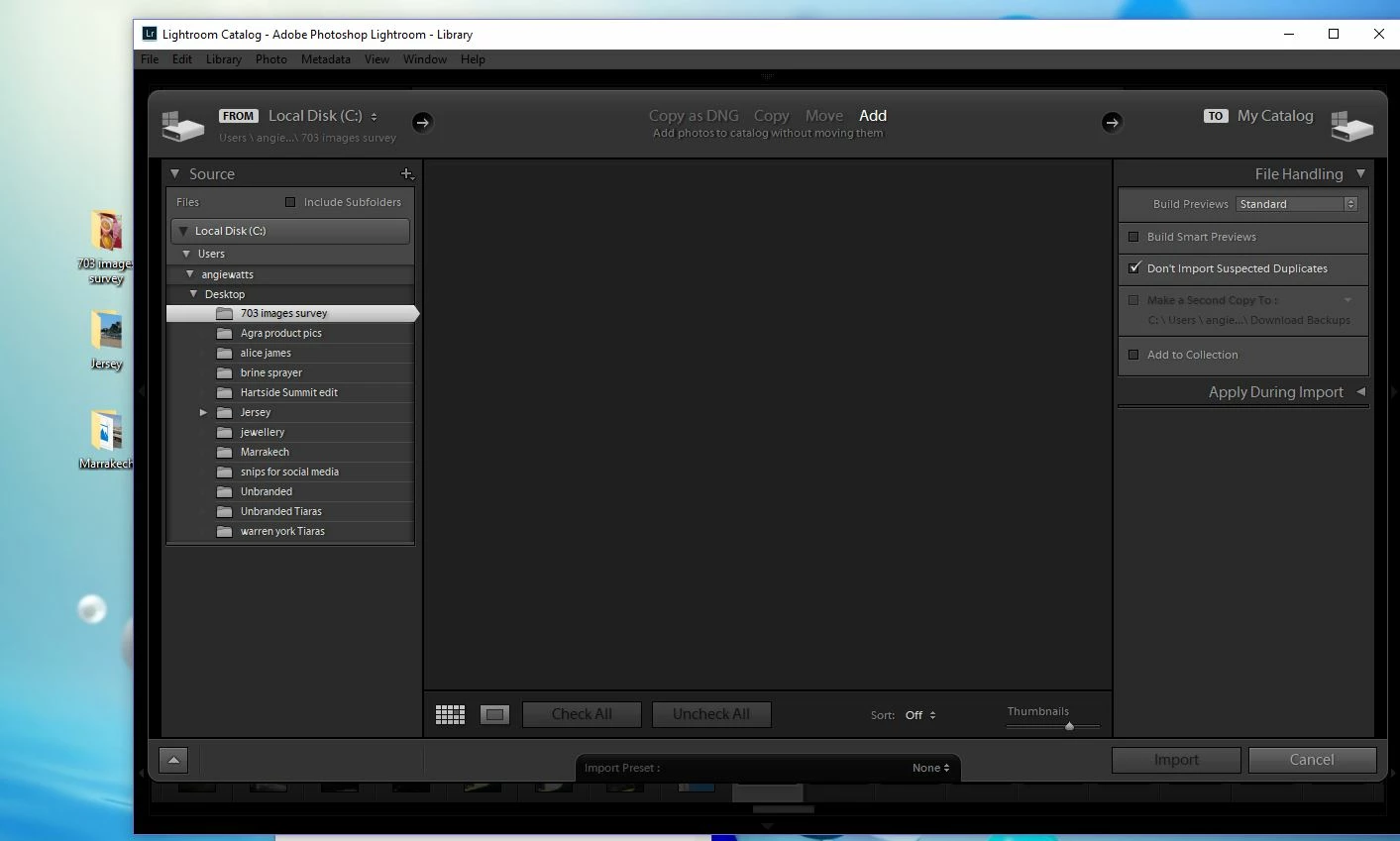
Please see screenshot. Since last Lightroom update have been unable to Import any images, it's like LR is just not reading that there is anything there. It does start a scrolling thing in bottom left side but only for a split second, goes off too quick for me to catch in the screenshot

To the left of screenshot you can see that there are 3 desktop folders of images. I was trying to import images from the 703 folder, as I had put some fresh images in there today.

I am not doing anything any differently to what I used to do, nothing extra been plugged into my PC.  It's only since I ran the Lightroom update that I have had this issue.

Can anyone help please as this issue is driving me crazy and means I can't do my work at work, have to keep taking home!
This topic has been closed for replies.
Correct answer dj_paige

Click on COPY, then make sure the Destination Panel on the right hand side is present and expanded and pointing to a valid Destination Folder (a folder that actually exists); then Click on ADD if desired.

2 replies

dj_paige
dj_paigeCorrect answer
Legend
September 28, 2017

Click on COPY, then make sure the Destination Panel on the right hand side is present and expanded and pointing to a valid Destination Folder (a folder that actually exists); then Click on ADD if desired.

Participating Frequently
October 2, 2017

Hi dj_paige, that worked, but it only allows me to choose my computer Cdrive as a destination!

Still it worked so allowed me to do what I needed to do.

Incidentally, I was working on mac at weekend and the import works fine and as it always had, so there is some peculiarity in the update and how it operates on windows.

Thanks for your reply, got me sorted!

dj_paige
Legend
October 2, 2017

ann-marierednip  wrote

Hi dj_paige, that worked, but it only allows me to choose my computer Cdrive as a destination!

Still it worked so allowed me to do what I needed to do.

Incidentally, I was working on mac at weekend and the import works fine and as it always had, so there is some peculiarity in the update and how it operates on windows.

Thanks for your reply, got me sorted!

Well, that's good news, but I'm pretty sure this issue has affected some Mac users as well, I don't know why it happens to some people and not others.

99jon
Legend
September 28, 2017

Does it work if you right-click on the folder 703 images survey in LR Library and choose synchronize folder?

Are the extra added images detected?

Participating Frequently
September 28, 2017

Thanks, that didn't work though!

99jon
Legend
September 28, 2017

One other thing to try. Put a checkmark in the box “include sub-folders” top left in the import dialog.