[View this reply in your Web browser to see the screenshots.]
| I've downloaded some new presets that are XML - and have put them into the Settings folder as recommended, then when in Lightroom I select Import |
It's not necessary to put them in the settings folder. The Presets' panel Import command will copy them into the correct location.
A new-format .xmp file could contain either a Develop preset, which would appear in the Presets panel on the left of Develop, or an "enhanced" profile, which would appear under Profile in the Basic panel on the right. It may be that the new files are enhanced profiles. In the Basic panel, click on the Profile dropdown and then Browse:
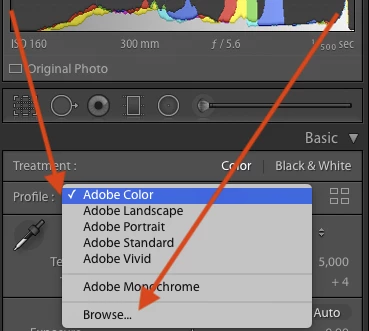
Imported profiles could appear in any of the groups (folders) displayed by Browse.


 AdChoices