winegardeng55249505
Participating Frequently
September 28, 2021
Answered

Can't launch the default email client

  • September 28, 2021
  • 3 replies
  • 1832 views

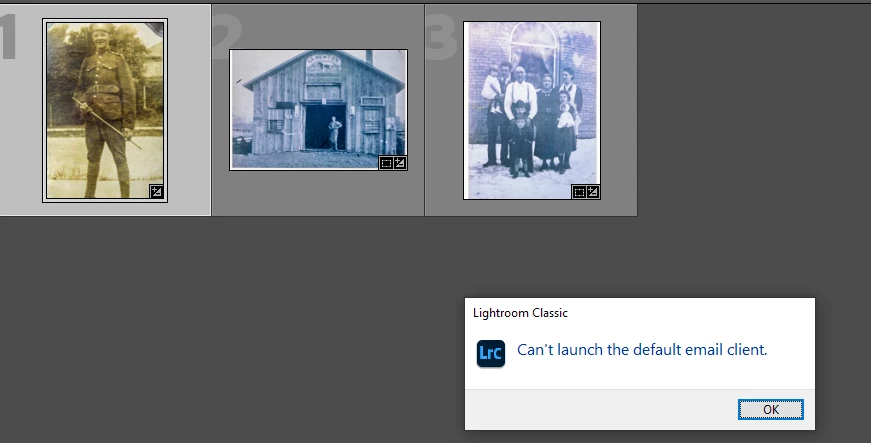
I was trying to email a photo from LR Classic.  Got the above message.

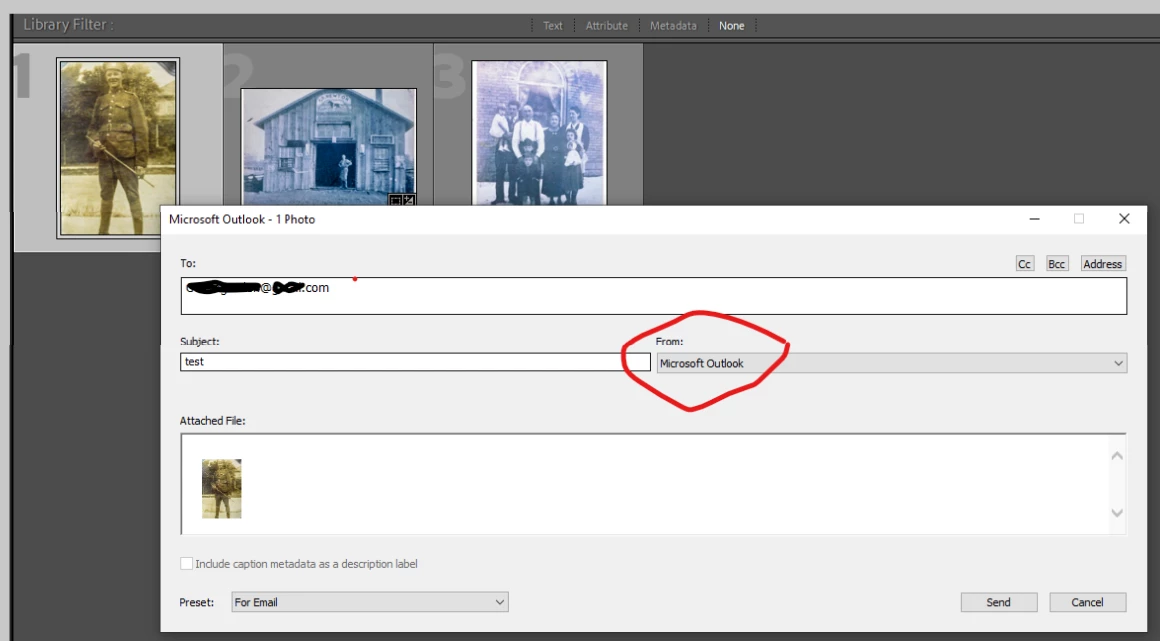
The first clip, below, shows that it knows which client I use.  

But, when I click Send, I get the error shown.

Any help would be greatly appreciated.

LRC Release 10.4

Latest updates.

Windows 10 21H1


Correct answer GoldingD

Previous setup for your e-mail may have gone missing and you may need to setup again.


For that, see:

https://helpx.adobe.com/in/lightroom-classic/help/prepare-send-or-post-photos.html#email_photos_from_lightroom


3 replies

GoldingD
Legend
September 29, 2021

Hmm, doing a bit of searching in the community. It is often asked, when did you last restart your computer? And I think they mean a cold boot.

winegardeng55249505
Participating Frequently
September 29, 2021

Your first answer was bang on!

Rob_Cullen
Community Expert
Community Expert
September 29, 2021

Don't you just 'love' errors!

I tried researching an answer for you and LrC had to Close. 😞

The 'Email Account Manager' gave me this-

See if you can reach the Go to Email Account manager from the drop-down context menu in the [From:] field.

Although my email request did successfully 'open' my Mozilla Thunderbird email client.


Regards. My System: Windows-11, Lightroom-Classic 15.3, Photoshop 27.5, ACR 18.3, Lightroom 9.3, Lr-iOS 10.4.0, Bridge 16.0.3 .
winegardeng55249505
Participating Frequently
September 29, 2021

Thanks!

GoldingD
GoldingDCorrect answer
Legend
September 28, 2021

Previous setup for your e-mail may have gone missing and you may need to setup again.


For that, see:

https://helpx.adobe.com/in/lightroom-classic/help/prepare-send-or-post-photos.html#email_photos_from_lightroom


winegardeng55249505
Participating Frequently
September 29, 2021

You are correct.

What threw me is that Microsoft Outlook was already in the dropdown list but it seems it was not set up.  I tried to figure how to edit it but could not.

So, I created a new one and it worked.

Thank you!!