


Participant
Nov 5, 2021 9:00 PM UTC
Answered

Can't move masks in v11

Hi there at first i thought this might be an issue specific to my KVM setup, using single-GPU passthrough. However, Photoshop works wonderfully and also Lightroom CC does not suffer from any issues.


Lightroom Classic v11 however does not let me move placed masks. I cannot rotate/resize/... any of them (e.g. radial or linear ones. The controls at first are shown, but glitch away as soon as i try to use them:
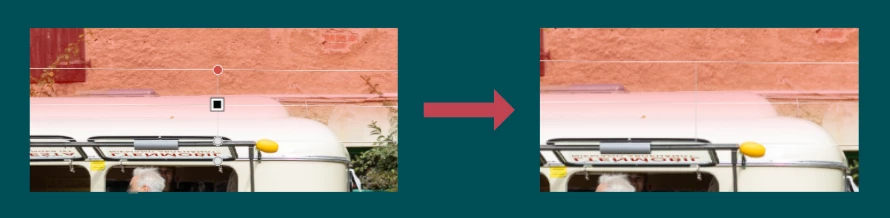
I am currently running on macOS Big Sur v11.6.1 with a Radeon RX 570 8 GB graphicscard.
The issue is gone when downgrading to the previous release but this is no long-term solution.


Looking at /Users/milan/Library/Logs/NGL/NGLClient_LightroomClassic111.0.log, while messing around with those masks, no log is generated. May i increase the loglevel somehow?


Regards 🙂

Terrell Photography
Terrell PhotographyCorrect answer
Participant
Jun 2, 2022 4:01 AM UTC

There is an option to turn this off and on. If you press "H" when lightroom is open it will never show the pins and tool handles for masks. If you press ctrl+shift+H it will always show the pins and tool handles for masks. I personally prefer to only see it when I select a mask in the mask dialog box. To turn this on, click the 3 dots on the mask dialog box. Then go to Pins and Tools which should give you 4 options to choose from including "Selected" which is the option I like. Hope this helps everyone.

17 replies

Terrell Photography
Terrell PhotographyCorrect answer
Participant
Jun 2, 2022 4:01 AM UTC

There is an option to turn this off and on. If you press "H" when lightroom is open it will never show the pins and tool handles for masks. If you press ctrl+shift+H it will always show the pins and tool handles for masks. I personally prefer to only see it when I select a mask in the mask dialog box. To turn this on, click the 3 dots on the mask dialog box. Then go to Pins and Tools which should give you 4 options to choose from including "Selected" which is the option I like. Hope this helps everyone.

Translate
Participant
Jun 11, 2022 5:10 PM UTC

Wow. I had been struggling with this, too, for too long! Thank you!

Translate
Participant
Dec 2, 2021 6:14 AM UTC

Any solution for this problem? Lightroom Classic v11.0.1 does not let me move placed masks, rotate and resize. Downgrade to v11.0 still not solve the problem. Already try reset lightroom. Now im back to lightroom V10. Current macos 12.0.1

Translate
citizin
Inspiring
Dec 2, 2021 5:27 PM UTC

I've upgraded to 12.1 beta 3 and it's solved the problem for me.

Translate
citizin
Inspiring
Nov 15, 2021 11:18 PM UTC

I've updated to 12.1 Public Beta 2 and this problem went away. 

Translate
Milan_IAuthor
Participant
Nov 20, 2021 7:24 PM UTC

Sounds promising, thanks for testing! Tho i feel like, since more and more are coming to this thread with the same issue, this should be a hotfix release and not delayed until 12.1 imho.

Translate
Participant
Nov 15, 2021 9:38 PM UTC

I'm having this same problem on an iMac running macOS Catalina 10.15.7.

I'm also having problems turning on the mask overlay.  It only appears if I rollover a mask icon in the mask window or a pin on my photo.  I can click the "show overlay" checkbox, but the overlay doesn't show.  Pressing the shortcut "O" key will turn off the checkbox, but won't turn it on.  In any case, regardless of the checkbox setting, the overlay doesn't show.


Translate
citizin
Inspiring
Nov 14, 2021 2:40 AM UTC

Seeing this same problem plus can't use application window keybord shortcuts but editing ones are fine. 

Mac0S 12.0.1

Translate
GoldingD
Legend
Nov 5, 2021 11:18 PM UTC

In the mask panel, do you have the actual gradiant mask selected as opposed to the overall mask or any sub components be it and add or subtract or intersect?


Translate
Milan_IAuthor
Participant
Nov 13, 2021 9:53 PM UTC

Hi there, thanks for the reply and sorry for my late response. I've just tested the update on my old MBP and have no issues moving the masks – unlike on the VM. While trying to get anything moved, e.g. on the radial or linear mask, i have tried sub-components without success.


It is enough to place the mask. Controls show, but as soon as i try to click on them, they vanish.

Translate
Participant
Nov 20, 2021 7:15 PM UTC

I have Lightroom Classic v.11 and I am having the same problem. I can initially open my gradient and linear masks, but once I try to adjust them using the pins, the pins disappear and I cannot move them at all. I tried moving the lines in the linear gradient and it doesn't work at all. 

Translate
KR Seals
Community Expert
Community Expert
Nov 5, 2021 9:52 PM UTC

I don't see that issue inWindows 10. I will check on my MBP which is on Big Sur.


On my MBP 2019 16" Big Sur, I am able to move the Radial Gradient, Linear Gradient and Brush. The Select Sky and Select Subject masks do not move, understandably. I did not try Color Range or Luminosity Range, which would seem to be restricted from movement by their nature, like sky and subject.

Translate
Ken Seals - Nikon Z 9, Z 8, 14mm-800mm. Computer Win 11 Pro, I7-14700K, 64GB, RTX3070TI. Travel machine: 2021 MacBook Pro M1 MAX 64GB. All Adobe apps.
Milan_IAuthor
Participant
Nov 13, 2021 9:54 PM UTC

Hi there – it also works as expected on my 2015 MBP, but not on the more important VM, sadly.

Translate