
Inspiring
October 31, 2024
Answered

can't open LR Cat created in Windows 10 on Windows 11 computer

  • October 31, 2024
  • 2 replies
  • 391 views

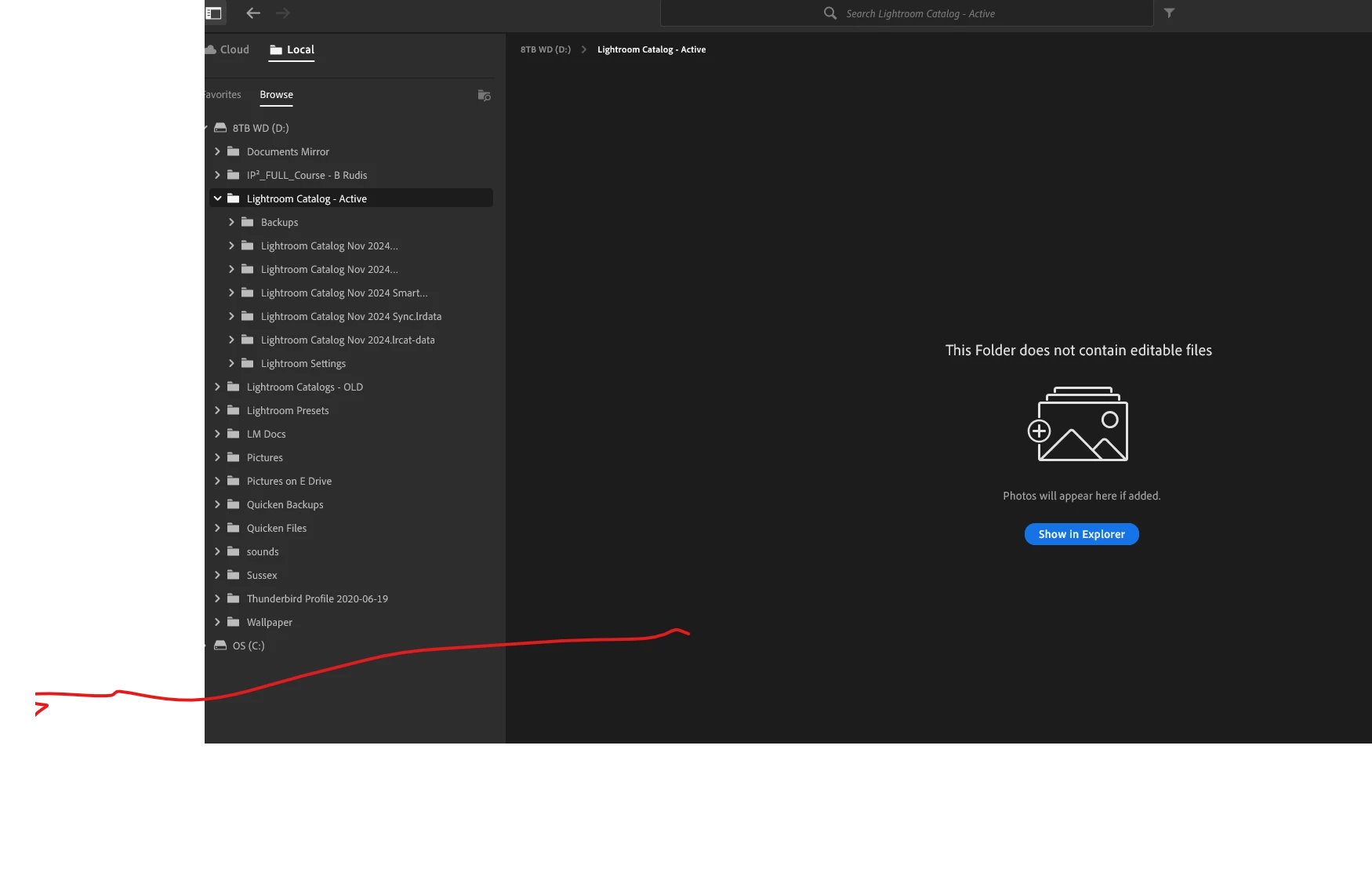
Before changing from a windows 10 computer to a new windows 11 one I copied myLR catalog and associated files to a hard disk and plugged it into the new computer, but when I double click on the LRCAT file Lightroom seems to open but it just says this folder does not contain editable files. All the contents of the folder containing the catalog are listed (sync and data files) but the LRCAT itself does not appear and there doesn't seem to be any way to get to it.


This topic has been closed for replies.
Correct answer Rob_Cullen

For a start you are not in Lightroom-Classic. Your screen-clip indicates you have the Cloud version of Lightroom (Known as Lightroom-Desktop on a PC).

So you will not have an .LRCAT catalog file for Lightroom. Lightroom 'catalogs' are stored in the Lightroom Cloud.

Perhaps you have installed the wrong app, or opened the wrong app?


In your screen-clip you are also using a 'Local' mode which acts as a very basic file browser, and the folder you have selected seems to be only Catalog working files from Lightroom-Classic. There are no photos in these folders.

But you must have had Lightroom-Classic at some time to create all those sub-folders.


Close the Lightroom App, Open Lightroom-Classic, or [Double-click] on a .LRCAT catalog file that you would find in that { Lightroom Catalog - Active } folder.


2 replies

heronsongAuthor
Inspiring
October 31, 2024

Thank you. I don't know how I managed to install the wrong Lightroom, but now that I have the right one all is good

Rob_Cullen
Community Expert
Rob_CullenCommunity ExpertCorrect answer
Community Expert
October 31, 2024

For a start you are not in Lightroom-Classic. Your screen-clip indicates you have the Cloud version of Lightroom (Known as Lightroom-Desktop on a PC).

So you will not have an .LRCAT catalog file for Lightroom. Lightroom 'catalogs' are stored in the Lightroom Cloud.

Perhaps you have installed the wrong app, or opened the wrong app?


In your screen-clip you are also using a 'Local' mode which acts as a very basic file browser, and the folder you have selected seems to be only Catalog working files from Lightroom-Classic. There are no photos in these folders.

But you must have had Lightroom-Classic at some time to create all those sub-folders.


Close the Lightroom App, Open Lightroom-Classic, or [Double-click] on a .LRCAT catalog file that you would find in that { Lightroom Catalog - Active } folder.


Regards. My System: Windows-11, Lightroom-Classic 15.0, Photoshop 27.0, ACR 18.0, Lightroom 9.0, Lr-iOS 10.4.0, Bridge 16.0 .