
Participant
October 29, 2024
Answered

Can't reliably get "locate folder" to show up on moved drive

  • October 29, 2024
  • 1 reply
  • 178 views

I had to move a catalog and associated content from a Mac to a PC and of course you can't get the paths to remain the same so I need to reconnect the content.


I can reconnect individual files no problem, but I have about 65K files on this drive so it's doing it individually is not going to work.  I need to reconnect the _folders_.


The weird thing is, I was able to do this somehow for _some_ folders, but what I thought I had done, select a photo, then select the date in the "target photo" box, isn't making the folder show up under the Navigator folders pannel.


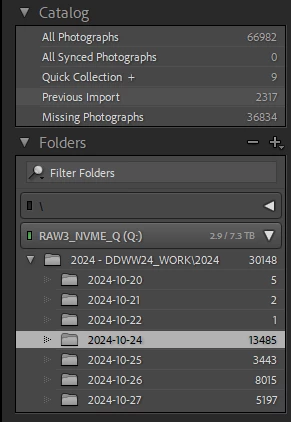
In the attached image you can see some folders show a couple of files, but they really have thousands.  These were obviously the files that only had one or two done by hand.


And yes, I selected "find nearby files" as well, and that didnt' seem to have any effect.


Any thoughts here?


Thanks,


-john
 

This topic has been closed for replies.
Correct answer JohanElzenga

You must 'relink' the top folder. That will relink all folders at once. If you can't see the top folder, then right-click on the current top folder (2024-DDWW24..... in your screenshot) and choose 'Show Parent Folder'. Repeat if necessary with this folder, until you see the main folder that contains all the image folders. Once you see this top folder, right-click on it and choose 'Find Missing Folder'. In the dialog that comes up, navigate to this folder on your drive and select it. Done.


1 reply

JohanElzenga
Community Expert
JohanElzengaCommunity ExpertCorrect answer
Community Expert
October 29, 2024

You must 'relink' the top folder. That will relink all folders at once. If you can't see the top folder, then right-click on the current top folder (2024-DDWW24..... in your screenshot) and choose 'Show Parent Folder'. Repeat if necessary with this folder, until you see the main folder that contains all the image folders. Once you see this top folder, right-click on it and choose 'Find Missing Folder'. In the dialog that comes up, navigate to this folder on your drive and select it. Done.


-- Johan W. Elzenga
Participant
October 29, 2024

That seems like it might be it, but it didn't work.  I'm going to re-copy the catalog from my external drive and try again, in case some of the fiddling I did messed things up so it didn't work. 


Will report back.  Thx