Participating Frequently
April 19, 2019
Answered

Can't select watermark for export

  • April 19, 2019
  • 3 replies
  • 9483 views

All of a sudden I can't select the watermark option for export.  The option is there but it is grayed out.  I am using Lightroom 5

This topic has been closed for replies.
Correct answer Just Shoot Me

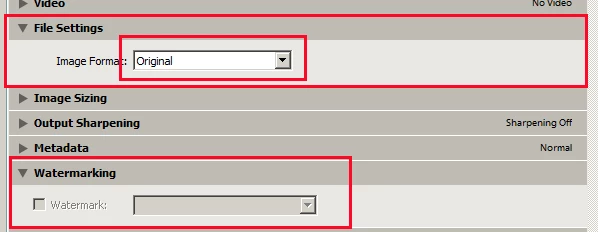
It is because you had the Image Format in the File Settings section set to "Original". With that set you can't add anything to the image. Not even the edits you made will show up.
3 replies

Just Shoot Me
Just Shoot MeCorrect answer
Legend
April 27, 2019

It is because you had the Image Format in the File Settings section set to "Original". With that set you can't add anything to the image. Not even the edits you made will show up.

Tony_See
Inspiring
April 19, 2019

So I take it you can see presets in the Export / Watermarking area, but can't select anything?

All the Watermarks below highlight when rolled over as shown . . .

But your not getting that?

Participating Frequently
April 27, 2019

Hi Tony, here is a screen shot.  Does this help?

JoeKostoss
Community Expert
Community Expert
April 27, 2019

You need to check the Watermark Box first before you can select a watermark.

GoldingD
Legend
April 19, 2019

What file format are you exporting to?

Raster (JPEG, TIFF, etc) or not (DNG)

Participating Frequently
April 27, 2019

Imported and exported as jpegs from my Iphone 8