
Participant
July 21, 2022
Answered

Cannot click on capture time to adjust it

  • July 21, 2022
  • 2 replies
  • 204 views

Being a wedding photographer that shoots on multiple bodies, I am very used to changing the capture times. I've done it a million times, but it's not working now. It won't even let me click on the capture date to change the capture time. I have recently updated my laptop to a Macbook Pro 2021 with the Mojave 12.3 version. I have the 11.4.1 release of LrC. How do I fix this? Someone help!
This topic has been closed for replies.
Correct answer johnrellis

[This post contains formatting and embedded images that don't appear in email. View the post in your Web browser.]


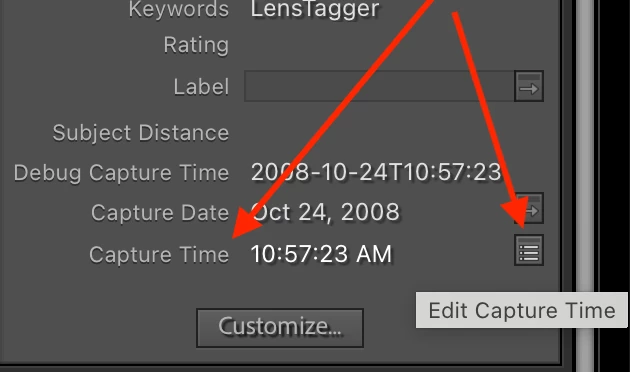
By default, LR no longer shows the Capture Time field, which has the editing button.   In the Metadata > Default panel, click Customize and add Capture Time to the list of fields displayed:


2 replies

johnrellis
johnrellisCorrect answer
Legend
July 22, 2022

[This post contains formatting and embedded images that don't appear in email. View the post in your Web browser.]


By default, LR no longer shows the Capture Time field, which has the editing button.   In the Metadata > Default panel, click Customize and add Capture Time to the list of fields displayed:


cmgap
Community Expert
Community Expert
July 22, 2022

Are you unable to change capture time via the dropdown menu:

This still works on my images (either multiples or one at a time). Not sure about the field in the right hand column not being editable. That behavior now opens the metadata filer showing other images taken on the same day.