

photopoeth
Inspiring
December 2, 2024
Answered

Cannot export more than 2 images and all exports don't end properly

  • December 2, 2024
  • 3 replies
  • 485 views

I have an issue with exporting on the Mac. The problem is twofold:
1. a maximum of 2 images get exported.
2. every export process (whether up to 2 or more images) never comes to an end (you can see in the top left).

Here is a screenshot to illustrate:
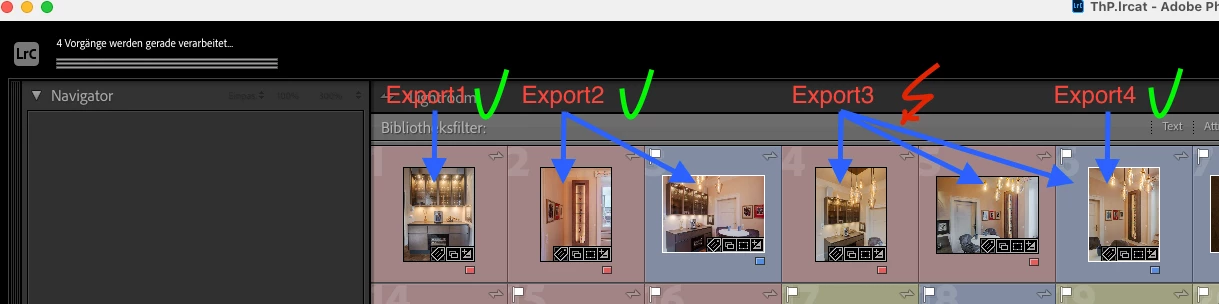
 

I have started 4 exports:
1. 1 image - this has been exported
2. 2 images - these have been exported
3. 3 images - only the first 2 have been exported
4. the missing third image from 3 - this has been exported

As you can see at the top left, none of the exports are completed correctly. All processes are still in progress (for several hours).

Does anyone have an idea what is going wrong here? I get scared when I think of exports with several dozens or maybe hundreds of pictures...

Since I am a Mac newbie and this is my first Mac after more than 3 decades of Windows PCs,  I am not sure if the problem is located in front of the screen. 🤷‍ 

BR, Thomas

This topic has been closed for replies.
Correct answer photopoeth

GOT IT! But at the same time it's a bit embarrassing... 🙊

It was the jpegmini plugin, that I haven't had activated due to this internal error message when typing in the activation code.:

[string "JPEGminiPluginManager.lua"]:88: attempt to concatenate global 'activationResult' (a nil value) |


I have asked the support, but I've got no answer so far. I use jpegmini for my jpeg exports.It happened my PC several times that the activation got lost. But it never was a problem to export images with the deactivated plugin. It just has been ignored. BUT, obviously it's not like this on the Mac. 

I had used another randomly selected export preset as a test and it worked several times. When comparing I noticed that jpegmini for was not included in that preset. I then removed it from one of the presets I was using before and now the exports worked.


LESSON LEARNED! Never transfer conclusions from PC to Mac (or vice versa)!

 
BTW: If anyone has an idea why the activation fails... I am very grateful for any hints.

3 replies

Participant
December 8, 2024

Hello, same issue, no more 5 images 😞


Ian Lyons
Community Expert
Community Expert
December 8, 2024

@FDO_Photo 


The OP found that the cause of his issue was a plugin error. If you aren't using the same plugin, then your issue is unrelated. As such, you should create your own thread, and describe in detail how the export dialog is configured and the mode of failure.

photopoeth
photopoethAuthorCorrect answer
Inspiring
December 4, 2024

GOT IT! But at the same time it's a bit embarrassing... 🙊

It was the jpegmini plugin, that I haven't had activated due to this internal error message when typing in the activation code.:

[string "JPEGminiPluginManager.lua"]:88: attempt to concatenate global 'activationResult' (a nil value) |


I have asked the support, but I've got no answer so far. I use jpegmini for my jpeg exports.It happened my PC several times that the activation got lost. But it never was a problem to export images with the deactivated plugin. It just has been ignored. BUT, obviously it's not like this on the Mac. 

I had used another randomly selected export preset as a test and it worked several times. When comparing I noticed that jpegmini for was not included in that preset. I then removed it from one of the presets I was using before and now the exports worked.


LESSON LEARNED! Never transfer conclusions from PC to Mac (or vice versa)!

 
BTW: If anyone has an idea why the activation fails... I am very grateful for any hints.
GoldingD
Legend
December 2, 2024

In that screenshot, it is hard to tell, but is a image selected? I ask because I notice that the Navigator Panel is empty. Also, is the Histogram also empty? If an image is selected, and the Navigator and the Histogram are empty

, then the preferences file may be corrupt. Have you considered resetting the preference file?


photopoeth
Inspiring
December 2, 2024

For this screenshot I had deselcted all images. I don't have an issue with empty Navigator/Histogram so far. But I will check if resetting the preferences will work. Thanks.