
Participant
August 15, 2022
Question

Cannot import any new pictures

  • August 15, 2022
  • 1 reply
  • 284 views

Hi,


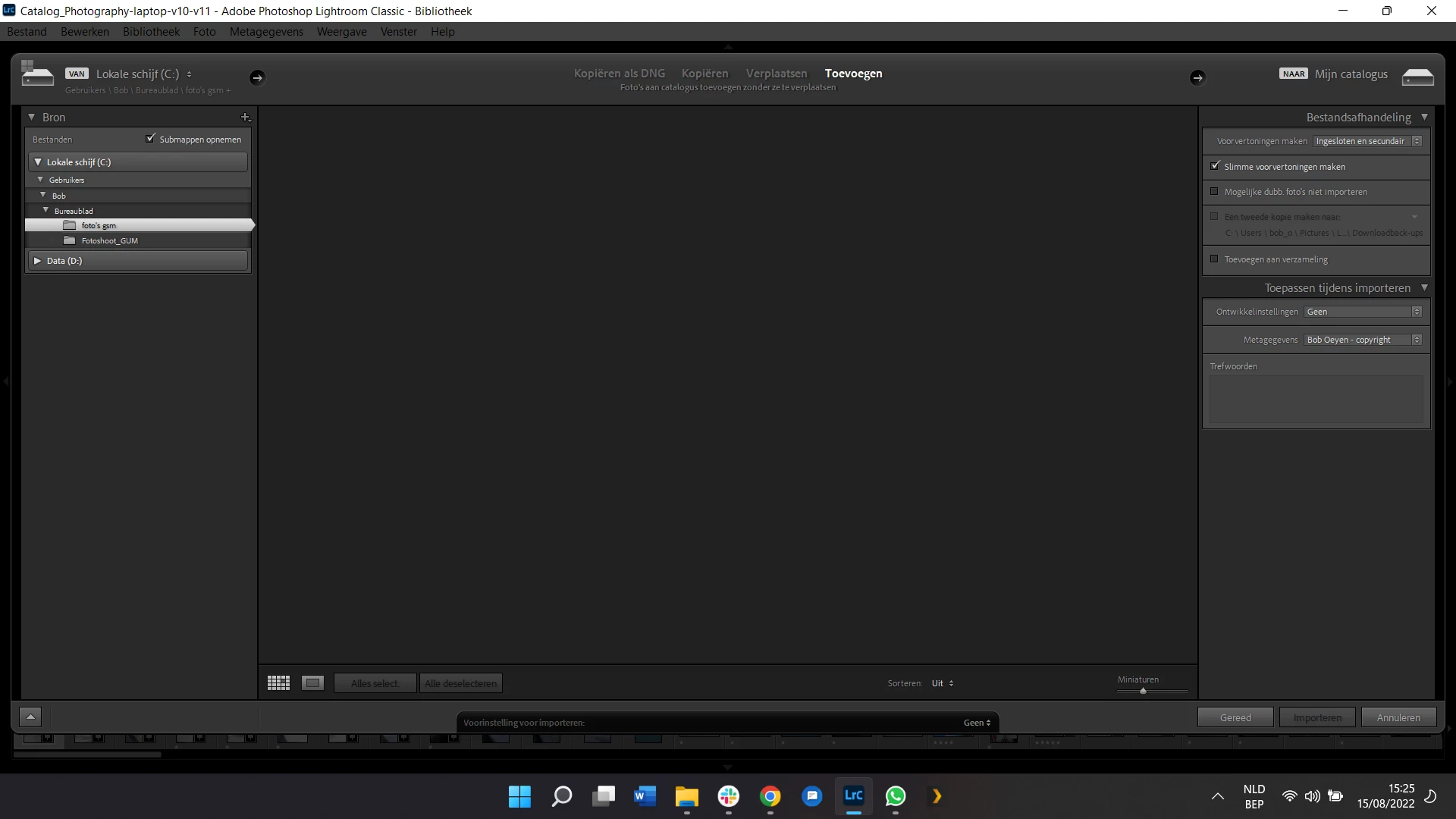
I am trying to import some new pictures but when I try to find them in the import panel, nothing comes up excapt for a black-grey empty panel: not in any local directory or SD-card etc (see screenshot). Is this a bug? Can anybody help me, because at the moment I cannot do anything with my new pictures. I haven't had this issue before and used Lightroom just a month ago when it was al working fine.


Thanks for your time!

Bob

Lightroom Classic 11.4.1

Camera 14.4.1

Windows 11 Home
 

This topic has been closed for replies.

1 reply

dj_paige
Legend
August 15, 2022

Click on Copy (yes, I know you want to Add, but click on Copy anyway). Make sure the Destination panel on the right is present and expanded and points to a valid folder (a folder that actually exists). Then click back on Add. (If the Destination Panel does not appear, right-click on File Handling and select Destinaton from the drop-down menu that appears)

Participant
August 15, 2022

Add, Copy, Move ... none of them are working

dj_paige
Legend
August 15, 2022

What about the part I explained about the Destination panel, did you make sure it appears and is expanded and points to a valid folder?