Participating Frequently
December 6, 2024
Answered

Cannot import photos from SD Card

  • December 6, 2024
  • 4 replies
  • 871 views
  • Version of the app
    •  

  • Platform and OS version
  • Basic steps to reproduce the problem
    • Not sure what this means exactly but here goes nothing:
      • When I insert the SD Card into the machine directly or an attached card reader the drive becomes navigatable on the desktop / finder. (working as expected)
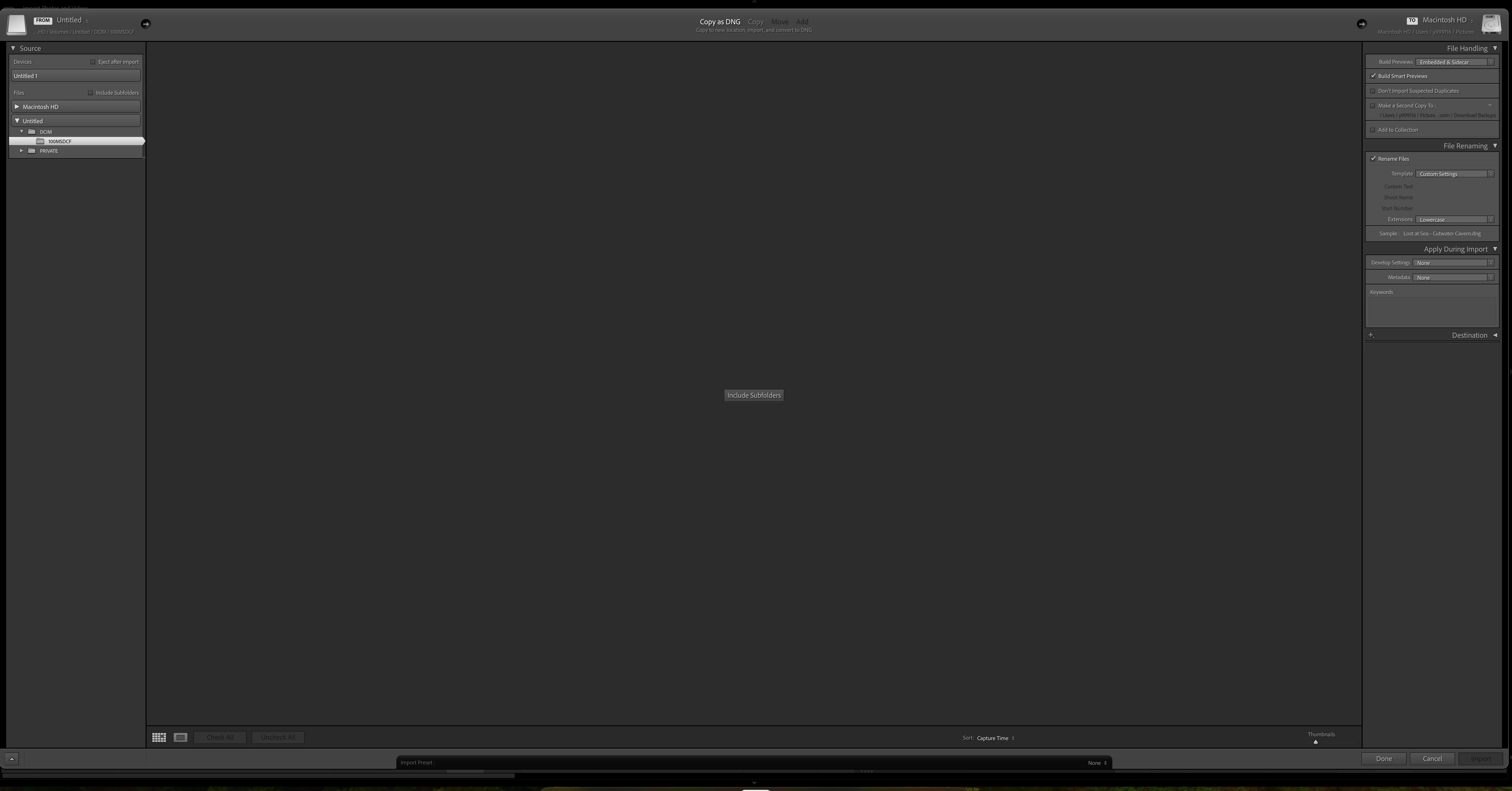
      • When I open LR Classic then navigate to the import screen the cards are selectable and in that left most pane the sub folders available and selectable however the photo previews do not appear so I am not able to select and import my photos from SD Cards.
      • LR Classic has access to all files in privacy 
  • Expected result and actual result
    • When I insert the SD Card into the machine directly or an attached card reader the drive becomes navigatable on the desktop / finder. (working as expected)
    • When I open LR Classic then navigate to the import screen the cards are selectable and in that left most pane the sub folders available and selectable however the photo previews do not appear so I am not able to select and import my photos from SD Cards. I would like to be able to Import photos. 
    •  


      Any help would be wonderful. Thanks

This topic has been closed for replies.
Correct answer GoldingD

Humor me.

Enter the Import screen, select Copy or Copy as DNG. Over on the right, change the Destination. No matter what it currently is, change it to something else.


The above is normally for when you can see the images, but they will not import via Add. (typically after doing something incorrect in Finder or Windows File Explorer)So not likely the solution, but?????


Also? did this import work previously on this MAC? and has the MACOS just been upgraded? If so, from what?

4 replies

Ian Lyons
Community Expert
Community Expert
December 7, 2024

Your screenshots indicate that 'Include Subfolders' is not enabled. In this mode you would need to select each of the individual subfolders in turn before their contents can be seen in grid or imported. To see and import contents of the subfolders when the top level folder is selected you need to have 'Include Subfolders' enabled.

Participating Frequently
December 11, 2024

I appreciate the suggestion. 

Unfortunatley including subfolders was not not the issue.

GoldingD
GoldingDCorrect answer
Legend
December 7, 2024

Humor me.

Enter the Import screen, select Copy or Copy as DNG. Over on the right, change the Destination. No matter what it currently is, change it to something else.


The above is normally for when you can see the images, but they will not import via Add. (typically after doing something incorrect in Finder or Windows File Explorer)So not likely the solution, but?????


Also? did this import work previously on this MAC? and has the MACOS just been upgraded? If so, from what?

Participating Frequently
December 11, 2024

Thank you for your suggestion.
I am currently doing a fresh install but if the issues persist i will see if adjusting the destination knocks something free.


Worked previously. Now not working. 

Participating Frequently
December 11, 2024

I believe the OS is the same version

Conrad_C
Community Expert
Community Expert
December 6, 2024

Just for troubleshooting, does it work any better if you select the card at the top under Devices, instead of using the default under Files?


Ian Lyons
Community Expert
Community Expert
December 7, 2024

@Conrad_C 


'Files' is the default because there is along standing OS level conflict. The conflict often results in exceedinly long folder enumeration and/or only partial import if the enumeration has not been allowed to fully complete.

Conrad_C
Community Expert
Community Expert
December 7, 2024

Hi Ian, yes, that’s why I started my reply saying “just for troubleshooting” because if it worked differently that way, that might be a data point. The Devices option is still there, so even though it might not be optimal, Adobe clearly sees a need to continue supporting that method, and below I have one reason why they should keep it.


I remember when they made this change and the explanation why. But it might surprise you to know that even with that in mind, I always switch away from the default to Device, and wait until enumeration is complete before finishing the import. The reason is in the demo below. Do you see the difference?


When Lightroom Classic Import is left at its default folder selection under Files, videos are not included for import. (Sort order is Capture Time, not Media.)


This might be because my cameras (Sony) put videos in a subfolder that is not within the scope of the Lightroom Classic default selected folder. I have done imports before where I realized I never got my videos, and had to go back and re-do the import with a different manual selection so that videos actually import.


But if I select the card under Devices, then Lightroom Classic always imports both the photo and the videos, and things are fine. So I do it that way.


Yes, I reported this to Adobe a long time ago, but the demo above was made today and the default still leaves out videos. From time to time we see other users run into this.

Participating Frequently
December 6, 2024

Also tried from Desktop and no luck