kayak107
Inspiring
February 2, 2020
Question

Cannot open working catalog

  • February 2, 2020
  • 2 replies
  • 535 views

how i got here. LR classic open, editing image in silver efex pro>hit "save"-got beachball.  came back several hours later, had black screen with only mouse showing.

turned off mac and then turned on. (BIG MISTAKE) silver efex program appeared but where image should have been there was only a blank white space.

computer was not reading my ext drive where all of my photos are.

i disconnected usb to ext drive and then inserted it.

computer recognized drive.  i did a backup a few days ago.

i did manage to open a catalog with the following results-no images from 2019 or later.  

several collections were missing.

all other prorams in mac are ok.

now, none of the 3 catalogs that are listed can be opened.


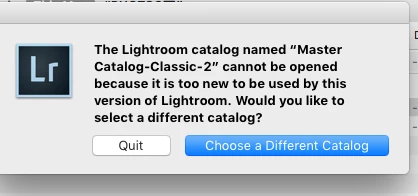
this is what i get when i try to open catalog.
 

This topic has been closed for replies.

2 replies

Just Shoot Me
Legend
February 2, 2020

That erro is stating you opened an Older version of LR than the one that created the catalog you are trying to open.

That mean you have 2 version of LR Classic installed. Open the newer of the 2.


If you then get an error that the catalog is in use by another program then the crash you had and the subsequent shut down left the .lock file in the catalog folder and all you have to do is Delete that .lock file and then open LR.

kayak107
kayak107Author
Inspiring
February 2, 2020

thanks for the feedback.  I actually have 3 catalogs on my computer.  gotta get rid of 2.  only one is the classic.

I was not able to open the newest version until I followed the following advice:  SEE MY POST ABOVE.  THE SMALL TYPE JUST ABOVE "PROBLEM SOLVED".


Just Shoot Me
Legend
February 2, 2020

Then there is something wrong with your computer and the LR install.


There shouldn't be any reason to Re-Associate the LR catalog that end with .lrcat with the LR .app. 

They should already be associated. If I double click on my .lrcat files in either Windows or MacOS (OS X) LR Classic opens and loads that catalog.


Something happen to your Mac when it crashed or whatewver it did to give you a Black Screen and no way to get out of it except to Force Shut Down the whole system.


But in any event glad you got it working.

kayak107
kayak107Author
Inspiring
February 2, 2020

PROBLEM SOLVED -GOD BLESS GOOGLE.