
Participant
April 6, 2017
Question

Cannot sign in to Lightroom on Desktop (for Lightroom mobile sync)

  • April 6, 2017
  • 3 replies
  • 1945 views

Hi, I'm trialling Lightroom (6) before deciding to subscribe. I am signed in to Adobe CC on my Mac (OSx 10.12.4), and install Lightroom via Adobe CC.

Lightroom installs fine, and if I go to Lightroom Help menu I can see 'Sign Out myemail@email.com'. So between Adobe CC and Lightroom Help I am signed in.

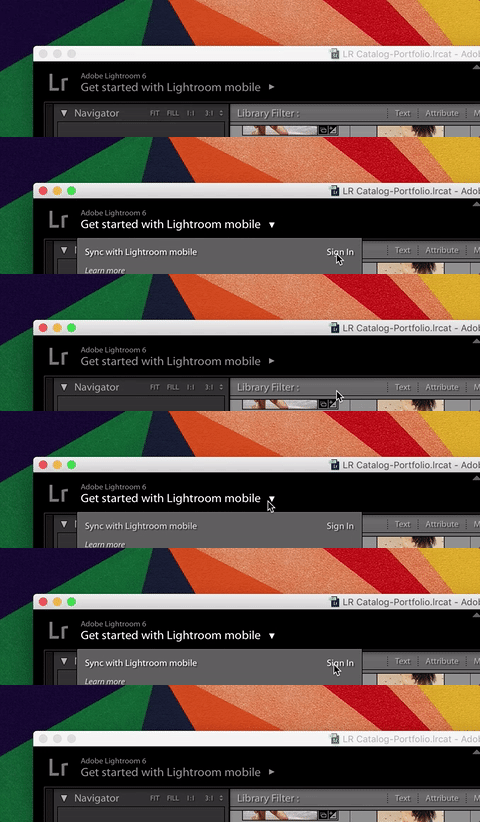
If I click on 'Get started with Lightroom mobile' and then 'Sync with Lightroom mobile', [sometimes ]the system thinks (spins the wheel) for about a second or less, then does nothing. In the below gif it doesn't even 'think', just closes the menu by itself.
I've reinstalled Lightroom a number of times now, and I've tried this on two different internet connections (same Mac), I also tried changing my account email just to see if forcing signing in again would do anything. Same results. At some point, I tried deleting Adobe CC and then clicking 'Sync with Lightroom mobile' at which point a window opened saying 'Connecting' in the title window bar, but no content inside, just white.

I can sign in to Adobe CC fine online, on Lightroom Mobile app.

Any pointers on this? !

This topic has been closed for replies.

3 replies

UmbrellasAndMIlk
Participant
April 10, 2017

So I just had a customer care agent take over my computer to troubleshoot and after he witnessed it not logging in, he quit the application, then opened the Creative Cloud Application and then opened Lightroom with the OPEN button in the drop down menu and then as soon as the app loaded, I was signed in to mobile Lighroom instantly. Now lets see if it will actually sync. :-)

foa_fAuthor
Participant
April 11, 2017

Thanks, I've read that, that solution works sometimes.

For me, I think the solution is something a bit more beyond my control, and may not be to do with Lightroom. I would like to be able to close this thread or delete it for that reason, but can't see how to.

Thanks for the replies guys.

UmbrellasAndMIlk
Participant
April 10, 2017

It is happening to me too and I just tried using it. I restarted machine and got logged in once. One sync happened. Now I want to do it again, and it is maddening that it isn't working. Like this is a very simple thing. What a waste.

Just Shoot Me
Legend
April 6, 2017

Go to the LR Preferences, Edit > Preferences, and then the LR Mobile tab to check if you are actually signed in.

But it could be a restriction without a valid subscription. There has been a rash of posts relating to LR 6 and the 30 day trial to LR Mobile. So Adobe may have included a restriction to stop any and all LR Mobile uses without a valid subscription plan. Not sure, don't now for sure.

foa_fAuthor
Participant
April 6, 2017

Thanks, can confirm I am not signed in within that section of Lightroom:

But strangely am within Help:

Just Shoot Me
Legend
April 6, 2017

What happens if you click the Join button?

As I stated Adobe may have placed a restriction on the use of LR Mobile to only allow subscribers access.

Go to Help > About Adobe PS LR and post the Exact version number that comes up.